10 Ecommerce SEO Mistakes and How to Fix Them
We audit ecommerce stores every week. These are the 10 SEO mistakes we find most often, why they happen, the damage they cause, and how to fix them.
The mistakes we see in almost every audit
We audit ecommerce stores every week. After hundreds of audits across Shopify, Magento, WooCommerce, and custom platforms, we see the same mistakes repeated over and over. Some are obvious. Some are subtle. All of them cost real money in lost organic traffic and revenue. Running a thorough ecommerce SEO audit is the fastest way to surface all of them at once.
What frustrates us is that most of these mistakes are preventable. They happen because of rushed store launches, platform defaults that nobody changed, or well-meaning developers who do not understand SEO. The good news is that every single one has a clear fix.
We ranked these 10 mistakes roughly by how frequently we encounter them and how much damage they typically cause. If you run an ecommerce store, you are almost certainly making at least two or three of these right now.
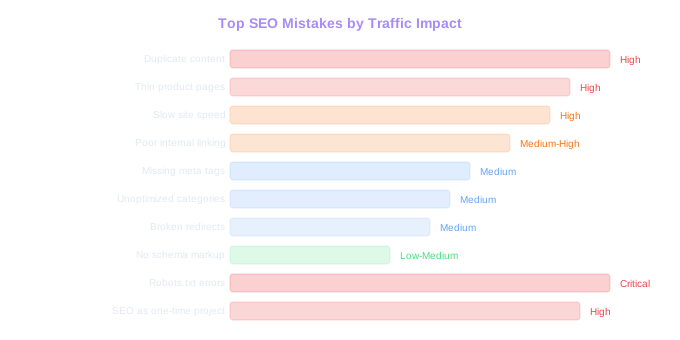
1. Duplicate content from product variants and filters
This is the most common ecommerce SEO mistake, and it is also one of the most damaging. It happens when your platform generates unique URLs for every product variant, filter combination, and sort order. A store with 500 products can easily end up with 50,000 indexable URLs, most of which contain near-identical content.
Why it happens: Ecommerce platforms create these URLs by default. When a customer selects size 'M' in blue, the URL changes to /product?size=m&color=blue. Apply a filter for 'price low to high' on a category page, and you get /category?sort=price-asc. Each of these URLs is a separate page to Google. And each one has the same core content as the base page.
The damage: Google wastes crawl budget indexing thousands of duplicate pages instead of your actual product and category pages. Ranking signals get diluted across multiple URLs for the same content. We audited a home goods store with 2,000 products that had 180,000 indexed URLs. Only 8,000 of those were the canonical product and category pages they actually wanted ranking.
How to fix it: Implement canonical tags on all variant URLs pointing to the main product page. Use the robots meta tag or robots.txt to block filter and sort parameter URLs from indexing. In Google Search Console, configure URL parameters to tell Google which parameters change page content (like category) and which do not (like sort order). The cleanup typically takes 2 to 4 weeks and we often see organic traffic increase by 15% to 30% within 2 months just from resolving this one issue. Use our ecommerce SEO checklist to work through these fixes systematically.
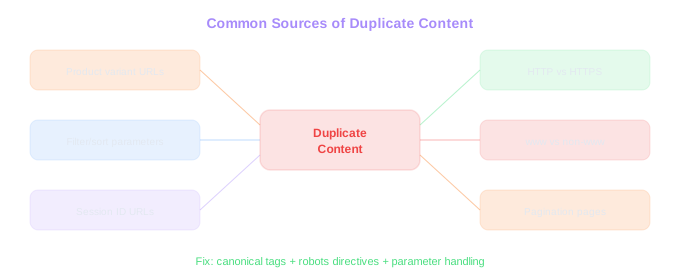
Duplication Scale
A store with 2,000 products had 180,000 indexed URLs -- only 8,000 were the actual pages they wanted ranking. Fixing canonicals alone can boost organic traffic 15-30% within two months.
2. Thin product page content
A product page with a title, a price, a 20-word manufacturer description, and a photo is not a page that Google wants to rank. Yet this is what most ecommerce product pages look like.
Why it happens: Stores often import product data directly from suppliers or manufacturers with no modifications. When you have 5,000 products, writing unique descriptions for each one feels impossible. So the manufacturer's boilerplate stays.
The damage: Thin content means Google sees your product pages as low-value. They rank poorly or not at all. Worse, if 200 other retailers use the same manufacturer description, Google has no reason to pick your page over any of the others. We compared two competing outdoor gear stores. One had manufacturer descriptions averaging 35 words. The other had original descriptions averaging 180 words with usage tips and comparisons. The second store ranked for 4x more product-level keywords.
How to fix it: Prioritize your top revenue-generating products and write original descriptions of at least 150 words. Include details that the manufacturer description misses: how the product is actually used, who it is best for, how it compares to alternatives, and what common questions buyers have. Add a structured specifications section with material, dimensions, weight, and compatibility details. You do not need to rewrite all 5,000 products at once. Start with the top 100 by revenue and work outward.
3. Ignoring site speed on product and category pages
Everyone knows site speed matters. Almost nobody actually fixes it. Ecommerce stores are especially prone to speed issues because product pages tend to be heavy with images, reviews, related product widgets, and third-party scripts. Speed is just one of many factors covered in our technical SEO for ecommerce guide.
Why it happens: Every app, plugin, or integration adds JavaScript. Review widgets, live chat, analytics tools, retargeting pixels, social proof popups. Each one adds 50ms to 500ms of load time. A typical Shopify store has 15 to 25 apps installed, and many of them inject scripts on every page load. Nobody notices the incremental slowdown until the site takes 6 seconds to become interactive.
The damage: Google uses Core Web Vitals as a ranking signal. Specifically, Largest Contentful Paint (LCP), Cumulative Layout Shift (CLS), and Interaction to Next Paint (INP). Slow sites rank lower, period. But the revenue impact goes beyond rankings. For every 100ms of improvement in load time, conversion rates increase by an average of 1.1% according to Deloitte's research on retail sites. A store doing $2M per year that improves load time by 1 second could see $100K+ in additional revenue.
How to fix it: Audit your third-party scripts and remove anything you are not actively using. Lazy-load images below the fold. Serve images in WebP format and use responsive sizing. Move non-critical JavaScript to async or defer loading. Implement proper browser caching headers. For Shopify stores specifically, reduce app count and check if any apps are loading scripts sitewide when they only need to run on specific pages. Target an LCP under 2.5 seconds and an INP under 200 milliseconds.
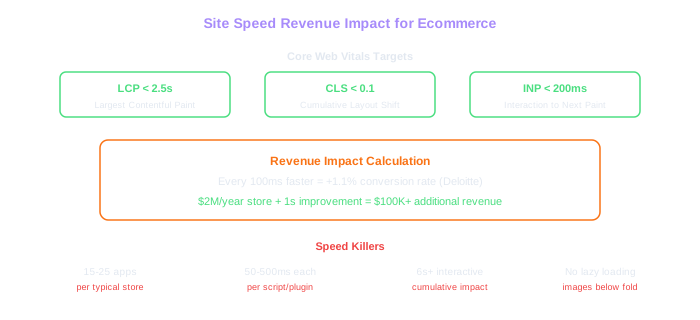
Speed = Revenue
A $2M/year store that improves load time by 1 second could see $100K+ in additional revenue. The typical Shopify store has 15-25 apps injecting scripts -- each adding 50-500ms of load time.
4. Poor internal linking structure
Most ecommerce stores rely entirely on navigation menus and breadcrumbs for internal linking. That is not enough. Google discovers and evaluates page importance based on how many internal links point to a page and from where.
Why it happens: Internal linking requires deliberate planning, and most store owners focus on product pages and checkout flow rather than link architecture. The CMS or platform handles navigation, and nobody thinks about it further. Related product sections exist for conversion purposes but often use JavaScript rendering that Google cannot follow.
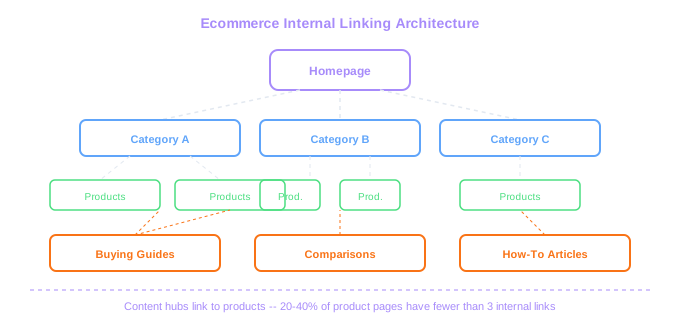
The damage: Orphaned product pages (pages with no internal links pointing to them) are invisible to Google's crawler. We regularly find that 20% to 40% of product pages on ecommerce stores have fewer than 3 internal links. These pages rank for almost nothing. Meanwhile, the homepage typically has thousands of internal links and all that authority has nowhere productive to flow.
How to fix it: Add contextual internal links in product descriptions pointing to related products and parent categories. Implement a 'related products' section that uses actual HTML links, not JavaScript-rendered carousels that Googlebot cannot parse. Create content hubs (buying guides, comparison pages, how-to articles) that link to groups of related products. Use breadcrumbs on every page. For large catalogs, build an HTML sitemap page that links to all top-level and second-level categories. One client added contextual internal links to their top 200 product pages and saw average ranking position improve by 4.2 positions within 8 weeks.
5. Missing or duplicate meta titles and descriptions
We still find stores where hundreds of product pages share the same meta title template ('Product Name | Store Name') with no unique description, or where meta descriptions are entirely missing and Google generates snippets from whatever text it finds on the page.
Why it happens: Platform defaults. Shopify, WooCommerce, and Magento all auto-generate meta titles from the product name, and many store owners never customize them. For descriptions, the default is often blank or a truncated version of the product description that reads poorly in search results.
The damage: Your meta title is the single strongest on-page ranking signal. A generic template like 'Blue Widget | Store Name' misses the opportunity to include relevant keywords. And your meta description, while not a direct ranking factor, directly affects click-through rate. A well-written meta description can increase CTR by 30% to 50% compared to auto-generated snippets.
How to fix it: Create a meta title formula that includes the primary keyword, the product name, and a differentiator. For example: 'Organic Cotton V-Neck T-Shirt for Men | Free Shipping | Store Name'. Write unique meta descriptions for at least your top-performing pages. For the rest, build smart templates that pull in product attributes dynamically: '[Product Name] in [Color]. [Material], [Key Feature]. [Price] with free shipping over $50.' This is better than nothing and takes minutes to set up in most platforms.
6. Not optimizing category pages for search
Category pages are often the highest-value SEO targets on an ecommerce store. They target head terms with real volume ('men's running shoes', 'organic skincare') while product pages target long-tail variations. Yet most stores treat category pages as nothing more than a grid of product thumbnails.
Why it happens: Designers and UX teams focus on making category pages visually clean, which usually means minimal text. The assumption is that shoppers want to browse products, not read paragraphs. This is a false choice. You can have both.
The damage: A category page with no text content gives Google almost nothing to work with. The only content is product titles and prices, which are not enough to rank for competitive category-level keywords. We see this constantly: stores that rank on page 2 or 3 for their most valuable category terms, losing thousands of potential visits per month.
How to fix it: Add 200 to 400 words of original content to each category page. Place it below the product grid so it does not interfere with the shopping experience. Include the target keyword naturally, describe what makes your selection different, and link to relevant buying guides or subcategories. Some brands add category content in a collapsible section above the product grid, visible to Google but unobtrusive for shoppers. Either approach works. For a full walkthrough of optimizing product and category pages, see our guide to on-page SEO for ecommerce.
7. Broken redirect chains and 404 errors
Products get discontinued. Collections rotate. URLs change during redesigns. Without proper redirect management, old URLs either break (404 errors) or stack up in long redirect chains (URL A redirects to B, which redirects to C, which redirects to D).
Why it happens: Nobody owns the redirect process. The marketing team removes old products without notifying anyone. The development team changes URL structures during migrations without mapping old URLs to new ones. Over time, redirect files grow into tangled messes that nobody wants to touch.
The damage: 404 errors on pages that had backlinks or rankings waste that accumulated authority. Redirect chains (3+ hops) slow down page delivery and lose link equity at each hop. Google has stated that 301 redirects pass full link equity, but chains of redirects still cause problems with crawl efficiency and page speed. We audited a fashion retailer that had 12,000 404 errors and 3,000 redirect chains. Fixing these issues alone recovered 18% of their lost organic traffic within 3 months.
How to fix it: Run a crawl of your site with Screaming Frog or Sitebulb and identify all 404 errors and redirect chains. For 404s, implement 301 redirects to the most relevant live page (usually the parent category or a similar product). For chains, update each redirect to point directly to the final destination URL. Set up a process so that whenever a product is discontinued, a redirect is created as part of the removal workflow. Check your redirect file quarterly.
8. No schema markup on product pages
Schema markup tells Google exactly what your page contains: the product name, price, availability, rating, and more. Without it, Google has to guess. And Google's guesses are not always correct.
Why it happens: Schema markup requires either a plugin, a theme that supports it natively, or custom development. Many store owners do not know it exists. Those who do often assume their theme handles it, without verifying whether the markup is correct or complete.
The damage: Pages without schema markup are ineligible for rich results (the enhanced search listings that show price, ratings, and availability directly in the SERP). Rich results have significantly higher click-through rates than plain blue links. Ahrefs data shows that pages with rich snippets get 58% of clicks on the first page, compared to standard results.
How to fix it: Implement Product schema on every product page with at minimum: name, image, description, brand, sku, offers (price, currency, availability), and aggregateRating. Use Google's Rich Results Test to validate your markup. If you are on Shopify, apps like JSON-LD for SEO handle this automatically. On WooCommerce, plugins like Rank Math or Yoast WooCommerce SEO add product schema. Verify that the schema updates dynamically when prices or availability change. Stale schema data (showing a product as in stock when it is sold out) can trigger manual actions from Google.
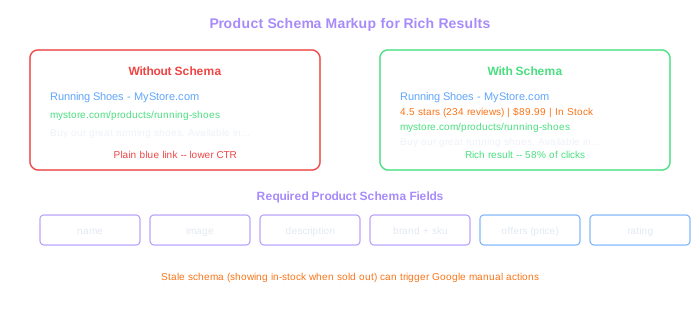
Rich Results Win Clicks
Pages with rich snippets get 58% of first-page clicks compared to standard results. Implement Product schema with name, image, price, availability, and rating on every product page.
9. Blocking important pages with robots.txt or noindex
This one sounds basic, but we find it in roughly 1 out of every 5 audits. Pages that should be indexed are accidentally blocked by robots.txt rules or noindex meta tags left over from development or staging environments.
Why it happens: During development, teams add noindex tags to prevent staging sites from being indexed. When the site launches, someone forgets to remove them. Or an overly aggressive robots.txt file blocks entire sections of the site. We once found a Magento store where the robots.txt blocked /catalog/, which contained every single product and category page on the site. Their developer had copied a robots.txt template from a forum post without understanding what it did.
The damage: If Google cannot crawl or index your pages, they do not exist in search results. The Magento store we mentioned had zero organic traffic to product pages for 4 months before they noticed. That is not a subtle issue. That is a total SEO blackout.
How to fix it: Check your robots.txt file right now. Make sure it is not blocking /collections/, /products/, /catalog/, or whatever URL pattern your platform uses for product and category pages. Use Google Search Console's URL Inspection tool to verify that your important pages are indexed. Search 'site:yourdomain.com' in Google and compare the indexed page count to the number of pages you expect. If there is a large discrepancy, investigate immediately.
10. Treating SEO as a one-time project
This is not a technical mistake. It is a strategic one. And it might be the most expensive mistake on this list.
Why it happens: A store launches, hires an agency or consultant to 'do SEO,' gets some improvements, and then stops. The assumption is that SEO is like a website redesign: you do it once and it is done. This misunderstanding is everywhere.
The damage: SEO results decay without ongoing effort. Competitors publish new content, earn new backlinks, and improve their technical foundations. Google updates its algorithm 500 to 600 times per year. Product pages go stale as inventory changes. New technical issues creep in with every platform update and new app installation. We have watched stores go from position 3 to position 15 for their primary keyword within 6 months of stopping SEO work.
How to fix it: Build SEO into your ongoing operations. Allocate monthly time for content creation (product descriptions, category content, blog posts). Do a technical audit quarterly. Monitor rankings and traffic weekly. Update product pages when inventory changes. Build links consistently rather than in bursts. SEO is a compounding investment. The stores that win in organic search are the ones that treat it as a continuous process, not a project with a finish date.
If you recognized your store in two or more of these mistakes, you are not alone. The difference between stores that grow organic traffic and those that stagnate is almost always execution on these fundamentals. Not advanced tactics, not secret tricks. Just getting the basics right, consistently.
SEO Never Stops
Google updates its algorithm 500-600 times per year. Stores that stop SEO work can drop from position 3 to position 15 within six months. Treat SEO as a continuous process, not a one-time project.