Ecommerce Homepage SEO: Traffic and Sales Tips
Optimize your ecommerce homepage for SEO with tips on title tags, internal linking, schema markup, speed improvements, and common mistakes to avoid.
Your homepage is your strongest SEO asset
The homepage of an ecommerce store carries more authority than any other page. It gets the most backlinks, receives the most direct traffic, and sits at the top of your site hierarchy. Google treats it as the definitive representation of your brand and what your store sells. Yet most ecommerce homepages waste this authority with generic content, poor internal linking, and missed optimization opportunities.
We audit dozens of ecommerce homepages each year. The same problems come up repeatedly: title tags that just say the brand name, zero crawlable text content above the fold, no internal links to important category pages, and hero images that take 4 seconds to load. Fixing these issues consistently produces measurable results. One client saw a 31% increase in organic homepage traffic within 8 weeks after implementing the changes we outline below.
Homepage SEO for ecommerce is different from homepage SEO for a service business or blog. Your homepage needs to signal to Google what you sell, which categories matter most, and why your store deserves to rank for brand and category terms. Here is how to do that properly.
Title tag and meta description optimization
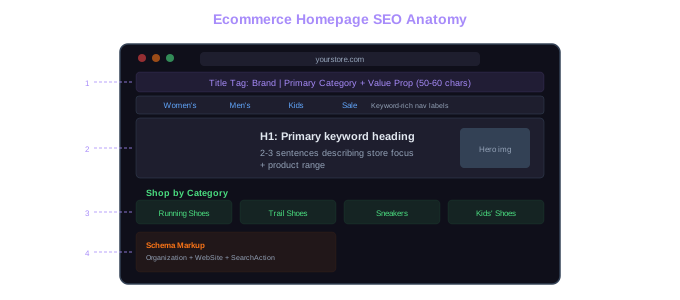
Your homepage title tag is the single most valuable piece of on-page real estate on your site. It should include your brand name and your primary product category or value proposition. A title like "ShoeVault | Premium Running Shoes, Trail Shoes & Sneakers" tells both Google and searchers what the store sells. A title that just says "ShoeVault - Home" wastes the opportunity entirely.
Keep your title tag between 50-60 characters. Google truncates titles that are too long, and the truncation often cuts off the most important information. Front-load the brand name if your brand has search volume. Otherwise, lead with the product category. We test both approaches for clients and let the data decide.
The meta description does not directly affect rankings, but it affects click-through rates from search results. Write it as a concise sales pitch: what you sell, what makes you different, and a reason to click. "Shop 2,000+ running shoes from top brands with free shipping and easy returns" is specific and compelling. "Welcome to our online store where you can find all your needs" is meaningless.
For stores with significant brand search volume, consider adding your tagline or unique selling point to the title tag. Searchers who type your brand name into Google are comparing your listing against competitors. Your title and meta description need to win that comparison.
Above-the-fold content that works for SEO
Most ecommerce homepages feature a massive hero banner with an image and maybe a "Shop Now" button. From a visual design perspective, this looks clean. From an SEO perspective, it is a blank page. Google needs text content to understand what your page is about. A hero image of someone wearing running shoes does not communicate "running shoe store" to a search engine.
The fix is straightforward: add an H1 heading and a short paragraph of text above the fold. The H1 should include your primary keyword or brand positioning. Something like "Running shoes for every distance" is clear, keyword-relevant, and not stuffed. Below the H1, add 2-3 sentences that describe your store's focus and product range.
We are not suggesting you ruin your homepage design with walls of text. A single heading and a short paragraph blend naturally into most designs. The text can overlay the hero image, sit beside it, or appear in a content block just below. The design team can make it look good while giving Google something to index.
One client resisted adding text to their homepage for months because their designer thought it would look cluttered. We compromised on a single H1 and one sentence below the hero banner. That small change, combined with proper title tag optimization, moved their homepage from position 8 to position 3 for their primary brand + category keyword.
Internal linking from the homepage
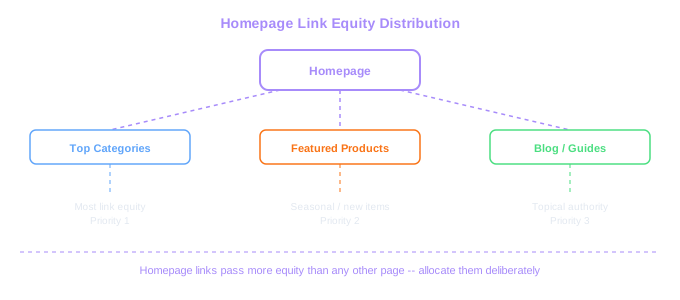
Your homepage passes more link equity than any other page on your site. Every page you link to from the homepage gets a direct authority boost. This is why homepage internal linking decisions matter so much for ecommerce stores.
Link to your most important category pages from the homepage. Not just in the navigation menu, but in the page content itself. Featured category sections with descriptive anchor text pass more value than navigation links alone. A section titled "Shop by category" with links like "Women's running shoes," "Men's trail shoes," and "Kids' sneakers" creates clear topical signals and distributes authority to the pages that need it most.
Seasonal and promotional links on the homepage should be managed carefully. It is fine to link to a "Summer sale" page during summer. But if that page goes away in September and becomes a 404, you have a problem. Use redirects or keep seasonal landing pages active year-round with updated content.
Limit homepage links to a reasonable number. We see homepages with 200+ links, including links to every product in the "new arrivals" section, every brand page, and every subcategory. When you link to everything, you dilute the value passed to each page. Focus on 20-40 high-priority internal links from homepage content (not counting navigation). One store we worked with reduced their homepage links from 187 to 52, directing more equity to their top category pages. Those category pages improved an average of 4.2 positions within two months.
Less Is More
Reducing homepage links from 187 to 52 concentrated link equity on top category pages. Those pages improved an average of 4.2 ranking positions within two months.
Brand versus generic keyword targeting
Your homepage will naturally rank for your brand name. The question is whether you should also try to rank for generic category terms like "running shoes online" or "buy sneakers." The answer depends on your brand's authority and competitive position.
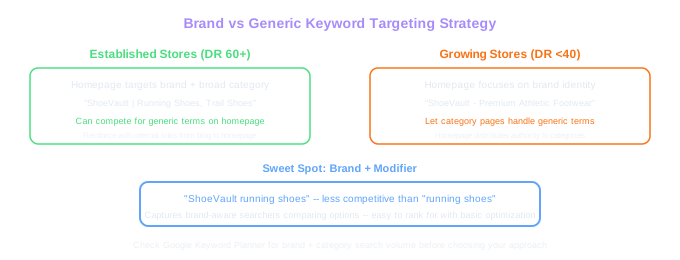
For established brands with strong domain authority, targeting generic terms on the homepage can work. If your domain has a DR of 60+ and you already rank on page 2 for a broad category term, homepage optimization might push you onto page 1. We helped a mid-size furniture retailer rank their homepage for "buy furniture online" by optimizing their title tag, adding structured homepage content, and building internal links from their most authoritative blog posts to the homepage.
For newer or smaller stores, the homepage should focus on brand terms and let category pages handle generic keywords. Trying to rank the homepage for "running shoes" when your domain authority is 25 is not realistic. You are better off optimizing specific category pages for those terms and using the homepage to establish your brand identity and distribute authority.
One approach that works well: target your brand name plus a broad modifier. "ShoeVault running shoes" is less competitive than "running shoes" but captures searchers who have some brand awareness. Your homepage should rank easily for this type of query with basic optimization.
Homepage schema markup
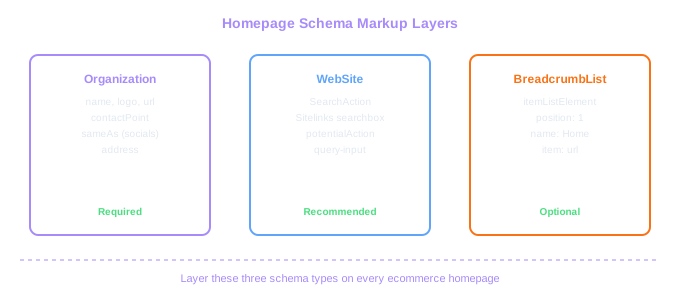
Implement Organization schema on your homepage at minimum. This tells Google your business name, logo, social profiles, and contact information. It takes 10 minutes to set up and helps Google build a knowledge panel for your brand. We have seen stores get a knowledge panel within weeks of implementing Organization schema, though results vary based on brand search volume. Use our meta tag analyzer tool to check how your homepage metadata is currently configured before making changes.
WebSite schema with a SearchAction markup enables sitelinks search box in Google results. When someone searches your brand name, Google may show a search box directly in the search results that lets users search your site. This takes a few minutes to implement and works on most ecommerce platforms. The search action URL should point to your site's search functionality.
If your homepage features products (best sellers, new arrivals), consider adding Product schema to those items. This can trigger rich results directly from your homepage listing. However, only do this if the products are genuinely featured on the page in a meaningful way. Adding schema for products that are barely visible on the page risks being flagged as misleading markup. Our schema generator tool helps you produce accurate structured data for featured products without guesswork.
Avoid stacking every possible schema type on your homepage. We have seen stores add FAQ schema, HowTo schema, and Review schema to their homepage in an attempt to grab more SERP real estate. Google has become stricter about schema relevance. If the content type does not genuinely exist on your homepage, the markup will be ignored or could trigger a manual action.
Navigation structure and its SEO impact
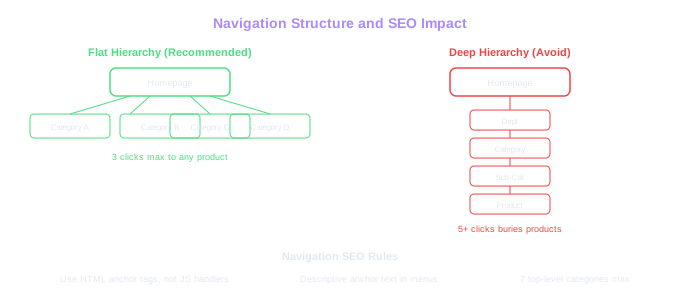
Your site-wide navigation lives on the homepage and appears on every page. The way you structure it affects how Google crawls and understands your entire site. A flat navigation with direct links to main categories helps Googlebot reach important pages within one click from the homepage. Strong category pages are the next layer of SEO to optimize once your homepage is solid — our guide on ecommerce category page SEO goes deep on that topic.
Mega menus are common on ecommerce sites. They work well for SEO when implemented properly. The links in mega menus should be crawlable HTML links, not JavaScript-rendered elements that appear on hover. Test your mega menu with JavaScript disabled. If the links disappear, Google might not see them either. We fixed a crawling issue for a fashion retailer where their mega menu was entirely JavaScript-rendered. After switching to HTML links with CSS-based hover behavior, Google indexed 2,400 more pages within three weeks.
Keep your navigation labels keyword-aware. "Women's Clothing" is better than "For Her" from an SEO perspective. "Running Shoes" is better than "Hit the Trail." Creative labels might work for branding, but they sacrifice search relevance. If you want creative labels, consider adding a secondary text line with the descriptive term.
Breadcrumbs on the homepage might seem redundant, but they establish the hierarchical structure that Google uses to understand your site. Implement BreadcrumbList schema alongside visual breadcrumbs. The homepage breadcrumb is simply your brand name or "Home," which sets the root for the entire breadcrumb chain across your site.
Mega Menu Fix
A fashion retailer's JavaScript-rendered mega menu was invisible to Googlebot. Switching to HTML links with CSS hover behavior got 2,400 additional pages indexed within three weeks.
Homepage speed optimization
Homepage speed affects both rankings and revenue. Amazon famously found that every 100ms of additional load time cost them 1% in sales. Your ecommerce homepage is probably loading a hero carousel, promotional banners, product images, third-party scripts, and analytics code. All of that adds up.
Start with images. Hero banners are often the largest element on the page and the primary cause of poor Largest Contentful Paint scores. Serve hero images in WebP or AVIF format, set explicit width and height attributes to prevent layout shift, and use responsive image srcsets so mobile users do not download desktop-sized images. One client's hero banner was a 2.4MB JPEG. Converting it to WebP at appropriate dimensions reduced it to 180KB with no visible quality loss.
Defer non-critical JavaScript. Chat widgets, review popups, recommendation engines, and tracking scripts do not need to load before the page is visible. Use async or defer attributes for third-party scripts, and consider loading them only after user interaction. We routinely find that third-party scripts account for 40-60% of homepage JavaScript weight.
Implement server-side caching and a CDN if you have not already. For Shopify stores, this is handled automatically. For Magento, WooCommerce, and custom platforms, proper caching configuration can cut server response times from 800ms to under 200ms. The homepage is your most-visited page, so speed improvements here have the widest impact on both user experience and crawl efficiency. For a broader look at the technical foundations that support homepage performance, see our guide on technical SEO for ecommerce.
Quick Speed Win
One client's hero banner was a 2.4MB JPEG. Converting to WebP reduced it to 180KB with no visible quality loss. Third-party scripts typically account for 40-60% of homepage JS weight.
Common homepage SEO mistakes to fix
Using the homepage as a landing page for every campaign. We see stores that change their homepage title tag monthly to match whatever sale they are running. "Summer Sale 50% Off" as a homepage title destroys your rankings for brand and category terms. Create dedicated landing pages for campaigns instead.
Linking to hundreds of individual products from the homepage. This is common with "featured products" sections that pull in 50+ items. Each of those links dilutes the authority flowing to your category pages. Feature 6-12 products maximum, and make sure the category page links are more prominent.
Ignoring mobile homepage optimization. Over 60% of ecommerce traffic comes from mobile devices, yet many homepages are designed desktop-first and poorly adapted for smaller screens. Check that your above-the-fold content, H1, and primary category links are all visible and functional on mobile without scrolling excessively.
Serving a completely different homepage to returning visitors based on personalization. If Google crawls your homepage and sees running shoes, but a returning visitor sees hiking boots because of their browsing history, you have a cloaking problem. Personalization is fine for elements like "recently viewed" or product recommendations. But the core content, headings, and category links should remain consistent for all users and for Googlebot.
Forgetting to set a self-referencing canonical tag. Your homepage might be accessible at multiple URLs: with and without a trailing slash, with www and without, or with tracking parameters appended. A self-referencing canonical tag on your homepage URL tells Google which version to index. This seems minor, but we have seen homepage authority split across multiple URL variants on stores that missed this basic step.