Category Page SEO: Drive Ecommerce Traffic
Optimize ecommerce category pages for SEO. Learn how to write descriptions, handle faceted navigation, fix pagination, and build internal links.
Category pages are your real traffic drivers
If we had to pick one page type to optimize on an ecommerce site, it would be category pages every time. Not product pages. Not blog posts. Category pages.
The reason is straightforward. Category pages target the head terms with the highest search volume and commercial intent. 'Women's running shoes' gets searched 60,000+ times per month. 'Nike Air Zoom Pegasus 40 women's size 8' gets searched maybe 200 times. Both are valuable, but the category term drives an order of magnitude more traffic. And unlike informational blog queries, someone searching for 'women's running shoes' is actively shopping.
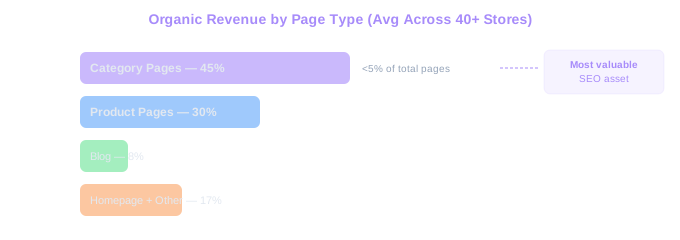
We analyzed traffic patterns across 40+ ecommerce clients last year. On average, category pages drove 45% of total organic revenue despite being fewer than 5% of total pages. Product pages drove 30% of organic revenue, and blog content drove roughly 8% (with the rest coming from the homepage and other page types). The math is clear: category pages are the most valuable SEO asset on your store. For a deep dive into optimizing the individual product level, see our guide to SEO for ecommerce product pages.
Despite this, most category pages we audit are SEO disasters. A grid of products with a category name at the top. No description. No FAQ. No buying guidance. Thin internal linking. Google looks at that page and sees a list of products identical to every other store selling the same items. There is nothing to differentiate it, nothing to rank it for, and nothing to convince a searcher to stay. Our category page SEO academy lesson walks through exactly how to fix this.
Writing category descriptions that rank and convert
A good category description is not a wall of text stuffed with keywords at the bottom of the page. It is a buying guide in miniature. It helps the shopper understand the category, narrows their options, and builds confidence in your store.
Place the description above the product grid, not below it. Content above the fold carries more weight with both users and search engines. Keep the above-the-fold portion to 100-150 words (2-3 sentences) with a 'read more' expansion for the full description. This preserves the shopping experience while getting your content crawled and indexed.
Structure the full description in 300-500 words covering: what the category includes, who these products are for, what to consider when choosing (size, material, use case), and why your store is a good place to buy. Include your primary keyword in the first sentence and sprinkle variations naturally throughout.
Here is an example of a good opening for a 'women's running shoes' category page: 'Our women's running shoes collection includes 200+ styles from Nike, ASICS, Brooks, and more. Whether you need lightweight racing flats for your next 5K or cushioned trainers for daily runs, we stock shoes for every distance and running style. Free shipping on orders over $75, and free 60-day returns on all footwear.'
Avoid writing descriptions that sound like they were written for search engines. 'Looking for the best women's running shoes? Our women's running shoes are the best women's running shoes for women who run.' Nobody wants to read that. Google does not want to rank it either. Write for humans first. The SEO benefits follow naturally.
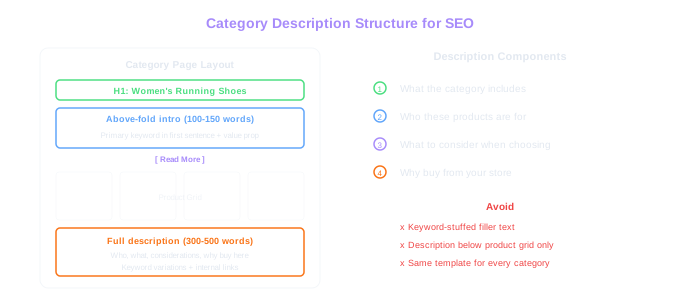
Above the Fold
Place your category description above the product grid, not below it. A short intro (100-150 words) above the fold with a 'read more' expansion gives Google content to index while preserving the shopping experience.
H1, title tag, and meta description for category pages
The H1 on a category page should be the category name itself. 'Women's Running Shoes' works perfectly. Do not add qualifiers like 'Buy Women's Running Shoes Online at Best Prices' in the H1. Keep it clean and descriptive.
The title tag can be more strategic. Include the category keyword, a value proposition, and your brand name: 'Women's Running Shoes - Free Shipping & Returns | ShoeStore.' This gives you ranking power, click-through appeal, and brand recognition in one line. Keep it under 60 characters.
Meta descriptions for category pages should emphasize selection and value: 'Shop 200+ women's running shoes from top brands. New styles added weekly. Free shipping over $75, free returns within 60 days.' Include specific numbers (product count, shipping threshold) because specificity drives clicks.
For subcategory pages, be specific in your title tags. 'Women's Trail Running Shoes' is better than 'Trail Running Shoes for Women' if Google Keyword Planner shows higher volume for the first phrasing. Always check actual search volume data before deciding on keyword order.
One tactical tip: add the current year to title tags for categories where freshness matters. 'Best Women's Running Shoes 2026' targets the dated search variant, which often has lower competition. Update these annually. Set a calendar reminder for January of each year to update all dated title tags across your category pages.
Faceted navigation and SEO
Faceted navigation (the filters on category pages for size, color, price, brand, etc.) is one of the biggest technical SEO challenges in ecommerce. Done wrong, it creates thousands of duplicate or near-duplicate URLs that waste crawl budget and dilute your category page's authority.
Here is what happens by default on most platforms. A user clicks 'Size 10' and the URL changes to /womens-running-shoes?size=10. Then they click 'Nike' and it becomes /womens-running-shoes?size=10&brand=nike. Then 'Under $100' and you get /womens-running-shoes?size=10&brand=nike&price=0-100. Each combination creates a new URL. With 8 sizes, 15 brands, and 5 price ranges, you now have 600 potential URL combinations for a single category. Multiply that by 100 categories and Google is trying to crawl 60,000 filter URLs when your store only has 3,000 actual products.
The standard solution has two parts. First, use noindex tags or canonical tags pointing to the base category URL for all filter combinations. This tells Google to ignore the filtered versions and focus on the main category page. Second, use JavaScript to handle filter interactions on the client side without changing the URL, or use the URL hash (which Google ignores) instead of query parameters.
The exception: some filter combinations deserve their own indexable page. If 'Nike women's running shoes' has 5,000 monthly searches, create a dedicated subcategory page for that, not a filter URL. The difference is that a subcategory page has its own unique title, description, and content, while a filter URL is just a filtered version of the parent category.
Audit your current situation by running a Google site search: site:yourstore.com inurl:? followed by common parameter names. If you see thousands of indexed filter URLs, you have work to do. Clean this up before doing anything else, because you are burning crawl budget that should be spent on your actual pages. Our faceted navigation SEO academy lesson covers the full solution for filter-heavy stores. Once crawl issues are resolved, adding structured data to your category pages helps Google present richer results — use our free schema generator tool to build the markup.
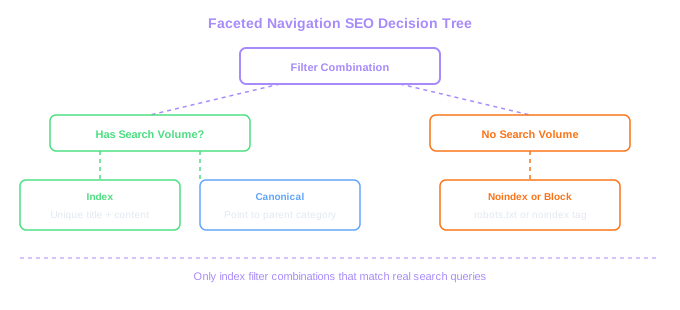
Filter URL Explosion
A category with 8 sizes, 15 brands, and 5 price ranges generates 600 URL combinations. Across 100 categories that is 60,000 filter URLs competing for crawl budget against 3,000 real product pages.
Pagination that does not hurt SEO
Most category pages cannot display all products on a single page. A category with 500 products needs pagination, and how you handle it affects both SEO and user experience.
The old approach was rel=next and rel=prev tags. Google officially stopped using these as an indexing signal in 2019, but they still help crawlers understand page relationships. We recommend keeping them because Bing and other search engines may still use them, and they do not hurt anything.
The better approach for SEO is a 'view all' page or load-more functionality. If a category has 100 products, loading them all on one page (with lazy loading for images) consolidates all link equity on a single URL. But this only works for smaller categories. A category with 5,000 products cannot load them all without destroying page speed.
For large categories, use traditional pagination with these guidelines. Each paginated page should have a unique title tag that includes the page number: 'Women's Running Shoes - Page 2 | ShoeStore.' Do not noindex paginated pages. Products that only appear on page 3 or page 4 need those pages indexed so Google can discover them. Set canonical tags on each paginated page to self-reference (page 2 canonicals to page 2, not to page 1).
Make sure paginated pages are linked in a crawlable way. If your pagination is JavaScript-rendered, test that Googlebot can follow the links. Use standard anchor tags with href attributes, not JavaScript onClick handlers. Include a link to the last page in the pagination component so Google can estimate the total depth.
One underused tactic: add a brief content snippet to paginated pages. Page 2 might say 'Continue browsing our women's running shoes collection. This page features styles from New Balance and Saucony.' This differentiates paginated pages from each other and gives Google a reason to treat each one as unique rather than near-duplicate content.
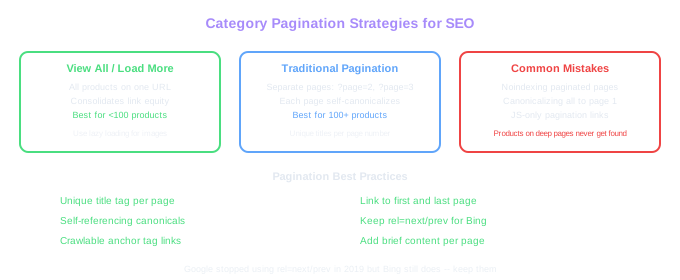
Do Not Noindex Paginated Pages
Products on page 3 or 4 need those pages indexed so Google can discover them. Use self-referencing canonicals and unique title tags per page instead of noindex.
Building a subcategory structure that matches search intent
Your category hierarchy should mirror how people search, not how your warehouse is organized. This is a mistake we see constantly. The merchandising team structures categories by internal logic (SKU groupings, supplier relationships, margin tiers) rather than by customer behavior.
Start with keyword research. Pull all the keywords related to your product categories and group them by topic and intent. If 'men's leather boots,' 'men's hiking boots,' 'men's chelsea boots,' and 'men's work boots' each have 2,000+ monthly searches, each one needs its own subcategory page. One generic 'men's boots' page cannot rank for all of those distinct intents. For a deeper look at keyword targeting for categories, see our guide to ecommerce keyword research.
Map your subcategories in a hierarchy that goes from broad to specific. Top-level: Men's Shoes. Second level: Men's Boots. Third level: Men's Leather Boots, Men's Hiking Boots, Men's Chelsea Boots, Men's Work Boots. Each level targets progressively more specific (and usually lower competition) keywords.
Do not create subcategories for groups with fewer than 5 products or fewer than 200 monthly searches for the target keyword. Thin subcategory pages with only 2-3 products do not provide a good user experience and rarely rank. Better to keep those products in the parent category and wait until the selection grows.
Cross-link between related subcategories. A 'men's hiking boots' page should link to 'hiking socks,' 'waterproof jackets,' and 'hiking backpacks.' This helps users discover related products and distributes link equity across your category structure. These links can go in the category description, in a 'related categories' sidebar section, or in a banner within the product grid.
Internal linking from and to category pages
Category pages should be the most internally linked pages on your store after the homepage. Every link to a category page passes authority that helps it rank for competitive head terms.
Your main navigation is the primary source of internal links to category pages. Include all top-level categories in the header navigation. Use dropdown menus or mega menus to link to subcategories. This ensures every category page receives a link from every page on your site (since the navigation appears everywhere).
Beyond navigation, build contextual links to category pages from your content. Blog posts should link to relevant category pages using keyword-rich anchor text. If you write a post about 'how to choose hiking boots,' link the phrase 'hiking boots' to your hiking boots category page. This is far more powerful than a generic sidebar link because contextual links within content carry more weight.
Product pages should link back to their parent category via breadcrumbs. But also add contextual links in product descriptions where relevant. If a product description mentions the broader category ('this boot is part of our waterproof hiking collection'), link it. Every product page linking to its category page creates a reinforcing loop of internal link equity.
FAQ sections on category pages also create internal linking opportunities. An FAQ answer like 'What size hiking boot should I get? Check our hiking boot sizing guide for detailed measurements and fitting tips' creates a natural link to a supporting content page that then links back to the category. For a broader look at how internal linking fits into your overall SEO structure, see our ecommerce SEO pillar guide.
Run a monthly report on internal links to your priority category pages. If a category page that targets a 10,000-volume keyword only has 15 internal links, while a less important page has 50, redistribute. The pages targeting your most valuable keywords should always have the strongest internal link profiles. We use Screaming Frog's inlinks report to audit this, and it consistently reveals imbalances that are easy to fix with measurable ranking improvements.
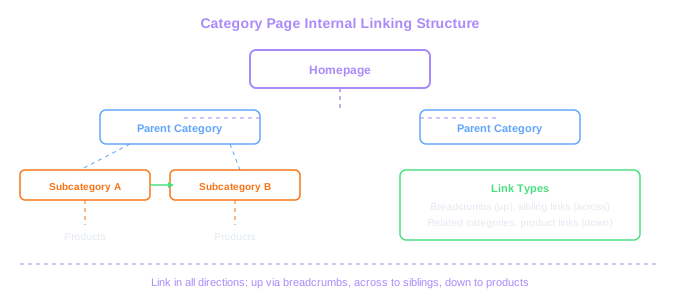
Link Equity Flow
Your homepage passes the most authority. Link to top category pages from homepage content, blog posts, and product breadcrumbs. Audit internal link counts monthly and redistribute to high-value pages.