On-Page SEO
10 min readCategory Page SEO
Category pages are the workhorses of ecommerce SEO. They target mid-funnel search queries where shoppers know what type of product they want but haven't decided on a specific item yet. A search for "women's running shoes" or "organic dog food" lands on a category page, not a product page. Getting [category page optimization](/blog/ecommerce-category-page-seo) right means capturing thousands of high-intent searches that funnel directly into your product catalog.
In this guide
Why Category Pages Matter More Than You Think
Most store owners pour their SEO energy into product pages and ignore category pages entirely. That's a mistake. Category pages target broader keywords with higher search volume than any individual product page. A single well-optimized category page for "leather wallets" can drive more organic traffic than fifty individual product pages combined, because the category keyword captures the entire browsing audience rather than just people searching for a specific SKU.
Category pages also serve as the primary hub in your site architecture. They pass link equity down to every product listed within them, and they receive internal links from your navigation, footer, and breadcrumb trails. A weak category page creates a bottleneck that limits the ranking potential of every product underneath it. Strengthening your category pages has a multiplier effect across your entire catalog.
From a user experience standpoint, category pages set expectations. A shopper arriving from Google expects to see a curated selection of relevant products with clear filtering options. If they land on a thin page with no context, poor sorting, or irrelevant products mixed in, they'll bounce back to the search results within seconds. That behavioral signal tells Google your page didn't satisfy the query, pushing you further down the rankings.
Crafting Category Page Content That Ranks
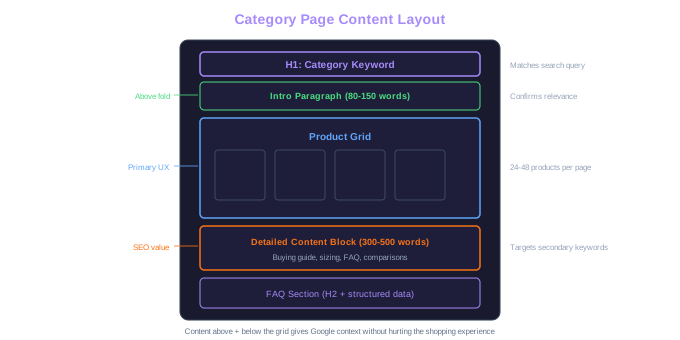
The biggest challenge with category page SEO is adding enough text content to rank without burying the product grid that shoppers came to browse. The solution is strategic placement: put a concise intro paragraph (80-150 words) above the product grid and a more detailed content block (300-500 words) below it. This layout satisfies Google's need for topical relevance while keeping the shopping experience front and center.
The intro paragraph above the product grid should answer the searcher's implicit question: "Am I in the right place?" For a category targeting "men's hiking boots," the intro might cover what makes a good hiking boot, the types available in this collection, and any standout brands or features. Keep it natural and useful, this isn't a place for keyword-stuffed filler text that shoppers will scroll right past.
The content block below the product grid is where you can expand on buying guides, comparison points, and secondary keywords. Cover topics like sizing advice, material comparisons, care instructions, or seasonal recommendations. You can also add an FAQ section to address common buyer questions directly on the category page. This bottom-of-page content rarely hurts conversion rates because it sits below the fold, but it gives Google substantial text to understand what the page is about and which queries it should rank for.
Avoid the trap of writing the same style of content across all categories. Your "winter coats" category should read differently from your "summer dresses" category. Tailor the advice, the language, and the seasonal references to each specific product type. Generic copy that could apply to any category signals low effort and won't outrank competitors who invest in tailored content.
Content Gap Effect
A single well-optimized category page for 'leather wallets' can drive more organic traffic than 50 individual product pages combined. Category keywords capture the entire browsing audience, not just specific-SKU searchers.
Check your competitors' category pages for the keywords you're targeting. If they have 400 words of useful content and you have zero, that content gap alone can explain the ranking difference. Match or exceed their depth while making your content more practical and specific.
Faceted Navigation and URL Structure
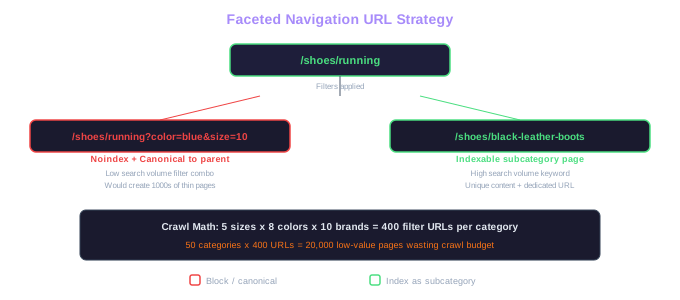
Faceted navigation, those filter options for size, color, price range, and brand on your category pages, creates one of the trickiest technical SEO challenges in ecommerce. Every filter combination can generate a unique URL, which means a single category with 5 sizes, 8 colors, and 10 brands could produce thousands of indexable pages. Without proper handling, this crawl bloat wastes your crawl budget and dilutes your category page authority across hundreds of near-duplicate URLs.
The standard approach is to keep your primary category and key subcategory URLs indexable while blocking filtered variations from being crawled and indexed. Use canonical tags on filtered pages pointing back to the main category URL. For example, "/shoes/running?color=blue&size=10" should canonical back to "/shoes/running." This tells Google that the filtered page is a variation, not a separate page deserving its own ranking.
Some filter combinations deserve their own indexable pages if they match high-volume search queries. If "black leather boots" gets significant search volume, creating a dedicated subcategory page at "/boots/black-leather" is worth more than a filtered URL at "/boots?color=black&material=leather." Research which filter combinations people actually search for using a solid keyword mapping approach, then build permanent subcategory pages for those terms.
Keep your category URL structure shallow and readable. "/women/shoes/running" is better than "/catalog/category/subcategory/12345." Use hyphens between words, avoid unnecessary parameters, and never let session IDs or tracking parameters creep into your indexed URLs. A clean URL structure helps both search engines and shoppers understand where they are in your store.
Crawl Budget Drain
5 sizes x 8 colors x 10 brands = 400 filter URLs per category. Across 50 categories, that is 20,000 low-value pages consuming crawl budget that should go to product pages.
Product Grid Optimization
The product grid itself carries SEO weight that many store owners overlook. Every product thumbnail, product name, and price displayed in the grid is content that Google reads and uses to understand the page. If your grid shows 12 products with names like "SKU-8842" and "Item #339," you're wasting an opportunity to reinforce keyword relevance. Product names visible in the grid should use descriptive, keyword-rich titles.
Pagination strategy matters for SEO. If your category has 200 products spread across 10 pages, Google needs a clear path to discover all of them. Implement proper pagination with rel="next" and rel="prev" links, or use a "load more" button that appends products to the same URL without creating new pages. Infinite scroll can work if implemented correctly with pushState to update the URL, but a poorly implemented infinite scroll can hide products from Google entirely.
Product count per page affects both SEO and conversion. Too few products (8-12) force excessive pagination that dilutes page authority and frustrates shoppers. Too many (100+) slow down page load times and create an overwhelming experience. We've found that 24-48 products per page hits the sweet spot for most categories, balancing load time, crawlability, and user experience.
Default sorting order influences which products Google sees first when crawling. If your default sort is "newest first" but your best-selling, most-reviewed products are buried on page 5, Google might associate your category with newer, less-proven products. Consider defaulting to "best sellers" or "most popular" to put your strongest products in front of both shoppers and search engines.
Add a small snippet of unique text to each product card in the grid, even just the first line of the product description. This gives Google more content to index from each category page view and helps differentiate your category pages from competitors who only show product names and prices.
Internal Linking from Category Pages
Category pages are natural internal linking hubs. Every product listed in the grid is an internal link, but the real SEO leverage comes from additional contextual links within the category content. Link from your intro or bottom-of-page content to related categories, buying guides, or featured products. A "winter coats" category page that links to "insulated jackets," "rain jackets," and "your guide to choosing the right winter coat" creates a topical cluster that strengthens all of those pages.
Breadcrumb navigation on category pages serves a dual purpose: it helps shoppers navigate back up the hierarchy, and it passes link equity from the category page to parent categories and the homepage. Make sure your breadcrumbs use schema markup so Google can display them in search results, giving your listings a cleaner, more navigable appearance.
Cross-linking between related categories is underutilized by most stores. If someone is browsing "coffee grinders," they might also be interested in "coffee makers" or "whole bean coffee." Adding a "Related Categories" section to your category pages creates horizontal linking paths that help both shoppers and search engines discover related content. These links also distribute page authority across your category structure rather than concentrating it in a few top-level pages.
Don't link to every related category from every page. Be selective and relevant. Too many internal links on a single page dilute the value of each link. Focus on the 3-5 most closely related categories and link to them with descriptive anchor text that includes the target keyword for each linked page.
Free Tools & Resources
Try our free SEO tools
Work Together With SEO Experts who understand ecommerce
World’s first Ecom-founded SEO agency