Technical SEO
13 min readFaceted Navigation SEO
Faceted navigation lets shoppers filter products by attributes like size, color, brand, price range, and rating. While essential for user experience, faceted navigation is one of the most dangerous features for ecommerce SEO. A single category with ten filter options can generate millions of crawlable URL combinations, creating massive duplicate content, wasting [crawl budget](/academy/crawl-budget-management), and diluting ranking authority across thousands of near-identical pages.
In this guide
How Faceted Navigation Creates SEO Problems
Faceted navigation works by appending filter parameters to the category URL. When a shopper selects "Brand: Nike" on a shoes category page, the URL becomes /shoes?brand=nike. Adding "Color: Black" changes it to /shoes?brand=nike&color=black. Adding "Size: 10" creates /shoes?brand=nike&color=black&size=10. Each combination is a unique, crawlable URL that search engines can discover and attempt to index.
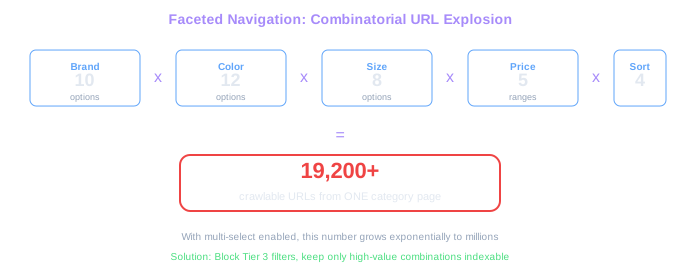
The mathematics of combinatorial URL generation are staggering. A category page with 5 filter groups, each containing 10 options, can theoretically generate over 100,000 URL combinations. A large fashion retailer with 20 filter groups across hundreds of categories can easily produce tens of millions of crawlable filter URLs. The vast majority of these pages show nearly identical product listings in slightly different arrangements, which search engines classify as duplicate or near-duplicate content.
Beyond the raw URL count, faceted navigation creates several interrelated SEO problems. Crawl budget gets consumed by low-value filter pages instead of product pages that actually drive revenue. Internal link equity gets distributed across thousands of filter URLs instead of concentrating on important category and product pages. Thin content pages emerge when specific filter combinations return very few or zero products. And keyword cannibalization occurs when multiple filter pages target the same search queries, competing against each other instead of presenting a single strong page.
The challenge is that some filter combinations have genuine search demand and SEO value. People search for "nike black running shoes" and "large blue winter jackets," which correspond to specific facet combinations. The SEO goal is not to block all faceted navigation, but to selectively allow search engines to access valuable filter combinations while preventing them from crawling the millions of low-value ones. This is a core challenge in technical SEO for ecommerce.
URL Explosion Scale
10 brands x 12 colors x 8 sizes x 5 price ranges x 4 sort orders = 19,200 URLs from ONE category. With multi-select enabled, this grows to millions.
Before implementing any technical solution, map out which filter combinations correspond to real search demand. Use keyword research tools to identify queries like "nike running shoes" or "blue wool sweaters" that match specific facet combinations. These are the combinations you want indexed; everything else should be blocked.
Identifying Which Facets to Index vs. Block
The fundamental decision in faceted navigation SEO is determining which filter combinations should be indexable pages and which should be blocked from search engines. This decision should be driven by search demand data, not technical convenience.
Start by exporting all your filter categories and their values. Then use keyword research tools to find search volume for combinations of your product type plus each filter value. For a shoe store, you might find that brand filters ("Nike shoes," "Adidas shoes") have significant search volume, color filters ("black shoes," "white sneakers") have moderate volume, and material filters ("leather shoes," "suede boots") have some demand. Meanwhile, rating filters ("4-star shoes"), availability filters ("in-stock shoes"), and multi-attribute combinations ("Nike black size 10 running shoes") typically have negligible search volume.
Create a three-tier classification system. Tier 1 includes single-attribute filters with proven search demand that should be fully indexable with dedicated SEO-optimized pages. These typically include brand, primary product type, and popular material or style filters. Tier 2 includes filters with some search potential that can be indexable but do not need dedicated optimization. These might include color filters or secondary category filters. Tier 3 includes all remaining filter combinations that should be completely blocked from crawling and indexing, including multi-select filters, sort orders, price ranges with arbitrary bounds, rating filters, and any combination of three or more filters.
This classification directly informs your technical implementation. Tier 1 filters ideally get clean, crawlable URLs (like /shoes/nike/ instead of /shoes?brand=nike). Tier 2 filters use parameter URLs with self-referencing canonical tags. Tier 3 filters use parameter URLs that are blocked via robots.txt, canonicalized to the parent category, or handled with noindex tags.
Review your Google Search Console performance data to see which existing filter URLs are already receiving impressions and clicks. If a filter page is already ranking for relevant queries, it belongs in Tier 1 or Tier 2 regardless of your initial keyword research assessment.
Technical Approaches to Controlling Faceted URLs
There are five primary technical approaches to managing faceted navigation for SEO, and most stores need a combination of them rather than a single solution.
Canonical tags are the most common approach. For Tier 3 filter pages, add a canonical tag pointing back to the parent category page. This tells Google that /shoes?brand=nike&color=black&size=10&sort=price is a duplicate of /shoes and should not be indexed separately. The canonical tag preserves any link equity flowing to the filter URL by passing it to the canonical target. However, canonical tags are hints, not directives, and Google may choose to ignore them for filter pages it considers genuinely different.
Robots.txt blocking prevents search engines from crawling filter URLs entirely. This is effective for conserving crawl budget but comes with a significant drawback: if external sites link to a blocked filter URL, Google cannot follow the link to discover the canonical tag, so the link equity is lost entirely. Robots.txt blocking works best for filter patterns that never receive external links, like sort orders and pagination-sort combinations.
Noindex meta tags tell Google to crawl the page but not include it in the search index. This allows Google to discover and follow links on the page (passing equity to linked products), but prevents the filter page itself from appearing in search results. The downside is that Google still crawls these pages, consuming crawl budget. Noindex is best for filter pages that contain valuable internal links but should not rank themselves.
JavaScript-based filtering renders filter changes client-side without modifying the URL. This prevents search engines from discovering filter URLs entirely because the URL never changes when a filter is applied. However, this approach eliminates the ability to create any indexable filter pages and prevents users from sharing or bookmarking filtered views.
Clean URL routing creates static, SEO-friendly URLs for your Tier 1 filter combinations. Instead of /shoes?brand=nike, create a dedicated /shoes/nike/ page with unique title tags, meta descriptions, and potentially unique introductory content. This is the gold standard for high-value filter pages but requires development effort to implement and maintain.
Tier 1 Gold Standard
High-demand brand and product type filters (e.g., /shoes/nike/) deserve clean URLs, unique H1 tags, custom meta descriptions, and introductory content. These pages can rank as well as any category page.
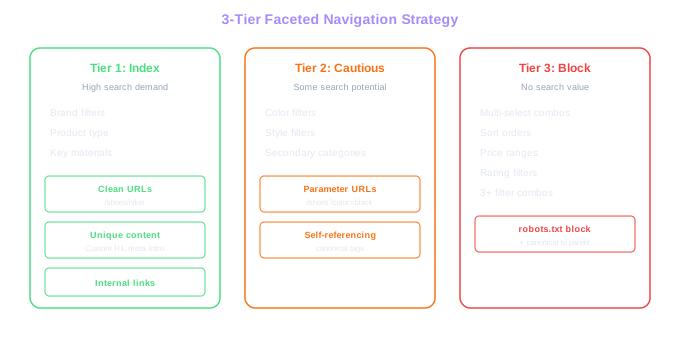
Combine multiple approaches based on your tier classification. Use clean URL routing for Tier 1 filters, canonical tags for Tier 2 filters, and robots.txt blocking for Tier 3 patterns like sort orders and multi-select combinations. No single technique handles all faceted navigation scenarios.
Creating SEO-Optimized Filter Landing Pages
For Tier 1 filter combinations with proven search demand, create dedicated landing pages that go beyond simply filtering your product catalog. These pages should be treated as first-class category pages with unique, valuable content that justifies their existence in the search index.
Start with unique title tags and meta descriptions that target the specific search query. A page for Nike running shoes should not use the same title template as the parent shoes category with "Nike" appended. Instead, craft a title like "Nike Running Shoes - Free Shipping on New Arrivals" that directly addresses searcher intent. Write a meta description that highlights the selection available and any unique selling propositions for that specific brand or product type.
Add unique introductory content to each Tier 1 filter page. A paragraph or two about the brand's heritage, the product category's features, or a buying guide specific to that filter combination differentiates the page from a simple filtered product list. This content serves dual purposes: it provides genuine value to shoppers who land on the page from search, and it gives Google unique text content that distinguishes this page from the parent category.
Implement proper heading hierarchy on filter landing pages. The H1 should match the primary search query target ("Nike Running Shoes"). Subsequent headings can organize the page by subcategory, product line, or use case. If the page has enough products, consider adding faceted navigation within the filter page itself, allowing users to further refine by price, size, or color.
Ensure these pages are well-integrated into your site's internal linking structure. Add them to your main navigation, category sidebars, and breadcrumb trails. Link to them from related blog content and buying guides. The more internal authority you direct to these pages, the stronger they will rank for their target keywords.
Analyze your top competitors' filter pages to see what content they include. Many leading ecommerce sites add brand stories, size guides, and frequently asked questions to their filter landing pages. These content elements improve both SEO rankings and conversion rates.
Handling Multi-Select and Combined Filters
Multi-select filters, where users can select multiple values within a single filter group (e.g., selecting both "Blue" and "Red" under the Color filter), create the worst URL bloat. A single multi-select filter with 10 options generates 1,023 possible combinations. Two multi-select filters with 10 options each create over one million combinations. These must be aggressively managed to prevent catastrophic index bloat.
The safest approach for multi-select filters is to prevent search engines from accessing them entirely. Use AJAX-based filtering that updates the product grid dynamically without changing the URL when multiple values are selected within a filter group. The URL should only change when a single value is selected, creating a clean single-filter URL that can be indexed if it falls into Tier 1 or Tier 2.
If your platform requires URL changes for multi-select filters, implement canonical tags that point all multi-select URLs back to the most relevant single-filter or parent category page. For example, /shoes?color=blue,red should canonicalize to /shoes or to the most popular single color variant. Also, use robots.txt rules to block URL patterns containing comma-separated or pipe-separated multi-select values.
Cross-filter combinations (selecting values from different filter groups simultaneously) should almost never be indexable. A URL like /shoes?brand=nike&color=black&size=10&material=leather represents such a narrow product selection that it almost certainly has no meaningful search volume and likely returns very few products. Canonicalize all cross-filter URLs with more than two active filter groups back to the parent category page.
Applied filters should maintain a consistent URL parameter order regardless of the order in which users select them. If a user selects "Brand: Nike" then "Color: Black," the URL should be the same as if they selected "Color: Black" then "Brand: Nike." Without consistent parameter ordering, you double your crawlable URL count for every two-filter combination. Most ecommerce platforms handle this at the application level, but verify your implementation explicitly.
Add Google Search Console URL parameters configuration (when available) alongside your robots.txt and canonical tag strategy. This provides an additional signal to Google about which parameters affect page content and which can be safely ignored.
Free Tools & Resources
Try our free SEO tools
Work Together With SEO Experts who understand ecommerce
World’s first Ecom-founded SEO agency