Content & Authority
9 min readBuying Guides & Comparisons
Buying guides sit at the intersection of informational and transactional intent, the exact place where shoppers make purchase decisions. A well-structured guide answers the questions a product page cannot, builds trust through objective comparison, and funnels readers directly to the right product. We cover the formats that perform best and how to connect them to your catalog.
In this guide
Why Buying Guides Convert Better Than Product Pages
Product pages serve shoppers who already know what they want. Buying guides serve the much larger audience still deciding. Someone searching "best wireless earbuds for running" is not ready to click "add to cart", they need help narrowing down from dozens of options. If your guide provides that help, you earn both the click and the trust.
The data backs this up consistently. Across our client portfolio, buying guides generate 35-55% higher conversion rates than organic traffic landing on category pages. The reason is simple: by the time a reader finishes a good guide and clicks through to a product, they have already been sold. The product page just confirms the decision.
Guides also capture queries that product and category pages cannot rank for. Google understands that "best espresso machine under 500" requires editorial content, not a filtered product listing. These informational-commercial hybrid queries represent a massive opportunity for stores that most competitors leave entirely to third-party review sites. Our ecommerce SEO content guide covers how to capture these queries at scale.
Types of Buying Guides That Work
The "Best X for Y" format is the highest-converting guide type. "Best running shoes for flat feet", "best espresso machines for small kitchens", "best laptops for video editing", these guides target a specific use case and recommend products that solve it. They rank well because the query structure is specific and the content directly answers the search intent.
The "X vs Y" comparison format works best when you carry both products or when comparing your product against a well-known competitor. These pages earn strong click-through rates from search because the title promises a clear resolution to the shopper's dilemma. Structure these with a side-by-side comparison table, followed by detailed analysis of each differentiating factor.
The "How to Choose" format targets broader queries: "how to choose a mattress", "what to look for in a DSLR camera". These guides educate the reader on the criteria that matter, then naturally lead to your products as examples. They tend to attract earlier-stage shoppers, so the conversion path is longer but the content builds significant topical authority. See our guide on content strategy for stores for how to balance these formats.
Start with "Best X for Y" guides for your top 5 product categories. These are the fastest to create and typically reach page one within 60-90 days when published on a domain with existing category authority.
Comparison Post Templates That Rank
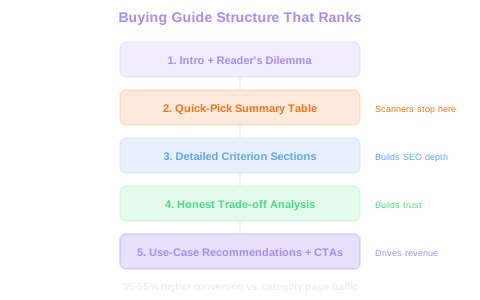
Every comparison guide should follow a consistent structure. Start with a brief introduction that acknowledges the reader's dilemma. Follow with a quick-pick summary table, many readers want the answer before the explanation. Then walk through each comparison criterion in dedicated sections.
The comparison table should include: product name, price, key differentiating spec, best-for use case, and a link to the product page. Keep it scannable. Readers who are deep in the decision process often just need the table to confirm their lean.
After the table, break down each comparison factor with honest analysis. If a product you sell loses on a particular criterion, say so. Credibility drives conversions far more than aggressive selling. A guide that admits trade-offs earns reader trust and keeps them on your site instead of bouncing to a third-party review.
End with a clear recommendation section. State which product wins for each use case, and make sure each recommendation links directly to the product page with a contextual call-to-action.
Credibility Wins
Guides that honestly acknowledge trade-offs convert better than one-sided recommendations. Readers trust transparent analysis and stay on your site instead of bouncing to third-party review sites for a second opinion.
Linking From Guides to Products
The internal linking between your guides and product pages is where content becomes revenue. Every product mentioned in a guide should link to its product page with descriptive, natural anchor text. Avoid generic "click here" or "buy now", use anchors like "the Sony WH-1000XM5 noise-cancelling headphones" that include the product name and a relevant modifier.
Place links at natural decision points within the text. When you recommend a product after explaining why it fits a use case, that is where the link belongs. Also, place product links in your comparison tables and in the final recommendation section.
Don't forget the reverse link. Your product pages should link back to relevant buying guides. Add a section like "Not sure this is right for you? Read our guide to choosing the best [category]" near the top of product pages. This creates a content loop that keeps shoppers engaged and helps Google understand the relationship between your commercial and informational pages. For more on building effective link structures between pages, see internal linking for stores.
Link Loop ROI
Bidirectional links between guides and products create a content loop Google rewards. Target a 15-25% click-through rate from guide pages to product pages. Use descriptive anchor text with the product name, never generic 'click here' links.
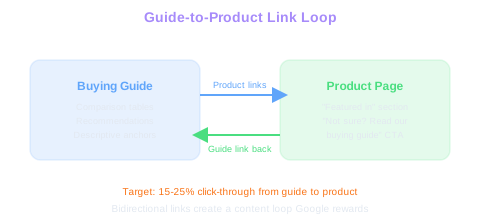
Add a "Featured in" section to product pages that links to every buying guide where that product appears. This strengthens the internal link network and gives shoppers additional context without leaving the product page.
Measuring Guide Performance
Track buying guide performance with metrics that connect content to revenue. The most revealing metric is assisted conversions, how many transactions touched a buying guide before completing the purchase. Set up this tracking in GA4 by creating a segment for sessions that include a guide page view followed by a transaction.
Organic traffic and keyword rankings show the guide's search visibility. Monitor which queries each guide ranks for, and track whether those rankings improve over the first 90 days. Guides typically gain ranking momentum as they accumulate engagement signals and internal links from related pages.
Measure time on page and scroll depth to gauge content quality. A good buying guide should see average time on page above 4 minutes and scroll depth past 70%. If these numbers are low, the content is not holding attention, either the structure is too dense, the recommendations are not compelling, or the formatting needs improvement.
Finally, track the click-through rate from guides to product pages. If readers are consuming the guide but not clicking through to products, the calls-to-action need work. We typically aim for a guide-to-product click-through rate of 15-25%.
Free Tools & Resources
Try our free SEO tools
Work Together With SEO Experts who understand ecommerce
World’s first Ecom-founded SEO agency