Keyword Research
9 min readKeyword Research for Ecommerce
Keyword research for online stores follows a fundamentally different logic than keyword research for blogs or media sites. Instead of chasing search volume, we start with revenue data and work backwards to identify the terms that actually generate sales.
In this guide
Why Ecommerce Keyword Research Is Different
Content sites monetize attention. They need eyeballs, so volume is king. An ecommerce store monetizes transactions. A keyword that brings 50 visitors who buy is worth more than one that brings 5,000 who bounce. This distinction changes everything about how you prioritize.
Most keyword research guides tell you to start with a seed list, expand it with a tool, and then filter by volume and difficulty. That workflow makes sense for a blog. For a store, it leads you straight to informational terms that fill your analytics with traffic that never converts.
The ecommerce keyword research workflow starts with your own transaction data. Which products sell? What do customers type into your site search? Which landing pages already convert? From there, you expand outward into adjacent terms and untapped opportunities. For a broader look at this topic, see our ecommerce SEO keywords guide.
The 15/70 Rule
In a typical store with 200+ products, 15-20% of pages generate 70-80% of organic revenue. Identify these pages first and build your keyword strategy outward from this proven core.
Starting With Revenue, Not Volume
Open your analytics platform and sort landing pages by revenue. The pages that generate the most sales already tell you which keywords matter. Cross-reference these pages with Google Search Console to see which queries bring visitors to them.
For a typical store with 200+ products, you will find that 15-20% of pages generate 70-80% of organic revenue. These are your priority keywords. Any research you do should build outward from this core, not from a blank sheet.
If you are launching a new store without historical data, use competitor analysis as your starting point. Identify 3-5 direct competitors and pull their ranking keywords from Ahrefs or Semrush. Filter for pages that look like product or category pages, ignore their blog content for now.
Create a simple spreadsheet with columns for URL, primary keyword, monthly searches, current rank, and monthly revenue. This becomes your keyword command center and prevents you from getting lost in tool data.
The Ecommerce Keyword Research Workflow
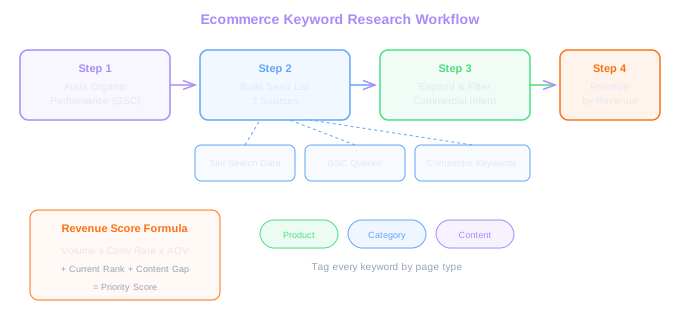
Step one: audit your existing organic performance. Pull all pages with organic traffic from GSC and tag each as product, category, blog, or other. Calculate revenue per organic session for each page type.
Step two: build your seed list from three sources, your site search data, your GSC query report, and competitor keyword exports. Deduplicate and tag each keyword with its likely page type (product vs category keywords is covered in our next topic).
Step three: expand your seed list using keyword tools. For each seed, pull related terms, questions, and long-tail variants. But filter ruthlessly, keep only terms with clear commercial or transactional intent. Understanding buyer intent vs search volume will help you make this distinction.
Step four: prioritize. Score each keyword on three axes: revenue potential (search volume multiplied by estimated conversion rate multiplied by average order value), current ranking position, and content gap (do you have a page for this term or not). The keywords that score highest across all three get worked on first.
Revenue Score Formula
Volume x CTR x Conversion Rate x AOV = Revenue Potential. A keyword with 500 searches and 5% conversion at $80 AOV beats one with 10,000 searches and 0.2% conversion at the same AOV by 2x.
Tools and Data Sources
Google Search Console is your most underrated keyword tool. It shows you exactly what queries Google associates with your pages, your click-through rates, and where you sit in rankings. No third-party tool gives you this level of accuracy for your own site.
Ahrefs and Semrush both provide keyword databases with volume estimates, difficulty scores, and competitor data. For ecommerce, their keyword gap features are particularly useful, they let you see exactly which terms your competitors rank for that you miss entirely.
Google Keyword Planner remains useful for volume estimates, especially for product-specific terms that third-party tools sometimes miss. Its data comes directly from Google Ads, so commercial keywords tend to have more accurate volume numbers.
Don't overlook Amazon autocomplete and Amazon search data if you also sell on marketplaces. Amazon search terms are pure purchase intent, people searching on Amazon are ready to buy. Tools like Helium 10 or Jungle Scout can extract this data.
Run your top 50 product names through Amazon autocomplete. The suggestions reveal buying-specific modifiers (sizes, colors, use cases) that Google keyword tools often miss.
Common Mistakes Stores Make
The biggest mistake is targeting head terms with massive volume and ignoring the long tail. A store selling running shoes might fixate on ranking for "running shoes" (201,000 monthly searches) while ignoring "women's trail running shoes wide fit" (480 monthly searches, 4x higher conversion rate).
Another frequent error is treating keyword research as a one-time project. Your product catalog changes, seasonal demand shifts, and competitors enter and leave the market. Keyword research should be revisited quarterly at minimum, with monthly checks on your priority terms.
Many stores also make the mistake of using blog-style keyword strategies. They publish dozens of informational articles that rank well but never connect to purchase behavior. A post about "how to choose hiking boots" only helps if it links effectively to your hiking boot category page and the content matches what a near-purchase shopper needs.
Finally, watch out for keyword tools that inflate difficulty scores. A keyword with a difficulty of 70 in Ahrefs might be perfectly achievable for your store if the top results are thin product pages from competitors with weak backlink profiles. Always manually review the SERP before dismissing a keyword as too competitive.
Building Your First Keyword Research Sprint
We recommend a focused two-week sprint to build your initial keyword map. Week one covers data collection: pull GSC data, export competitor keywords, gather site search queries, and run your seed terms through Ahrefs or Semrush.
Week two focuses on analysis and mapping. Cluster your keywords by topic, assign each cluster to a page type, identify gaps in your current site structure, and prioritize the top 20-30 keyword targets that will drive the most revenue.
At the end of this sprint, you should have a working keyword map that covers your top categories and products, a prioritized list of content gaps to fill, and a quarterly review schedule to keep the map current. This document becomes the foundation for every SEO decision you make going forward. If you need professional help with this process, explore our keyword research service.
Free Tools & Resources
Try our free SEO tools
Work Together With SEO Experts who understand ecommerce
World’s first Ecom-founded SEO agency