Advanced SEO
13 min readJavaScript SEO for Ecommerce
Modern ecommerce platforms increasingly rely on JavaScript frameworks like React, Vue, and Angular to deliver dynamic shopping experiences. While these frameworks excel at creating rich, interactive storefronts, they introduce significant challenges for search engine crawling and indexing. Understanding how Googlebot processes JavaScript and implementing the right rendering strategy can mean the difference between thousands of indexed product pages and an invisible store. This topic builds on [technical SEO fundamentals](/blog/technical-seo-for-ecommerce) with a JavaScript-specific focus.
In this guide
How Googlebot Processes JavaScript
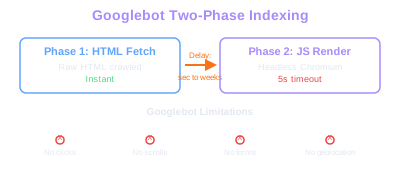
Googlebot uses a two-phase indexing process for JavaScript-heavy pages. In the first phase, it crawls the raw HTML response and indexes whatever content is present in the initial server response. In the second phase, it queues the page for rendering using a headless Chromium browser, executes the JavaScript, and then indexes the fully rendered content. The critical problem is the gap between these two phases.
The rendering queue can take anywhere from seconds to weeks depending on Google's crawl budget allocation for your domain. During this delay, any content that depends on JavaScript execution remains invisible to Google. For an ecommerce store with thousands of product pages, this means new products, price updates, inventory changes, and seasonal content might not appear in search results for days or even weeks after publication.
Googlebot's rendering engine runs a relatively recent version of Chromium, so modern JavaScript APIs are generally supported. However, it has important limitations: it does not interact with pages (no clicking, scrolling, or form submission), it has a rendering timeout of approximately 5 seconds for initial meaningful paint, and it blocks certain resource types like geolocation and notification APIs. Any product content that requires user interaction to load, such as tabbed descriptions or lazy-loaded reviews that require scrolling, may never be indexed.
The Web Rendering Service (WRS) that Googlebot uses also has limited resources per page. If your JavaScript bundle is excessively large or triggers cascading API calls before rendering product data, you risk incomplete rendering where Googlebot times out before your critical content appears in the DOM.
Rendering Timeout
Googlebot allows approximately 5 seconds for initial meaningful paint. Pages with large JS bundles or cascading API calls risk incomplete rendering and missing content in the index.
Use Google Search Console's URL Inspection tool with the 'View Tested Page' option to see exactly what Googlebot renders. Compare the rendered HTML to your live page to identify content that fails to load during Googlebot's rendering pass.
Rendering Strategies: CSR, SSR, and SSG
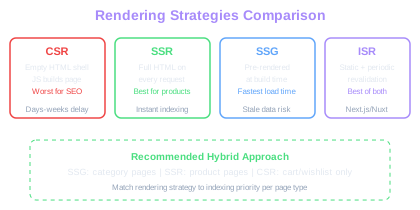
Client-side rendering (CSR) is the default for most single-page application frameworks. The server sends a minimal HTML shell and a JavaScript bundle that builds the entire page in the browser. For ecommerce SEO, pure CSR is the worst choice. Product titles, descriptions, prices, and structured data are absent from the initial HTML, making your store entirely dependent on Google's rendering queue for indexing.
Server-side rendering (SSR) generates the full HTML on the server for each request, delivering complete product content to both users and search engine crawlers immediately. Frameworks like Next.js, Nuxt.js, and Angular Universal provide SSR capabilities. The server processes the JavaScript, renders the component tree, and sends fully-formed HTML that includes all product data, meta tags, and structured data markup. Googlebot can index this content in the first crawl phase without waiting for rendering.
Static site generation (SSG) pre-renders pages at build time, producing static HTML files served directly from a CDN. For ecommerce catalogs with stable product data, SSG delivers the fastest page load times and guaranteed crawlability. However, it becomes impractical for stores with frequent price changes, real-time inventory, or catalogs exceeding tens of thousands of products because every change requires a rebuild.
Incremental static regeneration (ISR), available in Next.js and similar frameworks, offers a middle ground. Pages are statically generated but can be revalidated and regenerated on a defined schedule or on-demand. This allows you to maintain the performance benefits of static generation while keeping product data fresh without full rebuilds.
Hybrid rendering, where different page types use different strategies, is the pragmatic approach for most ecommerce stores. Use SSG for category landing pages and evergreen content, SSR for product detail pages with dynamic pricing, and CSR only for user-specific features like cart contents and wishlists that do not need indexing.
Hybrid Rendering
Pure CSR leaves product titles, prices, and structured data invisible until Googlebot renders JavaScript. SSR delivers complete HTML on every request, enabling first-pass indexing without delay.
Critical SEO Elements in JavaScript Frameworks
Meta tags, canonical URLs, and structured data must be present in the server-rendered HTML, not injected client-side. If your framework generates the <title> tag, meta description, and canonical link via JavaScript after page load, Googlebot may miss them during the first crawl pass. Use your framework's head management solution: next/head in Next.js, useHead in Nuxt 3, or Meta and Title components in Remix.
Internal linking is frequently broken in JavaScript-rendered ecommerce stores. Navigation menus, breadcrumbs, category links, and pagination that rely on JavaScript event handlers instead of standard <a href> tags are invisible to Googlebot. Every navigational link on your store must use proper anchor elements with full href attributes. Framework-specific Link components (next/link, router-link in Vue, etc.) generally render proper anchor tags, but verify this in your rendered HTML.
Lazy loading of product images and below-fold content can be SEO-friendly if implemented correctly. Use the native loading='lazy' attribute for images below the fold, but ensure that primary product images and above-fold content load immediately. Intersection Observer-based lazy loading is generally Googlebot-compatible, but custom scroll-triggered loading often fails because Googlebot does not scroll.
URL management through the History API must produce real, crawlable URLs. If your product filtering system changes the display without updating the URL, or if it uses hash-based routing (example.com/#/product/123), search engines cannot discover or index the filtered states. Push real URL changes using the History API and ensure your server can respond to those URLs directly.
Run a 'Disable JavaScript' test on every critical page type: product detail, category, search results, and homepage. If the page is blank or missing product information with JavaScript disabled, your SSR implementation is broken and needs immediate attention.
JavaScript Bundle Optimization for Crawl Efficiency
Large JavaScript bundles directly impact both user experience and Googlebot's ability to render your pages. Every kilobyte of JavaScript that must be downloaded, parsed, and executed delays the rendering of your product content. Google's crawl budget is finite, and inefficient JavaScript wastes rendering resources that could be spent indexing more of your product catalog.
Code splitting is essential for ecommerce stores. Split your JavaScript bundle by route so that product pages only load the code needed for product display, not the code for checkout, account management, or admin features. Dynamic imports allow you to defer non-critical functionality until user interaction, keeping the initial bundle small and rendering fast.
Tree shaking eliminates unused code from your bundles. Audit your dependencies regularly since many ecommerce stores import entire utility libraries when they only use a few functions. Importing lodash entirely adds roughly 70KB gzipped, while importing individual functions adds a fraction of that. Apply the same scrutiny to UI component libraries, analytics packages, and third-party integrations.
Third-party scripts are the most common source of JavaScript bloat in ecommerce. Chat widgets, analytics platforms, recommendation engines, retargeting pixels, and A/B testing tools each add JavaScript that competes with your core product rendering for execution time. Load third-party scripts asynchronously using async or defer attributes, and consider loading non-essential scripts only after the initial page render completes. For Googlebot, fewer competing scripts means faster rendering of your critical product content.
Monitor your JavaScript execution time using Chrome DevTools Performance tab and Lighthouse. For a deeper dive, see our guide on site speed optimization. Target a total blocking time under 200ms and a time-to-interactive under 3.8 seconds. Pages exceeding these thresholds risk incomplete rendering by Googlebot and poor Core Web Vitals scores that impact rankings.
Handling Dynamic Product Content
Product pages on ecommerce stores contain multiple types of dynamic content: prices that change with promotions, inventory status that updates in real time, reviews that accumulate over time, and variant-specific information that changes with user selection. Each type requires a different approach to ensure search engine visibility.
Prices and availability should be rendered server-side with the default or canonical variant's information. When a user selects a different size or color, client-side JavaScript can update the displayed price and availability without a full page reload. The server-rendered default state is what Googlebot will index, so ensure it represents the most commonly searched variant and includes accurate Product structured data with the Offer price and availability.
Product reviews are critical for SEO because they provide unique content, long-tail keyword coverage, and AggregateRating structured data that powers star ratings in search results. If reviews load asynchronously via API calls after initial page render, they may not be available when Googlebot renders the page. Either server-render the first batch of reviews, or include the AggregateRating schema in the server-rendered HTML even if individual reviews load later.
Product recommendations and 'frequently bought together' sections often load via API calls triggered after the main content renders. While this content is valuable for users, it typically does not need indexing. Use internal links within these sections to ensure Googlebot can discover related product pages, but do not depend on JavaScript-loaded recommendation widgets as your primary internal linking strategy.
Faceted navigation and product filters present a complex JavaScript SEO challenge. Filter interactions should update the URL with crawlable parameters, but most filter combinations should be blocked from indexing via robots.txt or noindex to prevent index bloat. Only pre-selected, high-value filter combinations should produce indexable pages with server-rendered content.
Create a rendering test checklist that verifies every product page element against both the server-rendered HTML and the fully-rendered DOM. Automate this test to run nightly on a sample of product pages, alerting you whenever critical content like prices or structured data fails to appear in the server response.
Testing and Monitoring JavaScript SEO
Continuous monitoring of your JavaScript rendering pipeline is essential because framework updates, third-party script changes, and content management system modifications can break server-side rendering without obvious user-facing symptoms. A technical SEO audit should always include JavaScript rendering checks. A page that works perfectly for users in a browser may be completely blank to Googlebot if SSR fails silently.
Google Search Console's Coverage report is your primary monitoring tool. Watch for spikes in 'Discovered - currently not indexed' or 'Crawled - currently not indexed' categories, which often indicate rendering failures. The URL Inspection tool lets you check individual pages by requesting a live test that shows Googlebot's rendered HTML, loaded resources, and any JavaScript errors encountered.
Set up automated rendering tests using headless Chrome or Puppeteer scripts that simulate Googlebot's behavior. These tests should disable JavaScript, capture the server-rendered HTML, then re-enable JavaScript and compare the rendered DOM. Critical SEO elements like product titles, prices, meta tags, canonical URLs, and structured data should be present in both versions for SSR sites.
Monitor your JavaScript error rates in production using error tracking services like Sentry or Datadog. JavaScript errors that prevent rendering in Googlebot's environment may not manifest in regular browsers due to differences in user agent, viewport size, or absence of user interaction. Filter for errors that occur in headless browser contexts or under Googlebot's user agent.
Track your page's rendering performance specifically from the server-side rendering perspective. If your SSR response time degrades due to API latency, database bottlenecks, or memory leaks, Googlebot may receive timeout errors or incomplete HTML. Monitor SSR response times separately from client-side performance metrics and set alerts for SSR response times exceeding 1-2 seconds.
Free Tools & Resources
Try our free SEO tools
Work Together With SEO Experts who understand ecommerce
World’s first Ecom-founded SEO agency