On-Page SEO
9 min readImage Optimization for Products
Product images are the bridge between browsing and buying in ecommerce. They also represent one of the largest untapped SEO opportunities for most online stores. Google Images drives 10-25% of organic traffic for visually-driven product categories like fashion, home decor, and electronics. Beyond image search traffic, poorly optimized images are the number one cause of slow page load times, which directly hurt both rankings and conversion rates. Addressing images is a key part of [site speed optimization](/academy/site-speed-optimization). A comprehensive image optimization strategy addresses file formats, compression, alt text, file naming, lazy loading, and responsive sizing to deliver fast pages and maximum search visibility.
In this guide
Why Image Optimization Matters for Ecommerce SEO
Images account for the majority of page weight on most ecommerce sites. A single product page with six high-resolution photographs can easily weigh 10-15 MB without optimization, resulting in load times of five seconds or more on mobile connections. Google's Core Web Vitals, particularly Largest Contentful Paint (LCP), are directly impacted by image file sizes, and pages that fail Core Web Vitals thresholds face ranking disadvantages in search results.
Beyond page speed, product images create direct search traffic opportunities through Google Images. When a shopper searches for "mid-century modern coffee table" in Google Images and your product photo appears with an optimized alt tag and descriptive file name, they click directly to your product page. This image search traffic often converts at rates comparable to regular organic traffic because the shopper has already seen the product visually and chosen to click through.
Image optimization also improves your product listings in Google Shopping and visual search results. Google Lens and similar visual search tools are growing rapidly, and products with properly optimized images are more likely to appear in these results. As visual search becomes a mainstream shopping behavior, stores with optimized product imagery will capture traffic that competitors with poorly named, uncompressed images simply cannot access.
The compound effect of image optimization across a large catalog is substantial. Reducing average image size by 60% across 5,000 product pages improves every page's load speed, which lifts rankings site-wide, reduces bounce rates, and increases the probability that Google can crawl your full catalog within its crawl budget. This is one of the highest-impact on-page SEO improvements you can make.
File Formats and Compression Techniques
Choosing the right image format is the foundation of image optimization. For product photography, three formats dominate: JPEG, PNG, and WebP. JPEG is the traditional choice for photographs with complex color gradients, it produces small file sizes with acceptable quality loss. PNG is better for images requiring transparency, such as product shots on transparent backgrounds. WebP, developed by Google, delivers 25-35% smaller file sizes than JPEG at equivalent visual quality and supports both lossy and lossless compression.
Modern ecommerce sites should serve WebP images as the primary format, with JPEG fallbacks for older browsers that do not support WebP. The HTML picture element or server-side content negotiation can serve WebP to compatible browsers and JPEG to others automatically. AVIF is an even newer format that achieves 20% better compression than WebP, but browser support is still catching up. Consider adopting AVIF for progressive enhancement once your platform and CDN support it.
Compression settings matter as much as format choice. A JPEG saved at 100% quality is far larger than necessary, most product images look identical to the human eye at 75-85% quality but are 40-60% smaller in file size. Tools like ShortPixel, TinyPNG, Squoosh, and ImageOptim can batch-compress images before upload. For automated compression at scale, integrate image optimization into your build pipeline or use a CDN that applies compression on the fly, such as Cloudflare Polish, Cloudinary, or Imgix.
Do not compress images multiple times. Each round of lossy compression degrades quality further while providing diminishing size reductions. Start with the highest quality original, compress once to your target quality level, and store the original separately in case you need to reprocess later.
Format Impact
WebP delivers 25-35% smaller files than JPEG at equivalent visual quality and has 97% browser support. A 6-image product page drops from 14.4 MB to 3.9 MB, cutting load time from 5+ seconds to under 2 seconds on mobile.
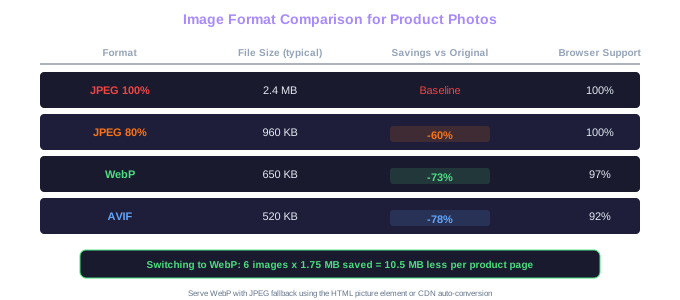
Set up automatic WebP conversion in your image pipeline. Most CDNs like Cloudinary, Cloudflare, and Imgix can serve WebP to supported browsers automatically without changing any image URLs in your HTML. This single change can reduce total image payload by 25-35% across your entire site.
Alt Text Best Practices for Product Images
Alt text (alternative text) serves two critical purposes: it describes images for visually impaired users relying on screen readers, and it provides keyword context that search engines use for image ranking. Every product image on your site needs unique, descriptive alt text that accurately describes what the image shows.
For the primary product image on your product page, write alt text that includes the product name and a key visual detail. "Women's red leather crossbody bag with gold chain strap - front view" is far more useful than "bag" or "product image." The alt text should read naturally as a description, not as a keyword-stuffed phrase. "Buy best red leather bag women's crossbody bag sale cheap" is spammy alt text that hurts rather than helps.
Product pages with multiple images should have varied alt text for each photo. The front view, back view, detail shots, and lifestyle images each show something different, and the alt text should reflect those differences. "Women's red leather crossbody bag - interior compartments and zipper" describes a different view than "Woman carrying red crossbody bag at outdoor market - lifestyle shot." This variation creates multiple ranking opportunities in Google Images for different search queries.
For variant-specific images, different colors, sizes, or configurations, include the variant attribute in the alt text. "Men's hiking boot in forest green, size 10" is more useful than a generic "hiking boot" for both SEO and accessibility. Shoppers searching for specific color or size variations in Google Images will find your product when the alt text matches their query.
Avoid leaving alt text empty on any product image. Empty alt attributes tell screen readers to skip the image entirely, which is appropriate for decorative images but never appropriate for product photos that convey essential shopping information. Equally, avoid using the same alt text for every image on a product page, each image deserves its own description.
File Naming and Image URLs
Image file names are a ranking signal for Google Images that most ecommerce stores completely ignore. The default camera file name "DSC_4821.jpg" tells search engines nothing about the image content. Renaming that file to "women-red-leather-crossbody-bag-front.jpg" before uploading gives Google an additional signal about what the image depicts, improving its chances of appearing in relevant image search results.
Use hyphens to separate words in file names, not shows or spaces. Google treats hyphens as word separators, so "blue-running-shoes.jpg" is interpreted as three separate words. Underscores are treated as word joiners, so "blue_running_shoes.jpg" is read as one compound term. Spaces in file names get converted to "%20" in URLs, which looks messy and can cause technical issues.
Keep file names descriptive but concise. Include the product name, a key attribute like color or material, and the view type (front, back, detail, lifestyle). Avoid stuffing file names with excessive keywords, "best-buy-cheap-blue-running-shoes-sale-discount-2024.jpg" is over-optimized and looks spammy. Aim for three to six descriptive words that a human would use to describe the image.
For stores with large catalogs, automate file naming using a consistent pattern. Build a naming convention like: {product-name}-{color}-{view}.{format} and apply it programmatically when images are processed for upload. Consistent naming patterns make your images easier to manage, easier for search engines to understand, and easier to audit for optimization issues.
Image URLs should also be clean and descriptive. Avoid URL structures that place images behind randomized hash strings like "/images/a7f3b2e1.jpg", these provide no context to search engines. Instead, use URL paths that reflect the product hierarchy: "/images/products/bags/crossbody/red-leather-crossbody-bag-front.webp" gives Google clear category and product signals within the URL itself.
Create a file naming template spreadsheet for your product photography team. Include columns for product name, color, material, and view type, with a formula that generates the standardized file name. Distribute this to your photographers or product content team so images arrive pre-named and ready for upload.
Responsive Images and Lazy Loading
Modern ecommerce sites must serve appropriately sized images for every device and screen size. A 3000x3000 pixel hero image designed for a desktop retina display wastes bandwidth when loaded on a mobile phone with a 375-pixel-wide screen. The srcset attribute in HTML lets you specify multiple image sizes, and the browser automatically selects the most appropriate one based on the device's screen width and pixel density.
Implement srcset with at least three size breakpoints for product images: a small version for mobile (around 400px wide), a medium version for tablets (around 800px wide), and a large version for desktop (around 1200px wide). For product detail pages where users can zoom into images, provide an additional extra-large version (2000-3000px) that loads only when the zoom function is activated, not on initial page load.
Lazy loading defers the loading of off-screen images until the user scrolls near them. For product pages with multiple images below the fold, lazy loading can reduce initial page weight by 50% or more. Implement lazy loading using the native loading="lazy" attribute on img tags, which is supported by all modern browsers. For more sophisticated control, use the Intersection Observer API to trigger image loading when images enter a defined viewport margin.
Do not lazy load the primary product image or the LCP (Largest Contentful Paint) element. The main product image visible when the page first loads should be eagerly loaded with fetchpriority="high" to ensure it appears as quickly as possible. Lazy loading the hero image would delay LCP and hurt your Core Web Vitals score. Only lazy load images that are below the fold or in secondary sections like related products and customer reviews.
Use width and height attributes on all img tags to prevent Cumulative Layout Shift (CLS). When a browser knows the dimensions of an image before it loads, it can reserve the correct amount of space, preventing the page content from jumping around as images load. This is particularly important on product listing pages where dozens of product images load in a grid layout.
LCP Priority Rule
Never lazy-load the primary product image. Use fetchpriority='high' on the main visible image and loading='lazy' only on below-the-fold images. Lazy-loading the hero image delays Largest Contentful Paint and hurts Core Web Vitals.
Image SEO for Product Listing Pages and Sitemaps
Product listing pages (category pages) display dozens of product thumbnails in a grid. Each thumbnail is a ranking opportunity in Google Images, but only if the images are properly optimized. Ensure that every product thumbnail in your grid has a unique alt text that includes the product name, do not use the same generic alt text like "product thumbnail" across all items.
Thumbnail sizing on category pages should be consistent and appropriately compressed. There is no need to load full-size product images in a grid where they are displayed at 200x200 or 300x300 pixels. Generate dedicated thumbnail versions at the exact display size and serve those instead. This alone can reduce category page weight by 70-80%, dramatically improving load times for pages that often contain 20-40 product images.
Create an image sitemap or include image tags within your existing XML sitemap. An image sitemap tells Google about all the images on your site and provides metadata like captions and license information. For ecommerce sites, the image sitemap should include every product image with its associated alt text and the product page URL. Most major ecommerce platforms can generate image sitemaps automatically through plugins or built-in features, but verify that your sitemap includes all product images and not just the primary photo for each product.
Monitor your image search performance in Google Search Console. The Performance report can be filtered to show only Google Images traffic, giving you insights into which product images receive the most impressions and clicks. Use this data to identify opportunities, products with high image impressions but low clicks may need more compelling product photography, while products with zero image impressions may have missing or poorly optimized alt text and file names.
Consider implementing structured data for product images. The Product schema supports the "image" property, which tells Google which images are associated with the product. Providing multiple image URLs in the schema helps Google display your product images in rich results, knowledge panels, and Google Shopping listings.
Run a quarterly image SEO audit: crawl your site to identify product images with missing alt text, oversized file sizes, default camera file names, and missing srcset attributes. Prioritize fixing images on your top 100 product and category pages by traffic volume for the fastest SEO impact.
Free Tools & Resources
Try our free SEO tools
Work Together With SEO Experts who understand ecommerce
World’s first Ecom-founded SEO agency