Industry Playbooks
12 min readFashion & Apparel SEO Playbook
Fashion ecommerce operates on tight seasonal cycles, heavy visual discovery, and an enormous number of product variants. Ranking well requires a search strategy built around these realities rather than generic SEO advice. This playbook covers the specific techniques that drive organic traffic for clothing, footwear, and accessories stores. For a broader overview, see our guide to [fashion ecommerce SEO](/blog/fashion-ecommerce-seo).
In this guide
Seasonal Collection Pages and Trend Keywords
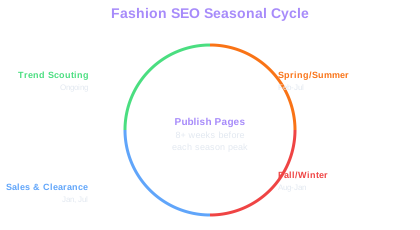
Fashion retail revolves around seasons, drops, and trend cycles. Your SEO calendar should mirror your buying calendar. Create dedicated landing pages for each seasonal collection, Spring/Summer 2026, Fall/Winter 2026, at least eight weeks before the season begins. These pages give Google time to crawl and index them before demand peaks.
Trend keywords shift rapidly. Terms like "barrel leg jeans" or "quiet luxury" can spike from zero to tens of thousands of monthly searches within weeks. Monitor Google Trends, Pinterest Trends, and social platforms weekly to catch rising search terms early. When you spot a trend relevant to your catalog, create or update a category page targeting that term immediately.
Avoid deleting seasonal pages after a season ends. Instead, update the content and product grid for the next cycle. A page at /collections/summer-dresses that has accumulated backlinks and ranking history over three years will outperform a brand-new page every time. Add a small note like "Explore our Summer 2026 collection" and swap out the products.
Use schema markup for product availability and seasonal offers. Google can display sale pricing, stock status, and promotional badges directly in search results, which lifts click-through rates significantly during peak shopping periods.
Seasonal URL Reuse
A page at /collections/summer-dresses with 3 years of accumulated backlinks and ranking history outperforms a newly created page every time. Swap the products and imagery each season but keep the URL intact.
Managing Size, Color, and Style Variants
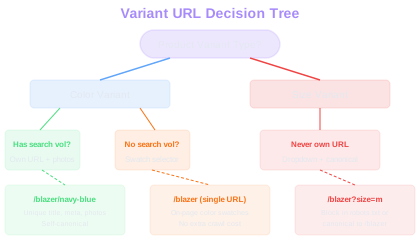
Apparel stores often have hundreds of variants per product, multiple sizes, colors, fits, and lengths. Each variant creates potential duplicate content and crawl waste if handled poorly. The standard approach is to use a single canonical product URL with variant selectors (dropdowns or swatches) that do not generate separate indexable URLs.
However, color variants deserve special treatment. Shoppers frequently search for specific colors: "navy blue blazer," "white leather sneakers," "burgundy midi skirt." If a color variant looks substantially different and carries meaningful search volume, consider giving it a dedicated URL with unique product photography, a color-specific title tag, and a distinct meta description. Keep these variants canonicalized to themselves, not to a parent product.
Size variants almost never warrant separate URLs. No one searches for "medium black t-shirt." Keep size as a selector parameter and either block size parameters in robots.txt or use canonical tags pointing to the base URL. This prevents Google from wasting crawl budget on pages that offer no unique content.
For faceted navigation, filtering by size, color, material, price, implement a combination of canonical tags and noindex directives. Allow Google to index the most commercially valuable filter combinations (e.g., /womens-dresses/black/) while blocking low-value permutations (e.g., /womens-dresses?size=xs&color=black&price=under-50).
Color vs Size URLs
Shoppers search for "navy blue blazer" but never "medium black t-shirt." Give color variants with search demand their own URL, unique title, and distinct photos. Keep size as an on-page selector to avoid crawl waste.
Audit your Google Search Console coverage report for variant URLs. If you see hundreds of "Duplicate, submitted URL not selected as canonical" entries, your variant handling needs tightening. Each indexed URL should serve a unique search intent.
Visual Search and Image Optimization
Fashion is one of the most visual ecommerce verticals. Google Lens searches, Google Images, and Pinterest visual search drive substantial traffic to apparel stores. Every product image should be optimized for visual discovery.
File names matter. Rename images from DSC_4820.jpg to navy-blue-slim-fit-blazer-front.jpg before uploading. Use descriptive, keyword-rich alt text that describes the garment: "Women's navy blue slim-fit blazer with gold buttons, front view." Avoid stuffing alt text with irrelevant keywords, describe what the image actually shows.
Provide multiple high-quality images per product: front, back, side, detail shots, and lifestyle images showing the garment worn by a model. Google increasingly surfaces lifestyle images in search results, and shoppers engage more with images that show how clothing looks on a real person.
Implement product image structured data using the schema.org ImageObject within your Product markup. Include the image URL, width, height, and a content description. Stores that provide complete image markup see higher image search visibility and richer product displays in Google Shopping results.
Lookbook and Editorial Content Strategy
Lookbooks bridge the gap between inspiration and purchase. A well-structured lookbook page targets top-of-funnel queries like "spring outfit ideas 2026" or "what to wear to a garden party" while linking directly to purchasable products. This creates a content funnel that captures browsers and converts them into buyers.
Structure lookbooks as shoppable editorial pages. Each outfit or look should include product links, brief styling notes, and occasion context. Use internal links from lookbook items to their respective product and category pages. This passes authority from high-traffic editorial content to your commercial pages.
Publish styling guides that target specific occasions and seasons: "Wedding guest outfits for summer," "Business casual for hot weather," "Festival fashion essentials." These guides target long-tail queries with clear commercial intent and naturally incorporate product recommendations.
Consistency matters. Publish new lookbook or editorial content on a predictable schedule, weekly or biweekly. A regular publishing cadence signals freshness to Google and gives returning visitors a reason to come back. Archive older lookbooks but keep them accessible; they continue to attract long-tail traffic indefinitely.
Add a "Shop the Look" section to each lookbook entry with direct product links. Track click-through rates from lookbook pages to product pages in Google Analytics to measure which editorial styles drive the most revenue.
Category Page Architecture for Fashion
Fashion stores typically carry thousands of SKUs across overlapping categories. A clear, hierarchical category structure helps both search engines and shoppers navigate your catalog. Start with broad gender or department categories (Women, Men, Kids), then subcategories by garment type (Dresses, Tops, Jeans), and optionally a third level for specific styles (Maxi Dresses, Crop Tops, Skinny Jeans).
Each category page needs unique, substantive copy, not just a product grid. Write 150-300 words of category-specific content that describes the collection, mentions key attributes shoppers care about (fabric, fit, occasion), and naturally includes target keywords. Place this content above or below the product grid, depending on your template.
Breadcrumb navigation is essential for fashion stores with deep category trees. Implement breadcrumbs using BreadcrumbList schema so Google understands your site hierarchy. Breadcrumbs like Home > Women > Dresses > Maxi Dresses also improve click-through rates in search results by showing users exactly where a page sits within your store.
Create cross-category landing pages for occasions and trends. Pages like /wedding-guest or /workwear pull products from multiple categories and target high-intent queries that do not fit neatly into your standard taxonomy. These pages often rank for competitive terms that individual category pages cannot capture alone.
Building Backlinks in the Fashion Space
Fashion link building relies on relationships, visual assets, and timely content. Unlike technical B2B niches where data studies earn links, fashion earns links through editorial features, influencer collaborations, and trend commentary.
Develop a digital PR strategy centered on seasonal trends. Before each fashion season, prepare a press kit with high-resolution campaign imagery, trend commentary from your design team, and exclusive data (e.g., "Our best-selling colors this spring" or "Year-over-year trends in sustainable fabric purchases"). Pitch this to fashion editors, lifestyle bloggers, and online magazines.
Collaborate with fashion influencers who maintain blogs alongside their social channels. While Instagram links carry no SEO value, a blog post reviewing your collection with a dofollow link to your store does. Prioritize influencers whose blogs have genuine domain authority over those with large social followings but no website.
Create linkable assets specific to fashion: size guide tools, fabric care infographics, trend forecast reports, and body measurement calculators. A comprehensive, well-designed size guide earns links from fashion forums, Reddit threads, and editorial roundups year after year.
Free Tools & Resources
Try our free SEO tools
Work Together With SEO Experts who understand ecommerce
World’s first Ecom-founded SEO agency