Keyword Research
8 min readProduct vs. Category Keywords
Deciding whether to target a keyword with a product page or a category page is one of the most consequential SEO choices for any online store. Get it wrong, and your pages compete against each other instead of against competitors.
In this guide
When to Target With Product Pages vs. Category Pages
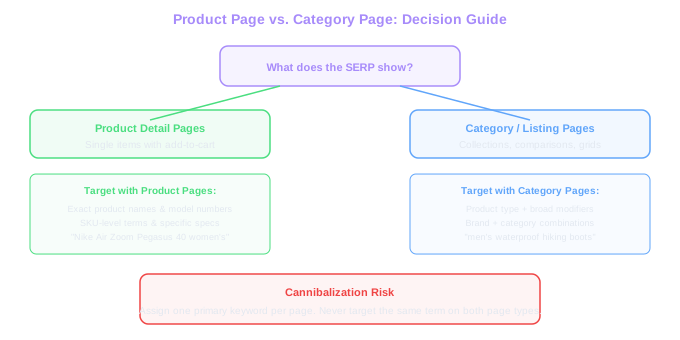
The simplest rule: look at what Google already ranks for the keyword. If the top 10 results are mostly product detail pages (single items with an add-to-cart button), target it with a product page. If the top 10 shows category listings, collection pages, or comparison-style content, use a category page.
Product pages should target specific, narrow queries: exact product names, model numbers, SKU-level terms, and queries containing detailed specifications like size, color, or material. These are bottom-of-funnel terms where the searcher knows what they want.
Category pages should target broader terms that describe a type of product rather than a specific one: "men's waterproof hiking boots," "wireless noise-cancelling headphones," or "organic cotton bedsheets." These mid-funnel terms have higher volume but require the searcher to browse options before buying.
The gray area appears with terms like brand + product type ("Nike running shoes"). Check the SERP, Google might show a mix of brand category pages and individual product pages. In these cases, a filtered category page showing only that brand typically wins.
Volume Split
For a store with 1,000 products across 50 categories: category pages target ~150 mid-tail keywords (1K-5K searches each), while product pages target 3,000+ long-tail keywords (20-500 searches each). Total addressable long-tail volume often exceeds mid-tail.
Head Terms vs. Long-Tail Distribution
In a typical ecommerce keyword landscape, the distribution follows a predictable pattern. A small number of head terms ("laptops," "running shoes," "skincare") carry enormous volume but convert poorly and are brutally competitive. The mid-tail ("gaming laptops under 1000," "women's trail running shoes") represents the sweet spot of volume, intent, and achievable difficulty.
The long tail, which makes up 70-80% of all search queries, consists of highly specific terms that individually have tiny volume but collectively drive the majority of ecommerce revenue. These map naturally to product pages.
Here is how the math typically breaks down for a store with 1,000 products across 50 categories. The 50 category pages might target 150 mid-tail keywords, averaging 1,000-5,000 searches each. The 1,000 product pages might target 3,000+ long-tail keywords, averaging 20-500 searches each. Total addressable search volume from the long tail often exceeds the mid-tail.
The strategic insight: your category pages fight for competitive mid-tail terms, while your product pages quietly accumulate long-tail traffic with minimal effort. Both layers matter, but most stores under-invest in product page optimization.
How Category Pages Rank for Mid-Funnel Terms
Category pages have structural advantages for mid-funnel keywords. They contain multiple products (more content signals), they typically receive more internal links (from navigation, breadcrumbs, and cross-links), and they match the search intent of someone browsing options rather than looking at one item.
To rank effectively, category pages need more than a grid of product thumbnails. Our guide to category page SEO covers this in detail, but the essentials include a descriptive intro paragraph (100-200 words) using the target keyword naturally, filter options that reflect how people search (by price range, features, use case), and enough product listings to demonstrate authority on the topic.
Faceted navigation creates a powerful opportunity here, as explained in our ecommerce category page SEO guide. If your category page for "wireless headphones" lets users filter by "noise-cancelling," "over-ear," and "under $100," you can create filtered views that target specific mid-tail terms. The URL structure matters, each meaningful filter combination should produce a crawlable, indexable URL.
Don't forget the category page copy below the product grid. A 300-500 word section covering buying considerations, feature comparisons, and use-case recommendations helps both rankings and conversion. This content answers the questions that mid-funnel shoppers have, building trust before they click through to a product.
Check your analytics for search queries that match filter combinations. If people search for "waterproof bluetooth speakers under 50," make sure that exact filter combination has its own crawlable URL with optimized content.
Product Page Keyword Targeting With Attributes and Specs
Product pages naturally target a primary keyword, usually the product name. But the real SEO value comes from the secondary keywords you weave into the page through specifications, attributes, and descriptive content.
Every product attribute is a keyword opportunity. A product page for a hiking backpack should naturally include the volume (in liters), the material, the weight, waterproof rating, number of compartments, frame type, and compatible body sizes. Each of these attributes, when combined with the product type, creates a long-tail keyword that the page can rank for.
The product description is where most stores drop the ball. Manufacturer descriptions are duplicated across every retailer who carries the product, zero SEO value. Write unique descriptions that incorporate attributes as natural language: "This 45-liter ultralight backpack weighs just 890 grams and features a waterproof ripstop nylon shell" targets at least four long-tail variations.
Structured data (product schema) amplifies the visibility of these attributes in search results. When your product page includes proper schema markup for price, availability, reviews, and specifications, Google can display rich snippets that improve click-through rates by 20-30%. Learn more about optimizing these pages in our product page SEO topic.
Build a product page content template for each product category. List all relevant attributes as fields, this ensures every product page covers the same keyword-rich specifications, even when written by different team members.
Avoiding Cannibalization Between Product and Category Pages
Keyword cannibalization happens when multiple pages on your site compete for the same search term. For ecommerce stores, the most common form is a category page and a product page both trying to rank for the same keyword. Google gets confused about which page to show, and often neither ranks well.
The clearest signal of cannibalization: check GSC for a keyword and see if multiple URLs from your site appear for it, with rankings fluctuating between them. If your category page for "men's leather boots" and a specific product page swap between position 8 and position 15, that's cannibalization eating your rankings.
Prevention is straightforward. Assign one primary keyword to each page and document it in your keyword map. Category pages get the broader term ("men's leather boots"), product pages get the specific term ("Wolverine 1000 Mile boot brown size 10"). The product page title and H1 should use the product name, not the category keyword.
Internal linking reinforces the hierarchy. Your product page should link to its parent category (reinforcing the category as the authority for the broader term), and your category page should link to individual products (passing authority down to the specific terms). Breadcrumbs handle this naturally when structured correctly.
When cannibalization already exists, the fix depends on which page should rank. Usually, it's the category page for mid-tail terms and the product page for specific product terms. Add a canonical hint by strengthening internal links to the preferred page, and adjust the on-page optimization of the non-preferred page to focus on different keywords.
Practical Decision Framework
When you encounter a new keyword, run through this decision tree. First, check the SERP: what page types rank in the top 5? If product pages dominate, assign it to a product page. If category/listing pages dominate, assign it to a category page.
Second, evaluate the specificity. Does the keyword describe one item or a group of items? "Sony WH-1000XM5" is one item, product page. "Best wireless headphones for running" describes a group, category or guide page.
Third, check your existing pages. Do you already have a page that targets this keyword or something very close? If yes, optimize the existing page rather than creating a new one. Creating duplicate targeting is one of the fastest ways to trigger cannibalization.
Fourth, consider the user journey. Where does someone searching this term fall in the buying process? Early-stage browsers need category pages with filters and comparisons. Ready-to-buy shoppers need product pages with specifications and purchase options. Matching your page type to the buyer's stage directly impacts conversion rates.
Free Tools & Resources
Try our free SEO tools
Work Together With SEO Experts who understand ecommerce
World’s first Ecom-founded SEO agency