Platform SEO
13 min readMagento SEO Guide
Magento (now Adobe Commerce) offers unmatched flexibility for ecommerce SEO, but that flexibility comes with complexity. Unlike hosted platforms that handle many SEO basics automatically, Magento requires deliberate configuration to avoid duplicate content, manage crawl budget, and optimize page speed. Mastering Magento's SEO settings and common pitfalls lets you leverage the platform's power to build a highly optimized, large-scale ecommerce store. For a deeper dive into platform-specific strategies, see our [Magento ecommerce SEO](/blog/magento-ecommerce-seo) guide.
In this guide
Magento URL Structure and Rewrites
Magento's default URL structure generates clean, SEO-friendly URLs for products and categories, but the platform has several URL-related pitfalls that create duplicate content if left unconfigured. The most critical setting is under Stores, then Configuration, then Catalog, then Search Engine Optimization. Here you must enable URL rewrites and set the canonical link meta tag to yes for both categories and products.
By default, Magento can generate multiple URLs for the same product. A product may be accessible at /product-name.html, /category/product-name.html, and /another-category/product-name.html if the product belongs to multiple categories. Without canonical tags, Google sees three separate pages with identical content. Enable the Use Canonical Link Meta Tag setting to tell Google which URL is the primary version.
URL suffixes are another consideration. Magento lets you add .html or any other suffix to product and category URLs. While the suffix itself does not affect SEO, changing it after your site is indexed will break all existing URLs. If you need to change the suffix, create redirect rules in your .htaccess file or use Magento's built-in URL rewrite system to map old URLs to new ones.
For large catalogs with hundreds of categories, consider your URL hierarchy carefully. Magento can create deeply nested URLs like /mens/clothing/shirts/casual/blue-oxford-shirt.html. While Google can crawl deep URLs, shorter paths tend to perform slightly better in click-through rates. Configure your category URL structure to balance descriptiveness with brevity. Many successful Magento stores use a flat structure like /blue-oxford-shirt.html for products, reserving the hierarchical path for category pages only.
After configuring URL settings, use Screaming Frog to crawl your Magento site and check for duplicate pages. Filter by canonical tag status to find pages where the canonical points to a different URL. Address any mismatches before Google indexes both versions.
Managing Layered Navigation and Faceted URLs
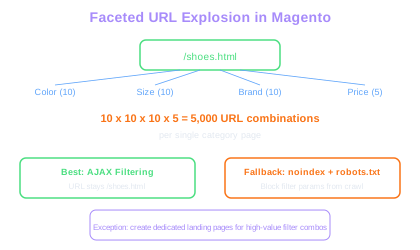
Layered navigation is Magento's term for faceted filtering, which lets customers narrow products by attributes like size, color, price, and brand. While essential for user experience, layered navigation creates a massive crawl budget problem. Every filter combination generates a unique URL, and a catalog with ten attributes of ten values each can produce millions of filterable URL combinations.
The default Magento behavior appends filter parameters to the URL, creating paths like /shoes.html?color=red&size=10&brand=nike. Google will attempt to crawl all these combinations, consuming crawl budget on pages that add no unique indexable value. For stores with large catalogs, this can prevent Google from efficiently crawling and indexing your actual product and category pages. Effective crawl budget management is essential for Magento stores at scale.
The most effective approach is to use AJAX-based filtering that does not change the URL at all. Several Magento extensions implement this pattern, loading filtered results dynamically while keeping the URL as /shoes.html. This eliminates the faceted URL problem entirely. If you cannot implement AJAX filtering, add noindex meta robots tags to all filtered pages and block the filter parameters in robots.txt.
However, some filter combinations do have SEO value. A page showing all red Nike running shoes might match a valuable search query. For these specific cases, create dedicated landing pages with unique content rather than relying on the filtered navigation URL. A purpose-built landing page at /red-nike-running-shoes.html will always outperform a filtered URL because you can add unique descriptions, internal links, and structured data.
Monitor your Google Search Console coverage report for signs of faceted URL problems. If you see hundreds of thousands of discovered but not indexed URLs, or if your crawl stats show Googlebot requesting filter parameter URLs at high volume, your layered navigation is consuming crawl budget that should go to your product pages.
Crawl Budget Drain
A catalog with 50 categories and 4 filter attributes of 10 values each can produce 250,000 filterable URLs. Google may spend its entire crawl budget on these low-value pages instead of indexing your actual products.
Magento Page Speed Optimization
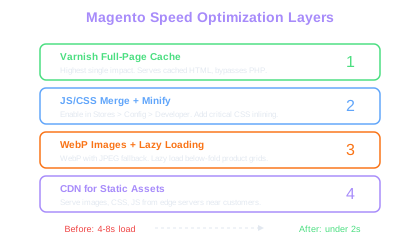
Magento sites historically struggle with page speed, and slow load times directly impact both rankings and conversion rates. A typical unoptimized Magento installation loads product pages in four to eight seconds, far exceeding Google's recommended threshold. Systematic site speed optimization can bring this under two seconds for most pages.
Enable Magento's built-in full-page cache, which is the single highest-impact speed improvement available. For Magento 2, Varnish is the recommended caching layer. Configure Varnish as a reverse proxy in front of your Magento server, and full-page load times will drop dramatically for returning visitors and any page that has been previously cached. Without full-page caching, every request hits the PHP application layer, which is inherently slow for complex Magento pages.
Optimize JavaScript and CSS delivery. Magento loads numerous JavaScript files and CSS stylesheets by default. Enable JS and CSS merging and minification in Stores, Configuration, Developer settings. Consider implementing critical CSS extraction, which inlines the above-the-fold styles and defers the rest. Extensions like MagePack or Defer JS can help reduce render-blocking resources.
Image optimization is essential for product-heavy ecommerce pages. Implement WebP format with JPEG fallback for all product and category images. Use lazy loading for images below the fold so the browser does not download all product grid images simultaneously. Magento 2.4 and later includes native lazy loading support. For earlier versions, add a lazy loading extension or implement it via JavaScript.
Consider using a Content Delivery Network for static assets. Serve images, CSS, and JavaScript from CDN edge servers located geographically close to your customers. Configure Magento to use the CDN URL for all static content under Stores, Configuration, Web, Base URLs for Static View Files. This reduces server load and improves load times for visitors far from your primary hosting location.
Varnish Cache Impact
Without full-page caching, every Magento request hits the PHP application layer. Varnish as a reverse proxy can reduce TTFB from 2-4 seconds to under 100ms for cached pages.
Test page speed on product pages, category pages, and the homepage separately. Magento category pages with large product grids often have different performance bottlenecks than product detail pages. Your optimization priorities may differ by page type.
Structured Data and Rich Results
Magento does not implement comprehensive structured data out of the box, which means you miss opportunities for rich results in Google search. Adding Product, BreadcrumbList, Organization, and Review schema markup can significantly improve your click-through rates from organic search.
Product schema is the most impactful for ecommerce. Each product page should include JSON-LD markup with name, description, image, sku, brand, offers (including price, currency, availability, and price valid until date), and aggregate rating if you have reviews. Magento extensions like Amasty SEO Suite or Mageplaza SEO handle this automatically, or your development team can add it via layout XML and template modifications.
Breadcrumb schema helps Google display your site hierarchy in search results, replacing the raw URL with a clickable breadcrumb trail. This improves both aesthetics and click-through rates. Implement BreadcrumbList JSON-LD on every page, mapping your Magento category hierarchy into the structured data. Ensure the breadcrumb path matches what users see on the page.
For stores with physical locations, add LocalBusiness schema to your store locator pages. This helps your physical locations appear in Google Maps and local search results. Include address, phone number, opening hours, and geo coordinates for each location.
Review markup deserves careful handling. Only implement AggregateRating schema if you have genuine customer reviews on your product pages. Google penalizes sites that show review stars for pages without actual reviews. If you use a third-party review platform like Trustpilot or Yotpo, ensure their Magento integration outputs the correct schema markup. Validate all structured data using Google's Rich Results Test after implementation.
XML Sitemaps and Crawl Management
Magento generates XML sitemaps automatically, but the default configuration often includes pages that should not be in the sitemap. A poorly configured sitemap sends Google to low-value or duplicate pages, wasting the crawl budget you need for your actual product catalog.
Configure your sitemap settings under Stores, Configuration, Catalog, XML Sitemap. Disable inclusion of out-of-stock products unless you plan to restock them. Exclude CMS pages that are not meant for organic search, such as terms and conditions, privacy policy, and return policy pages. These pages should be indexable but do not benefit from sitemap inclusion because Google already discovers them through internal links.
For large Magento catalogs with more than 50,000 URLs, Magento automatically splits the sitemap into multiple files with a sitemap index. Verify this is working correctly because a single sitemap file exceeding the 50,000 URL or 50MB limit will be rejected by Google. Check the generated sitemap files in your root directory and confirm they validate against the sitemap protocol.
Supplement Magento's auto-generated sitemaps with a manual review of what is included. Crawl your site with Screaming Frog and compare the discovered URLs against the sitemap. If the crawler finds pages that are not in the sitemap but should be, add them. If the sitemap contains URLs that return 404 errors, redirect loops, or noindex tags, remove them. A clean sitemap that only contains indexable, canonical URLs tells Google exactly which pages you consider important.
Submit your sitemaps through Google Search Console and monitor the indexation ratio. If Google indexes significantly fewer URLs than your sitemap contains, investigate why. Common Magento issues include orphaned products not linked from any category, product pages with noindex tags from a misconfigured extension, and canonical tags pointing to different URLs than those in the sitemap.
Set up a monthly automated comparison between your sitemap URLs and your Google Search Console indexed pages report. Any growing gap between submitted and indexed URLs signals a crawling or indexation problem that needs investigation before it impacts your organic traffic.
Common Magento SEO Mistakes to Avoid
The most damaging Magento SEO mistake is ignoring duplicate content caused by configurable products. When a configurable product like a t-shirt has size and color variations, Magento can create individual simple product URLs for each variation. A t-shirt in three sizes and four colors produces twelve simple product pages with nearly identical content, plus the configurable product page itself. Set simple products associated with configurables to Not Visible Individually in the product visibility settings to prevent this duplication.
Another common mistake is leaving Magento's default meta title and description templates unchanged. The default title format of Product Name - Store Name produces titles that lack keywords and waste character space. Customize the title format in Content, Design, HTML Head to include category context and relevant keywords. A better format might be Product Name - Category | Store Name, which adds topical relevance.
Magento's built-in search creates indexable search result pages by default. Every search query generates a URL like /catalogsearch/result/?q=query that Google can discover and crawl. These pages add no value because they are thin content pages that often show the same products as your category pages. Block /catalogsearch/ in robots.txt and add noindex tags to the search results template.
Failing to handle out-of-stock products properly is another frequent issue. When products go out of stock, many store owners delete the product or let Magento return a 404 error. Both approaches waste the SEO equity those product pages accumulated. Instead, keep out-of-stock product pages live with a clear out-of-stock message and suggest alternative products. If the product is permanently discontinued, redirect the URL to the most relevant category or replacement product page.
Finally, many Magento stores neglect mobile optimization. While Magento 2 themes are responsive by default, heavy customizations often break mobile layouts or introduce mobile-specific performance issues. Since Google uses mobile-first indexing, your mobile site experience directly determines your rankings. Test your customized Magento theme on actual mobile devices, not just browser emulation.
Free Tools & Resources
Try our free SEO tools
Work Together With SEO Experts who understand ecommerce
World’s first Ecom-founded SEO agency