Advanced SEO
12 min readLog File Analysis
Server log files are the only source of truth about how search engine crawlers actually interact with your ecommerce site. While tools like Google Search Console provide aggregated summaries, raw log data reveals exactly which URLs Googlebot requests, how often it returns, which pages it ignores entirely, and where your [crawl budget](/academy/crawl-budget-management) is being wasted. For large ecommerce catalogs, log file analysis is the difference between guessing at crawl issues and diagnosing them with precision.
In this guide
- 1. Understanding Server Log Data for SEO
- 2. Crawl Budget Analysis for Product Catalogs
- 3. Identifying Crawl Waste and Orphan Pages
- 4. Status Code Analysis and Error Detection
- 5. Crawl Pattern and Timing Analysis
- 6. Setting Up a Log Analysis Pipeline
- 7. What Trawler Reveals About Crawl Behaviour (And What Logs Can't Show)
Understanding Server Log Data for SEO
Every time a search engine bot requests a page from your server, the web server records a log entry containing the IP address, user agent string, requested URL, HTTP response code, response size, timestamp, and referrer. For SEO purposes, the critical fields are the user agent (identifying whether the request came from Googlebot, Bingbot, or another crawler), the requested URL, the status code returned, and the timestamp.
Googlebot identifies itself through several user agent strings that distinguish between desktop rendering, mobile rendering, image crawling, AdsBot, and other specialized crawlers. Filtering logs to only Googlebot requests requires matching against all known Googlebot user agent patterns. Verify Googlebot identity by cross-referencing IP addresses against Google's published ASN ranges to filter out fake bots that impersonate Googlebot's user agent.
Log files are typically stored in Common Log Format (CLF) or Combined Log Format, which adds the referrer and user agent fields. Most modern web servers like Nginx and Apache support both formats. If your ecommerce platform runs behind a CDN like Cloudflare or Fastly, you may need to configure the CDN to pass real client IP addresses through headers like X-Forwarded-For, or use the CDN's own log export features.
For ecommerce stores with significant traffic volume, raw log files can grow to gigabytes per day. Efficient analysis requires either specialized log analysis tools like Screaming Frog Log Analyzer, Botify, or JetOctopus, or a data pipeline that ingests logs into a queryable database like BigQuery, Elasticsearch, or ClickHouse for custom analysis.
Set up a separate log stream dedicated to bot traffic that filters out human visitors at the server level. This dramatically reduces the data volume you need to process and makes Googlebot behavior analysis faster and more focused.
Crawl Budget Analysis for Product Catalogs
Crawl budget is the number of pages Google will crawl on your site within a given time period. For small sites, crawl budget is rarely a concern. But ecommerce stores with tens of thousands of product pages, multiple category hierarchies, faceted navigation parameters, and paginated listings can easily exhaust their crawl budget on low-value URLs while important product pages go unvisited.
Log file analysis reveals your actual crawl budget allocation. Calculate the total number of Googlebot requests per day, then segment those requests by URL pattern. Common patterns to analyze include product detail pages (/product/), category pages (/category/), search result pages (/search?), faceted navigation URLs (URLs with filter parameters), paginated pages (?page=), static assets (CSS, JS, images), and administrative or utility pages (cart, login, account).
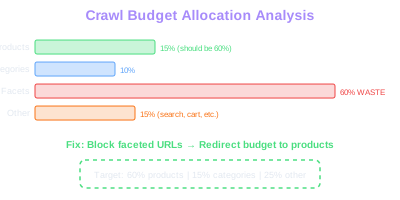
The ratio of crawl allocation should roughly match your indexation priorities. If 60% of Googlebot's requests target faceted navigation URLs that produce thin, duplicate content while only 15% reach your canonical product pages, you have a severe crawl budget problem. Redirect that wasted crawl activity by blocking parameter-heavy URLs in robots.txt, implementing proper canonical tags, and using the noindex meta tag on low-value pages.
Calculate the crawl frequency for your most important pages. If flagship product pages are only crawled once every 30 days while out-of-stock products receive daily visits, your internal linking structure or XML sitemap is sending the wrong signals. High-value pages should receive disproportionately more crawl attention, and log files are the only way to verify whether that is actually happening.
Track crawl budget trends over time. A declining crawl rate often signals deteriorating site health: increasing server errors, growing duplicate content, or expanding URL parameter space. Conversely, improving crawl rates after technical fixes confirm that your optimizations are working.
Budget Reallocation
Segment Googlebot requests by URL pattern to identify where budget is spent. Block low-value filter combinations in robots.txt and use canonical tags to redirect crawl attention to indexable product pages.
Identifying Crawl Waste and Orphan Pages
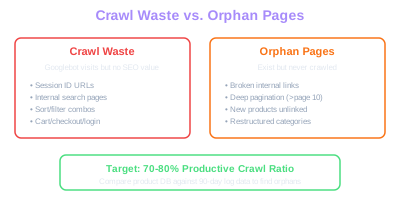
Crawl waste occurs when Googlebot spends time and resources requesting URLs that provide no SEO value. In ecommerce stores, common sources of crawl waste include session ID parameters appended to URLs, internal search result pages with query strings, sorting and filtering parameter combinations, cart and checkout pages, login and account management pages, and tracking redirect URLs.
Log file analysis quantifies exactly how much crawl budget each waste category consumes. Cross-reference your log data with your intended index by comparing the URLs Googlebot requests against your XML sitemap and your Google Search Console index coverage report. URLs that Googlebot crawls but that are not in your sitemap or desired index represent pure crawl waste.
Orphan pages are the opposite problem: pages that exist and should be indexed but never receive a single Googlebot request. To find orphan pages, compare the complete list of product URLs from your database or CMS against the URLs that appear in your log files over a 90-day period. Products that exist in your catalog but have never been requested by Googlebot are effectively invisible to search engines regardless of their content quality.
Orphan pages in ecommerce typically arise from broken internal linking, deep pagination that Googlebot does not reach, products only accessible through on-site search, recently added products not yet linked from category pages, or discontinued product pages removed from navigation but not properly redirected. Each cause requires a different fix, but the common thread is that log file analysis is the only reliable method to discover them.
Create a systematic crawl health dashboard that tracks the ratio of productive crawls (requests to indexable pages that return 200 status codes) versus wasteful crawls (requests to blocked, redirected, erroring, or low-value pages). A healthy ecommerce site should aim for at least 70-80% productive crawl ratio.
Revenue at Risk
Orphan pages with proven conversion history represent immediate revenue recovery opportunities. Cross-reference orphan URLs with sales data to prioritize which pages to reconnect through internal linking.
Export your orphan page list and cross-reference it with Google Analytics or your ecommerce platform's sales data. Orphan pages with proven conversion history represent immediate revenue recovery opportunities once they regain search visibility through proper internal linking.
Status Code Analysis and Error Detection
HTTP status codes in log files reveal the health of your URL structure from Google's perspective. Every Googlebot request that returns a non-200 status code represents a missed indexing opportunity, wasted crawl budget, or a signal of site health problems that can depress your overall crawl rate.
301 and 302 redirect chains are common in ecommerce stores that frequently change URL structures, rename categories, or migrate platforms. Log analysis reveals how many Googlebot requests hit redirect chains and how deep those chains go. Each redirect hop adds latency and risks losing link equity. Identify URLs where Googlebot encounters more than one redirect hop and flatten those chains to point directly to the final destination.
404 errors from Googlebot indicate URLs that were once valid but now return not-found responses. In ecommerce, this typically happens when products are discontinued, categories are reorganized, or URL slugs are changed without implementing redirects. A spike in Googlebot 404 requests signals a technical problem that needs investigation. High-volume 404 patterns often indicate a broken sitemap, a removed category page that still has internal links pointing to it, or an external site linking to product pages you have removed.
5xx server errors are the most damaging status codes for SEO and represent a core technical SEO concern. They tell Googlebot your server is failing to respond, which triggers crawl rate reduction as Google throttles requests to protect your server. Log analysis can reveal whether 5xx errors correlate with specific URL patterns, time periods, or traffic spikes. Common ecommerce causes include database timeout on complex product queries, memory exhaustion during peak traffic, and application errors triggered by specific product variants or filter combinations.
Soft 404 pages, where the server returns a 200 status code but the page content indicates the product is unavailable, are harder to detect in logs alone. Combine log analysis with crawl data to identify pages that return 200 but display out-of-stock messages, empty search results, or placeholder content.
Crawl Pattern and Timing Analysis
Analyzing when Googlebot crawls your site reveals patterns that inform server capacity planning, content freshness strategies, and sitemap optimization. Plot Googlebot requests over time to identify crawl peaks and troughs across hours of the day, days of the week, and longer seasonal patterns.
Most ecommerce sites see Googlebot activity distributed throughout the day but often with higher intensity during off-peak hours when server response times are fastest. If your server slows down during peak shopping hours and Googlebot shifts its crawling to overnight windows, you may be losing crawl coverage for time-sensitive content like flash sales or limited-stock products that are published during business hours.
After submitting an updated XML sitemap through Search Console, monitor log files to measure how quickly Googlebot begins requesting the new or updated URLs. The lag between sitemap submission and actual crawl provides insight into Google's prioritization of your domain. A healthy site with strong authority typically sees sitemap-triggered crawls within hours, while lower-authority domains may wait days.
Track the crawl depth Googlebot reaches through your site's hierarchy. Analyze the URL path depth of crawled pages to determine whether Googlebot reaches your deepest product pages or stops at upper-level categories. If Googlebot consistently fails to reach pages more than 4-5 clicks deep from the homepage, you need to flatten your site architecture or add direct internal links from authority pages to deep products.
Compare crawl patterns before and after major site changes like redesigns, platform migrations, robots.txt updates, or internal linking modifications. Changes in crawl volume, crawl depth, or URL pattern distribution after a technical change confirm whether the change had the intended effect on search engine behavior.
Setting Up a Log Analysis Pipeline
Building a sustainable log analysis practice requires a pipeline that automatically collects, processes, and visualizes log data without manual effort. For most ecommerce teams, the goal is a system that provides daily or weekly crawl health reports with alerting for anomalies.
Start by determining where your logs are generated and how to access them. If you use managed hosting or a platform like Shopify, log access may be limited or require API integration. For self-hosted stores on AWS, GCP, or dedicated servers, configure your web server to stream logs to a centralized storage location. Cloud platforms offer managed log services like AWS CloudWatch, Google Cloud Logging, or Azure Monitor that can ingest server logs directly.
For analysis, choose between commercial log analysis tools and custom pipelines. Commercial tools like Botify, JetOctopus, OnCrawl, or Screaming Frog Log Analyzer offer pre-built SEO-focused dashboards, anomaly detection, and integration with crawl data. These tools handle the heavy lifting of parsing, filtering, and visualizing log data. Custom pipelines using BigQuery, Elasticsearch, or ClickHouse offer more flexibility but require engineering resources to build and maintain.
Establish baseline metrics during your first analysis period: daily Googlebot request volume, productive crawl ratio, crawl frequency distribution by page type, error rate by status code, and average response time for bot requests. Set up automated alerts for deviations from these baselines: a sudden drop in crawl volume, a spike in 5xx errors, or a new URL pattern consuming significant crawl budget.
Integrate log analysis data with your other SEO data sources. Combining log crawl frequency with Google Search Console impression data, Analytics traffic data, and technical crawl results from tools like Screaming Frog creates a comprehensive picture of how search engines discover, crawl, index, and rank your product pages.
Schedule monthly log analysis reviews that compare current crawl metrics against your baselines and previous months. Create a standardized report template covering crawl budget allocation, error trends, orphan page count, and crawl efficiency ratio. Consistent reporting transforms log analysis from a one-time audit into an ongoing competitive advantage.
What Trawler Reveals About Crawl Behaviour (And What Logs Can't Show)
The 2024 leak named Google's crawler Trawler and exposed the inputs that drive its scheduling decisions. Server logs show what Trawler actually did — which URLs it requested, how often, with what response codes — but the leak is what explains why.
For ecommerce log analysis, this means specific patterns now have specific names. URLs Trawler hits frequently with 200s are pages it considers crawl-worthy: they have link equity, internal link depth ≤3, accurate lastmod, and recent content changes. URLs Trawler hits rarely or never are scoring poorly on those inputs — and in 90% of cases this maps to thin internal linking, not crawl-budget caps.
The leak also confirms a long-suspected pattern: Trawler crawls higher-quality pages MORE often, and lower-quality pages LESS often. Increased crawl frequency to a section is a positive signal — Google sees it as worth refreshing. Decreased frequency, especially after recent algorithmic updates, often correlates with rising lowQuality or pandaDemotion signals on those URLs. Read it as a quality signal, not just a budget question.
Free Tools & Resources
Try our free SEO tools
Work Together With SEO Experts who understand ecommerce
World’s first Ecom-founded SEO agency