On-Page SEO
8 min readHeading Structure for Ecommerce
Heading structure is the skeleton of your ecommerce pages. It tells search engines what each section of content is about, guides shoppers through product information, and creates a logical hierarchy that makes pages accessible and scannable. Most ecommerce stores get headings wrong by either using them purely for visual styling or ignoring them entirely on product and category pages. A deliberate heading strategy across your store can improve both rankings and user experience simultaneously, making it one of the most underrated [on-page SEO](/blog/on-page-seo-for-ecommerce) tactics available.
In this guide
The Role of Headings in Ecommerce SEO
HTML headings (H1 through H6) serve as a content outline that search engines read to understand page structure and topic hierarchy. Google has confirmed that headings help its algorithms understand what a page is about and how different sections relate to each other. In ecommerce, where pages often combine product details, specifications, reviews, and related items, a clear heading structure is essential for Google to parse the page correctly.
Headings also play a critical role in accessibility. Screen readers use heading tags to navigate pages, allowing visually impaired users to jump between sections without listening to the entire page content. A product page with properly structured headings lets a screen reader user skip directly to the reviews section or the specifications table. Beyond being the right thing to do, accessibility compliance reduces legal risk and can improve rankings, as Google considers user experience signals in its algorithms.
From a user experience perspective, headings break up walls of text and create visual anchors that shoppers use to scan content quickly. Eye-tracking research shows that online shoppers scan pages in milliseconds before deciding whether to read deeper. Clear headings with descriptive text act as signposts that keep shoppers engaged and guide them toward purchase-relevant information. A product page without headings looks like an undifferentiated block of text that discourages reading.
Subheading Hierarchy for Product Pages
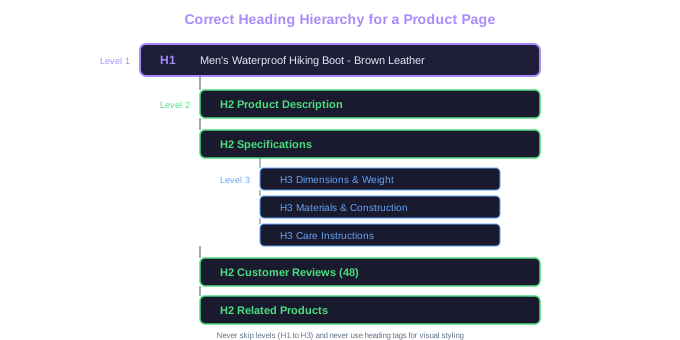
Below the H1, product pages should use H2 through H4 tags to organize content sections in a logical hierarchy. Typical H2 sections on a product page include: Product Description, Specifications, Customer Reviews, Shipping Information, and Related Products. Each H2 introduces a major content section that a shopper might want to navigate to directly.
Within those H2 sections, use H3 tags for subsections. Under the "Specifications" H2, you might have H3 tags for "Dimensions," "Materials," and "Care Instructions." Under "Customer Reviews," H3 tags could separate "Recent Reviews" from "Top-Rated Reviews." This nested structure gives Google detailed information about the content hierarchy and helps shoppers find specific details quickly.
Avoid skipping heading levels. Going from an H2 directly to an H4 without an intervening H3 creates a broken hierarchy that confuses both screen readers and search engine crawlers. The heading structure should follow a logical nesting pattern: H1 contains H2s, which contain H3s, which contain H4s. Think of it like an outline where each level represents a deeper layer of detail.
Do not use heading tags for visual styling. If you want text to appear large and bold but it is not a structural section header, use CSS classes instead of an H2 tag. Promotional banners, sale announcements, and decorative text elements should never be wrapped in heading tags. Misusing headings for styling pollutes the page's semantic structure and dilutes the value of your actual content headings for SEO.
Common Template Bug
Many ecommerce themes wrap the site logo in an H1 on every page, creating two competing H1 tags when combined with the product name H1. The logo should only be H1 on the homepage.
Heading Strategy for Category Pages
Category pages present a unique heading challenge because their primary purpose is to list products, not to present long-form content. However, the best-performing category pages in search results combine product listings with strategic content sections that use headings to target relevant keywords and provide value to shoppers.
The H1 should be the category name with the primary keyword. Below the product grid, add H2 sections for supporting content: a "Buying Guide" section, a "Frequently Asked Questions" section, and a brief category description. These H2 sections serve double duty, they provide keyword-rich content that helps the page rank, and they answer shopper questions that reduce bounce rates.
Product names within the grid should generally not be heading tags. If each product card uses an H2 for the product name, a category page displaying 40 products would have 40 H2 tags plus your content H2 sections, creating a flat, meaningless heading structure. Product names in the grid work better as styled links or paragraph tags. Reserve heading tags for the structural content sections that organize the page.
Subcategory links on a parent category page can be wrapped in H2 or H3 tags if they represent significant navigational sections. For example, a "Men's Shoes" category page might have H2 sections for "Running Shoes," "Casual Shoes," and "Dress Shoes," each linking to the respective subcategory. This approach gives Google clear signals about the taxonomic relationship between categories while also helping shoppers navigate to specific product types.
For filtered or faceted pages, be careful about heading tags on dynamically generated content. Filter selections like "Size: 10" or "Color: Blue" should not generate new heading tags, as this creates an unpredictable heading structure that changes with every filter combination.
Add a content section below the product grid on category pages with 200-400 words of unique content organized under H2 and H3 headings. This section can include buying advice, size guides, or category-specific tips. We have seen category pages jump 10-20 positions after adding well-structured content sections with proper heading hierarchy.
Heading Keywords Without Keyword Stuffing
Headings are a valuable place to include relevant keywords, but the line between strategic keyword placement and keyword stuffing is important. A heading like "Women's Running Shoes" is a natural keyword inclusion. A heading like "Best Women's Running Shoes - Buy Women's Running Shoes Online" is keyword stuffing that looks unnatural to both users and search engines.
The best approach is to write headings that accurately describe the section content while naturally incorporating the target keyword or a close variation. For a product page about an espresso machine, the H2 headings might be: "How to Use the Breville Barista Express," "Specifications and Dimensions," "Customer Reviews and Ratings," and "Compatible Accessories." Each heading describes the section content, and the first heading naturally includes a product keyword variation.
Use semantic keyword variations across your headings rather than repeating the same primary keyword. If your H1 is "Organic Cotton T-Shirts," your H2 headings might reference "sustainable fabrics," "eco-friendly fashion," and "natural fiber clothing" rather than repeating "organic cotton" in every heading. This approach signals topical breadth to Google and captures a wider range of related search queries.
Consider the questions shoppers ask when writing heading text. Question-based headings like "What Size Espresso Grind Should I Use?" or "How Long Does Shipping Take?" can match voice search queries and featured snippet opportunities. Google frequently pulls featured snippets from content organized under descriptive, question-based headings, giving your product pages additional SERP visibility.
Avoid using generic headings like "Details," "More Information," or "Overview" that provide no keyword value and no descriptive value to shoppers. Every heading on the page should tell the reader, and Google, exactly what the following section contains.
Featured Snippet Tip
Question-based headings like 'What Size Espresso Grind Should I Use?' match voice search queries and get pulled into featured snippets. Google frequently extracts answers from content organized under descriptive question headings.
Auditing and Fixing Heading Structure at Scale
For ecommerce stores with large catalogs, heading structure issues are almost always template-level problems. A single theme template controls the heading structure of every product page, so fixing the template fixes thousands of pages simultaneously. Start your audit by identifying every page template your site uses: product pages, category pages, collection pages, blog posts, the homepage, and any custom landing pages.
Crawl your site with a tool like Screaming Frog, Sitebulb, or Ahrefs Site Audit and export heading data for every page. Look for these common issues: pages with no H1 tag, pages with multiple H1 tags, pages where the H1 is identical across many URLs, pages that skip heading levels (H1 to H3 with no H2), and pages where headings are used for non-structural elements like widget titles or footer content.
Prioritize fixes by page type and traffic volume. Product page templates typically affect the most pages, so fix those first. Then move to category page templates, and finally to secondary templates like blog posts or information pages. For each template, map the ideal heading structure before making changes. Write out what the H1, H2, and H3 tags should contain for that page type, and verify the fix across multiple pages after implementation.
Document your heading standards in a style guide that your development and content teams can reference. Include specifications like: one H1 per page matching the primary keyword, H2 for major content sections only, no heading tags on decorative or promotional elements, and heading text should be descriptive and concise. This prevents heading structure from degrading over time as new features and content are added to the site.
After fixing heading structure, monitor the impact through Google Search Console. Look for ranking improvements on pages where heading issues were most severe. While heading fixes alone rarely cause dramatic ranking jumps, they contribute to a compound effect when combined with other on-page optimizations and often improve crawl efficiency for large ecommerce sites.
Create a heading structure template document for each page type on your site. Share it with your development team and include it in your QA checklist for any new page templates or redesigns. Prevention is far more efficient than periodic auditing and fixing.
Free Tools & Resources
Try our free SEO tools
Work Together With SEO Experts who understand ecommerce
World’s first Ecom-founded SEO agency