Content & Authority
10 min readContent Pruning & Consolidation
Every ecommerce store accumulates pages over time, expired promotions, seasonal landing pages, thin product descriptions, and blog posts that never gained traction. Left unchecked, this content bloat dilutes your [crawl budget](/academy/crawl-budget-management), confuses search engines about which pages matter, and drags down your entire domain's quality signals. Content pruning and consolidation is the disciplined process of auditing, merging, redirecting, or removing underperforming pages to sharpen your site's topical focus and boost rankings across the board.
In this guide
Why Content Bloat Hurts Ecommerce SEO
Content bloat occurs when an ecommerce site accumulates hundreds or thousands of low-value pages that add no meaningful search visibility. Common culprits include out-of-stock product pages that were never removed, duplicate category pages generated by faceted navigation, blog posts targeting overlapping keywords, and seasonal landing pages from promotions that ended years ago.
Google allocates a finite crawl budget to every website. When Googlebot spends its budget crawling thin, duplicate, or outdated pages, it has fewer resources left to discover and index your high-value product and category pages. For large ecommerce catalogs with tens of thousands of URLs, this is not a theoretical problem, it directly delays indexing of new products and reduces the freshness signals on pages that matter.
Beyond crawl budget, content bloat creates keyword cannibalization. If you have three blog posts and two category pages all targeting variations of the same keyword, Google cannot determine which page to rank. Instead of one strong page ranking in position three, you end up with five weak pages scattered across positions fifteen through fifty. Consolidating these into a single authoritative page concentrates your ranking signals and almost always produces a net traffic gain.
Conducting a Content Audit
A thorough SEO audit begins with exporting every URL on your site. Pull your full URL list from your XML sitemap, crawl tool (Screaming Frog or Sitebulb), and Google Search Console. Cross-reference these sources to find orphaned pages that exist on the server but are not linked from anywhere on the site and not included in your sitemap.
For each URL, collect key performance metrics: organic sessions over the past 12 months, impressions and clicks from Search Console, number of referring domains, internal links pointing to the page, and the page's indexed status. Pages with zero organic sessions, zero backlinks, and fewer than two internal links are strong candidates for pruning.
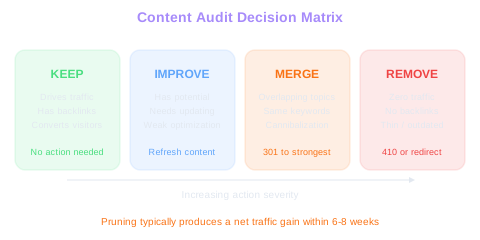
Categorize every page into one of four buckets. Keep pages that drive meaningful traffic or conversions. Improve pages that have ranking potential but need content updates or better optimization. Merge pages that cover overlapping topics and should be consolidated into a single stronger page. Remove pages that provide no value and should be deleted or redirected.
Document your decisions in a spreadsheet with columns for URL, current status, action (keep, improve, merge, remove), redirect target (if applicable), and priority level. This becomes your pruning roadmap and ensures no page is changed without a clear rationale and redirect plan.
Pruning Pays Off
Content pruning typically produces a net traffic gain within 6-8 weeks even though you are removing pages. Concentrated authority on fewer, stronger pages beats diluted signals across hundreds of thin ones.
Export the last 12 months of Search Console data before starting. Pages with declining impressions quarter-over-quarter are losing relevance and should be prioritized for review. A page that peaked at 500 impressions per month and now gets 20 is a strong merge or remove candidate.
Merging and Consolidating Pages
Consolidation is the highest-value activity in content pruning because it combines ranking signals from multiple weak pages into one strong page. The process starts by identifying page clusters, groups of URLs that target the same or closely related keywords. Use Search Console to find pages that share impressions for the same queries, which indicates Google is already confused about which page to rank.
Choose the strongest page in each cluster as the consolidation target. This is typically the page with the most backlinks, the highest average position, or the most organic traffic. All other pages in the cluster will be redirected to this target using 301 redirects. Before redirecting, review the content on each page being merged and incorporate any unique, valuable information into the target page.
When merging blog posts, extract the best sections from each post and weave them into a comprehensive, updated article on the target URL. When merging thin category pages, ensure the surviving page has a strong introductory paragraph, complete product listings, and thorough internal linking. The goal is not just to redirect, it is to create a page that is genuinely better than any of the individual pages it replaces.
After consolidation, update all internal links across your site to point to the new target URL rather than the old redirected URLs. While 301 redirects pass link equity, direct internal links are always stronger. A site-wide internal link update prevents redirect chains and ensures maximum authority flow to your consolidated pages.
Handling Out-of-Stock and Discontinued Products
Out-of-stock and discontinued product pages require special treatment because they often carry backlinks and ranking history that you do not want to lose. The correct approach depends on whether the product will return to stock, is permanently discontinued, or has been replaced by a successor.
For temporarily out-of-stock products, keep the page live but clearly indicate the product is unavailable. Add a back-in-stock notification signup, suggest similar available products, and maintain the page's structured data. Do not remove the page from your sitemap or add a noindex tag, this preserves your rankings so you capture traffic immediately when the product returns.
For permanently discontinued products with significant organic traffic or backlinks, redirect the page to the most relevant alternative. If you sold a specific model of running shoe that has been replaced by a newer version, 301 redirect the old URL to the new model's page. If no direct replacement exists, redirect to the parent category page. Never redirect discontinued products to the homepage, this creates a poor user experience and wastes the topical relevance of the original page.
For discontinued products with no traffic, no backlinks, and no ranking history, a clean 410 (Gone) response is appropriate. This tells Google the page has been intentionally removed and will not return, prompting faster de-indexing than a soft 404. Audit your discontinued products quarterly to prevent accumulation.
Before removing any product page, check its backlink profile in Ahrefs or Search Console. A discontinued product page with 15 referring domains is a valuable asset, redirect it to preserve that link equity rather than letting it return a 404.
Implementing Redirects Correctly
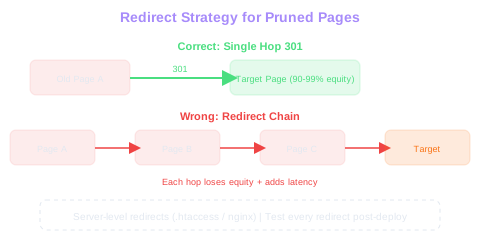
Redirect implementation is where content pruning projects succeed or fail. A 301 redirect signals a permanent move and passes approximately 90-99% of the original page's link equity to the target URL. Use 301 redirects for all permanent consolidations and page removals where a relevant target exists.
Avoid redirect chains at all costs. A redirect chain occurs when page A redirects to page B, which redirects to page C. Each hop in the chain loses a small amount of link equity and adds latency. After a pruning project that involves hundreds of redirects, audit your redirect map to ensure every old URL reaches its final destination in a single hop.
Map redirects at the most specific level possible. If you are pruning three blog posts about running shoe cushioning into one comprehensive guide, each old URL should redirect to the specific section of the new guide that covers its original topic, not just to the top of the page. While not always technically feasible, anchor-link redirects improve user experience and signal to Google that the redirect is topically precise.
Implement redirects at the server level (in your .htaccess file, nginx configuration, or hosting platform's redirect manager) rather than through JavaScript or meta refresh tags. Server-side redirects are processed before the page loads, pass full link equity, and work correctly for search engine crawlers. Test every redirect after implementation using a tool like httpstatus.io or Screaming Frog's redirect audit feature.
No Homepage Redirects
Never redirect discontinued products to the homepage. This wastes the topical relevance of the original page. Redirect to the most relevant alternative product or parent category page to preserve link equity and user intent.
Measuring the Impact of Content Pruning
Content pruning results typically manifest within four to eight weeks as Google recrawls your site and reassesses your page quality signals. Track three categories of metrics to measure impact: crawl health, ranking improvements, and traffic changes.
Crawl health improvements show up first. Monitor your crawl stats report in Google Search Console for changes in pages crawled per day and average response time. After removing hundreds of low-value pages, you should see Googlebot spending more time on your important pages and less time on dead ends. Server log analysis provides even more granular data, track how Googlebot's visits shift from pruned URLs to your priority pages.
Ranking improvements for consolidated pages are the primary success metric. Track the keyword positions of your consolidation target pages before and after merging. In most cases, the consolidated page will rank higher than any of the individual pages it replaced within two to four weeks. Use a rank tracking tool to monitor your target keywords daily during this period.
Overall organic traffic may dip briefly as redirects settle and Google reprocesses your site structure. This is normal and expected. Within six to eight weeks, total organic traffic should exceed pre-pruning levels as your remaining pages benefit from concentrated authority, cleaner crawl paths, and reduced cannibalization. Document the traffic baseline two weeks before pruning begins and compare against the same period eight weeks after completion.
Create a pruning dashboard in Google Looker Studio that tracks crawl stats, rankings for consolidated keywords, and overall organic traffic on a weekly basis. This makes it easy to demonstrate ROI to stakeholders and identify any pages that need further attention post-pruning.
lowQuality and pandaDemotion: Why Pruning Lifts What Remains
The leak named two signals that explain why pruning thin content reliably boosts the rankings of the pages that survive. lowQuality is a flag that can prevent a page from reaching top positions. pandaDemotion is the same Panda algorithm SEOs have known about since 2011, now confirmed as an active demotion signal applied at page and (the leak suggests) site level.
For ecommerce, the implication is direct. A store with 1,200 product variants, each with a 50-word manufacturer description and no other content, is feeding Google 1,200 lowQuality signals. The CompressedQualitySignals "rap sheet" that wraps these computes a worse standing for the entire site, not just for the thin pages. Pruning or canonicalising the thinnest 600 of those — keeping only the variants that actually generate revenue or differentiated content — typically lifts the remaining 600 in rankings within 8–12 weeks.
The right pruning candidates are usually obvious from data: zero-revenue and zero-impressions over the last 12 months, no backlinks, no internal links beyond auto-generated cross-sell. Removing or 301'ing them costs almost nothing and cleans the catalogue Google evaluates.
Free Tools & Resources
Try our free SEO tools
Work Together With SEO Experts who understand ecommerce
World’s first Ecom-founded SEO agency