Platform SEO
10 min readBigCommerce SEO Guide
BigCommerce is built with native SEO capabilities that rival or surpass many competing ecommerce platforms. Its clean URL structures, built-in CDN, and flexible customization options give merchants a strong foundation for organic search. However, unlocking the full SEO potential of BigCommerce requires understanding its unique architecture, default behaviors, and the areas where manual optimization is still necessary. For cross-platform technical fundamentals, see our guide on [technical SEO for ecommerce](/blog/technical-seo-for-ecommerce).
In this guide
BigCommerce URL Structure and Clean Permalink Control
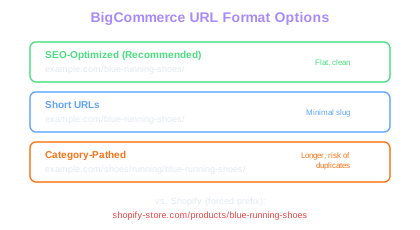
BigCommerce offers one of the most SEO-friendly URL structures among hosted ecommerce platforms. Unlike Shopify, which forces /products/ and /collections/ prefixes, BigCommerce lets you configure fully customizable URL paths. Product URLs can sit directly off the root domain (e.g., /blue-running-shoes/) without mandatory category or folder prefixes.
The platform provides three URL format options in the store settings: SEO-optimized URLs, short URLs, and category-pathed URLs. The SEO-optimized format is the default and recommended choice, as it creates clean, keyword-rich slugs without unnecessary nesting. Category-pathed URLs (/shoes/running/blue-running-shoes/) can be useful for topical authority but create longer URLs and potential duplicate content issues when products belong to multiple categories.
BigCommerce automatically generates canonical tags for product pages to handle scenarios where the same product is accessible through different category paths. However, you should audit these canonical tags regularly, especially after reorganizing your category structure. Use the URL Inspection tool in Google Search Console to verify that the canonical URL matches your preferred version.
Custom URL redirects can be managed through the BigCommerce admin panel or via the API for bulk operations. The platform supports 301 and 302 redirects natively, which is essential during product lifecycle management and catalog restructuring.
No Forced Prefixes
Unlike Shopify's mandatory /products/ and /collections/ paths, BigCommerce lets products sit at the root domain. A URL like /blue-shoes/ is shorter, cleaner, and earns slightly higher CTR in search results.
When migrating to BigCommerce from another platform, use the 301 redirect CSV import feature to map all old URLs before launching. Test each redirect category with a crawler to catch redirect chains or loops before they affect rankings.
Built-In SEO Features and Configuration
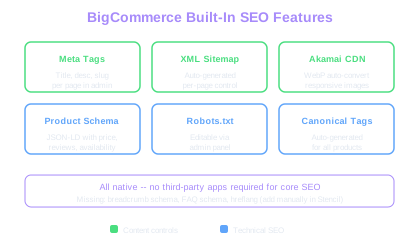
BigCommerce ships with a robust set of native SEO tools that reduce dependency on third-party apps. Every product, category, and content page exposes editable fields for page titles, meta descriptions, and URL slugs directly in the admin panel. The platform also auto-generates a comprehensive XML sitemap that updates as you add or remove pages.
The built-in sitemap includes product pages, category pages, brand pages, and content pages. Unlike some platforms, BigCommerce allows you to control sitemap inclusion at the page level by toggling visibility settings. Pages set to hidden are automatically excluded from the sitemap, which helps keep your sitemap lean and focused on indexable content.
BigCommerce provides automatic image optimization through its Akamai CDN, converting images to WebP format and serving appropriately sized versions based on the requesting device. This native image optimization directly impacts Core Web Vitals scores without requiring manual intervention or third-party image compression apps.
Robots.txt customization is available through the admin panel, letting you block specific paths from crawling. This is particularly useful for filtering out internal search result pages, customer account pages, and other low-value URLs that consume crawl budget without contributing to organic visibility.
Native Image CDN
BigCommerce's Akamai CDN auto-converts images to WebP and serves device-appropriate sizes. This handles image optimization that Shopify and WooCommerce require manual setup or plugins to achieve.
BigCommerce auto-generates meta descriptions from the first few sentences of your product description if you leave the field blank. Always write custom meta descriptions for your top-revenue products to maximize click-through rates from search results.
Theme Customization and Structured Data
BigCommerce themes are built on the Stencil framework, which uses Handlebars templating to render storefront pages. Stencil gives developers granular control over HTML output, heading hierarchy, and structured data markup. Unlike tag-based template languages, Handlebars separates logic from presentation, making it easier to maintain clean, semantic HTML.
Structured data is where BigCommerce truly differentiates itself. The platform automatically injects JSON-LD Product schema on product pages, covering many of the structured data for products requirements, including price, availability, SKU, brand, and review aggregate data when reviews are enabled. This native structured data implementation covers the most impactful schema types without any manual coding.
However, the default structured data does not include breadcrumb schema, FAQ schema, or HowTo schema. For these, you need to modify the Stencil theme templates directly. Breadcrumb schema can be added to the base layout template by iterating over the breadcrumb navigation data already available in the Stencil context. FAQ schema should be added on category pages where you include expandable FAQ sections.
Heading hierarchy requires careful attention in Stencil themes. Ensure that the product name uses an H1 tag, category names use H1 on collection pages, and the site logo or store name does not consume the H1 element. Audit your theme templates to verify that each page type has a single, descriptive H1 that targets your primary keyword for that page.
Speed Optimization and Core Web Vitals
BigCommerce stores benefit from a global Akamai CDN that delivers content from edge servers closest to the visitor. This infrastructure advantage means that server response times (Time to First Byte) are generally faster than self-hosted solutions and competitive with other SaaS platforms. However, page speed still depends heavily on theme code quality, image sizes, and third-party script loading. Apply the same site speed optimization principles that work across all ecommerce platforms.
Largest Contentful Paint (LCP) is the most impactful Core Web Vital for ecommerce SEO. On BigCommerce, the LCP element is typically the hero banner image or the primary product image. Optimize these by uploading images at the exact dimensions your theme requires rather than relying solely on automatic resizing. Use the Stencil image helper to specify srcset attributes for responsive image delivery.
Cumulative Layout Shift (CLS) issues on BigCommerce commonly arise from dynamically loaded elements like promotional banners, review widgets, and product recommendation carousels. Reserve explicit dimensions for these elements in your CSS to prevent content from shifting as the page loads. Lazy-loaded images below the fold should have width and height attributes set in the HTML.
Third-party scripts from analytics tools, chat widgets, and marketing pixels are the primary source of Total Blocking Time (TBT) issues. Load non-essential scripts asynchronously or defer their execution until after the main content has rendered. BigCommerce's Script Manager lets you control script placement in the head or footer, and you should place all non-critical scripts in the footer with async or defer attributes.
Use BigCommerce's built-in Google Lighthouse integration in the Page Builder to monitor Core Web Vitals scores as you make changes. Test both mobile and desktop scores, as mobile scores are what Google uses for ranking.
BigCommerce SEO Limitations and Workarounds
Despite its strong SEO foundation, BigCommerce has limitations that merchants must work around. The platform does not support native blog category pages or advanced content management features comparable to WordPress. While BigCommerce includes a blog module, it lacks hierarchical categories, custom post types, and sophisticated content blocks that are standard in dedicated CMS platforms.
Faceted navigation on category pages creates a significant crawl budget challenge. Each filter combination generates a unique URL with query parameters, potentially creating thousands of indexable pages with near-duplicate content. BigCommerce does not provide native controls for adding noindex tags to filtered pages. The workaround is to implement canonical tags on filtered URLs pointing back to the unfiltered category page, which can be done through custom Stencil template logic.
International SEO on BigCommerce requires careful planning. The platform supports multi-currency display and multi-language content through third-party integrations, but it does not natively generate hreflang tags. If you operate in multiple markets, you need to implement hreflang annotations manually in your theme header or use a localization app that handles this automatically.
Another limitation is the lack of native support for product variant-level URLs. Each product variant (color, size) shares the same URL with JavaScript-based variant switching. For products where individual variants have significant search volume, this means you cannot create dedicated landing pages for each variant without workarounds like creating separate product listings.
Pagination handling uses rel=next and rel=prev annotations, but Google no longer uses these signals for indexing. Ensure your paginated category pages are crawlable through internal links and that all products are accessible within a reasonable crawl depth from the homepage.
For stores with large catalogs, consider implementing a product feed to Google Merchant Center as an additional indexation signal. Google can discover product URLs through the feed even if crawler access to deep paginated pages is limited.
BigCommerce SEO Monitoring and Ongoing Optimization
Effective SEO on BigCommerce requires continuous monitoring beyond the initial setup. Connect Google Search Console and Google Analytics 4 to track indexation status, click-through rates, and organic traffic trends. BigCommerce provides a native integration for both tools, making setup straightforward through the admin panel.
Monitor your index coverage report in Google Search Console weekly. Pay particular attention to pages excluded by noindex, pages with redirect errors, and soft 404 pages. BigCommerce stores commonly trigger soft 404 issues on out-of-stock product pages that display an empty state rather than a proper 404 response code.
Set up automated alerts for significant drops in indexed pages or organic traffic. Google Search Console provides email notifications for critical issues, but third-party monitoring tools like ContentKing or Lumar can provide real-time alerts when pages are unintentionally deindexed, canonical tags change, or structured data breaks.
Conduct quarterly content audits to identify thin product pages that need description enrichment, category pages with low word counts, and blog posts that have lost traffic. BigCommerce's CSV export feature lets you pull all product data into a spreadsheet for bulk analysis of title tag lengths, meta description completeness, and URL slug optimization opportunities.
Review your internal linking structure regularly. Ensure that top-selling products and strategic category pages receive the most internal links from related content, navigation menus, and cross-sell widgets. BigCommerce's related products feature can be configured to serve SEO purposes when the algorithm is set to show products from the same category rather than random recommendations.
Free Tools & Resources
Try our free SEO tools
Work Together With SEO Experts who understand ecommerce
World’s first Ecom-founded SEO agency