Technical SEO
12 min readRobots.txt & XML Sitemaps
Your robots.txt file and XML sitemaps are two of the most fundamental technical SEO files in your ecommerce store. Together, they control what search engines can crawl and provide a roadmap of the pages you want indexed. Getting these wrong can hide your best products from Google or flood the index with low-value filter pages that cannibalize your rankings. Both files play a central role in [crawl budget management](/academy/crawl-budget-management).
In this guide
Robots.txt Fundamentals for Ecommerce
The robots.txt file sits at the root of your domain (example.com/robots.txt) and provides crawling directives to search engine bots. It uses a simple syntax: User-agent specifies which bot the rules apply to, Disallow blocks specific URL paths from being crawled, and Allow overrides a Disallow for specific sub-paths. The file is publicly accessible, so never use it to hide sensitive content.
For ecommerce stores, robots.txt serves a critical role in managing crawl budget. See our broader guide on technical SEO for ecommerce for the full picture. Without restrictions, bots will attempt to crawl every discoverable URL on your site, including cart pages, checkout flows, account pages, internal search results, and thousands of faceted navigation URLs. These pages waste crawl budget and can create duplicate content issues if they get indexed.
A common misconception is that robots.txt prevents indexing. It does not. Robots.txt only prevents crawling. If another page links to a Disallow-ed URL, Google may still index that URL based on the link's anchor text and surrounding context, displaying it in search results with the message "No information is available for this page." To prevent both crawling and indexing, you need to combine strategies, though you cannot use a noindex meta tag on a page that is blocked from crawling because Google cannot see the tag.
Every ecommerce store should test their robots.txt file using Google Search Console's robots.txt Tester tool before deploying changes. A single misplaced wildcard or an overly broad Disallow rule can accidentally block your entire product catalog from being crawled.
Keep a backup of your robots.txt before making any changes. A broken robots.txt file that accidentally blocks everything (Disallow: /) can cause catastrophic organic traffic loss within days.
Essential Robots.txt Rules for Online Stores
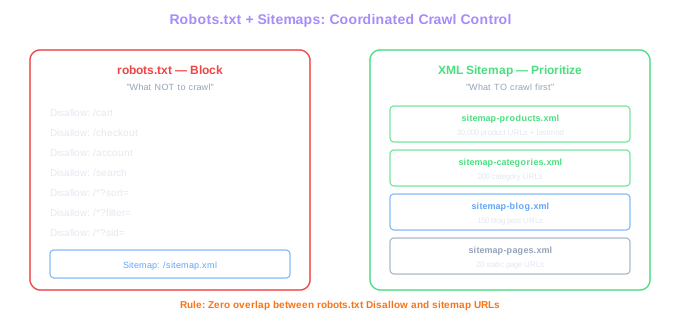
Every ecommerce robots.txt should block several categories of low-value URLs. Cart and checkout pages (/cart, /checkout, /account) provide no SEO value and contain user-specific content that should never be indexed. Internal search result pages (/search?q=) generate thousands of thin content pages that duplicate your category listings and can lead to keyword cannibalization.
Faceted navigation parameters represent the largest source of crawl waste in most stores. Rules like Disallow: /*?color=, Disallow: /*?size=, Disallow: /*?brand=, and Disallow: /*?sort= prevent bots from crawling the combinatorial explosion of filter URLs. Be strategic about which parameters to block. If your store has strong SEO-optimized pages for specific brands (like /shoes/nike/), do not block the brand parameter globally. Instead, block only the query-string version while keeping your clean URL brand pages accessible.
Sort order parameters should always be blocked. URLs like /category?sort=price-asc and /category?sort=newest show the same products in a different order and add zero unique content. Similarly, pagination parameters beyond a reasonable depth can be restricted. While you want Google to discover products on paginated pages, sort variations of those paginated pages (/category?page=3&sort=rating) are pure duplication.
Always include a Sitemap directive at the bottom of your robots.txt pointing to your XML sitemap. This helps search engines discover your sitemap without requiring them to check other locations. The format is simply: Sitemap: https://www.example.com/sitemap.xml. You can list multiple sitemaps if you use a sitemap index file.
Zero Overlap Rule
Never include URLs in your sitemap that are blocked by robots.txt. This contradiction wastes Google's effort and erodes trust in both files. Cross-reference after every platform update.
Use wildcard patterns carefully. Disallow: /*? would block all URLs with any query parameters, including potentially valuable ones. Instead, block specific parameter names individually so you maintain precise control over what gets crawled.
XML Sitemap Structure for Product Catalogs
An XML sitemap is a structured file that lists the URLs you want search engines to discover and index. For ecommerce stores with large product catalogs, proper sitemap architecture is critical because it directly influences which pages Google prioritizes for crawling and indexing.
Use a sitemap index file as your primary sitemap that references multiple child sitemaps organized by content type. A typical ecommerce sitemap structure includes separate sitemaps for product pages (sitemap-products.xml), category pages (sitemap-categories.xml), blog posts (sitemap-blog.xml), and static pages like About and Contact (sitemap-pages.xml). This organization makes management easier and helps you identify issues with specific content types.
Each XML sitemap has a limit of 50,000 URLs and 50MB uncompressed file size. For stores with more than 50,000 products, split your product sitemap into multiple files, ideally organized by category or department: sitemap-products-shoes.xml, sitemap-products-clothing.xml, and so on. This logical grouping makes it easier to track indexing rates per product category in Google Search Console.
Every URL in your sitemap should be the canonical version of that page. Never include URLs that redirect, return 404 errors, have noindex tags, or are blocked by robots.txt. Including these URLs wastes Google's crawling effort on your sitemap and erodes trust in the accuracy of your sitemap file. Google may eventually ignore sitemaps it considers unreliable.
Submit your sitemap through Google Search Console and check the Coverage report regularly. GSC will tell you exactly how many URLs from your sitemap were indexed, excluded, or had errors. A healthy sitemap should have a high ratio of indexed to submitted URLs.
Lastmod, Priority, and Changefreq: What Actually Matters
XML sitemaps support several optional attributes for each URL: lastmod (last modification date), priority (relative importance from 0.0 to 1.0), and changefreq (expected change frequency). In practice, only lastmod provides meaningful value. Google has publicly stated that it ignores the priority and changefreq attributes entirely because webmasters set them incorrectly so often that they carry no reliable signal.
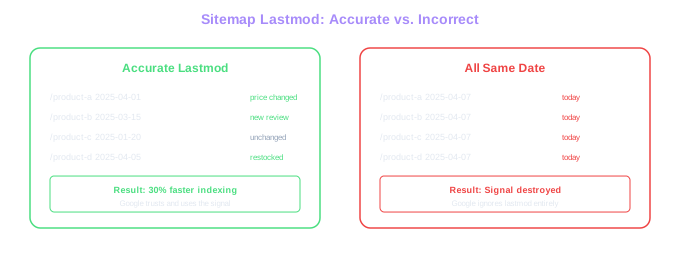
The lastmod attribute tells search engines when a page's content was last meaningfully updated. This is a genuine signal that Google uses to prioritize recrawling. When you update a product's price, availability, description, or images, the lastmod date should reflect that change. Accurate lastmod dates help Google identify which pages need recrawling most urgently.
The critical mistake many stores make is setting lastmod to the current date for all pages every time the sitemap regenerates. If your sitemap rebuilds nightly and stamps every URL with today's date, Google quickly learns that your lastmod dates are meaningless and stops using them as a signal. We have audited stores where fixing inaccurate lastmod dates alone resulted in 30% faster indexing of product updates.
For ecommerce specifically, tie lastmod to actual data changes in your product information management system. When inventory levels change, when prices update, when new reviews are posted, or when product descriptions are edited, update the lastmod date for those specific product URLs. This creates a genuine freshness signal that Google can rely on to prioritize crawling your recently updated products.
Lastmod Mistake
Stores that set all lastmod dates to today's date on every sitemap rebuild teach Google to ignore the signal entirely. Fix this by tying lastmod to actual price, stock, or description changes.
After correcting your lastmod implementation, monitor the Crawl Stats report in Google Search Console. You should see Google shifting its crawl focus toward recently updated pages within two to four weeks.
Managing Out-of-Stock Products in Sitemaps
Out-of-stock products present a unique sitemap challenge for ecommerce stores. The correct approach depends on whether the product is temporarily unavailable or permanently discontinued, and whether the product page has accumulated valuable backlinks and search authority.
For temporarily out-of-stock products that you expect to restock, keep the product page live and in your sitemap. Update the page to clearly indicate the product is currently unavailable and offer alternatives or a restock notification signup. The structured data should reflect the out-of-stock availability status. This preserves the page's accumulated SEO authority and prevents the ranking loss that comes from removing and re-adding pages.
For permanently discontinued products with no SEO value (few or no backlinks, minimal organic traffic), remove them from your sitemap and eventually from the site. Let them return 404 naturally. Google handles 404s gracefully for pages with no authority, and removing dead products from your sitemap keeps it clean and trustworthy.
For discontinued products with significant backlink authority or organic traffic, implement a 301 redirect to the most relevant replacement product or category page. Remove the discontinued URL from your sitemap and add the redirect target URL if it is not already there. This transfers the accumulated authority to a relevant page rather than losing it entirely. Monitor redirected product pages through Google Search Console to verify the authority transfer is working.
Never leave hundreds of 404-returning discontinued product URLs in your sitemap. This erodes Google's trust in your sitemap accuracy and wastes crawl budget on pages that no longer exist. Run a quarterly cleanup to remove any non-200 URLs from your sitemap files.
Create an automated process that removes product URLs from your sitemap when they return non-200 status codes for more than seven consecutive days. This prevents sitemap bloat from accumulating over time as products are discontinued.
Coordinating Robots.txt and Sitemaps for Maximum Impact
Robots.txt and XML sitemaps must work together as a coordinated system. Your robots.txt tells search engines what not to crawl, while your sitemap tells them what to prioritize. Conflicting signals between these two files create confusion and wasted effort.
The most common coordination failure is including URLs in your sitemap that are blocked by robots.txt. If your robots.txt contains Disallow: /search and your sitemap includes URLs like /search?q=popular-term, you are sending contradictory signals. Google cannot crawl the page because robots.txt blocks it, but your sitemap says it is important enough to be listed. Clean your sitemap to ensure zero overlap with robots.txt Disallow rules.
A second coordination issue involves canonical URLs. Your sitemap should contain only the canonical version of each URL. If a product is accessible at both /products/shoes and /category/footwear?product=shoes, only the canonical URL should appear in the sitemap. Including non-canonical URLs inflates your sitemap without adding value and can confuse crawling priorities.
For large ecommerce sites, create a tiered crawling strategy. Use robots.txt to block URL patterns that should never be crawled (filters, sorts, sessions). Use sitemaps to proactively declare which URLs are most important and most recently updated. Use internal linking to reinforce crawl priority for your highest-value product and category pages. These three mechanisms working in concert give you comprehensive control over how search engines interact with your store.
Finally, monitor both files continuously. Set up alerts for changes to your robots.txt (some platforms modify it during updates), and schedule weekly sitemap validation to catch URLs that have started returning errors. A deployment that inadvertently modifies robots.txt or breaks sitemap generation can take weeks to recover from if not caught promptly.
After every platform update or theme change, immediately verify your robots.txt and regenerate your sitemap. Cross-reference the two files to ensure no sitemap URLs are blocked and no critical pages are missing from the sitemap. This ten-minute check can prevent weeks of organic traffic loss.
Free Tools & Resources
Try our free SEO tools
Work Together With SEO Experts who understand ecommerce
World’s first Ecom-founded SEO agency