On-Page SEO
9 min readTitle Tags & Meta Descriptions
Title tags and meta descriptions are the storefront window of your ecommerce site in search results. They determine whether a potential customer clicks through to your product or scrolls past it to a competitor. In ecommerce, where thousands of similar products compete for attention, crafting compelling, keyword-rich title tags and meta descriptions is not optional, it is a fundamental revenue driver. This is a core part of [on-page SEO for ecommerce](/blog/on-page-seo-for-ecommerce). Getting these two elements right across your catalog can lift organic click-through rates by 20-40%, translating directly into more traffic and more sales without spending a cent on ads.
In this guide
- 1. Why Title Tags Matter More in Ecommerce
- 2. Crafting High-Converting Ecommerce Title Tags
- 3. Meta Descriptions That Drive Clicks
- 4. Scaling Title Tags and Meta Descriptions Across Large Catalogs
- 5. Common Title Tag and Meta Description Mistakes
- 6. Measuring and Improving Title Tag Performance
- 7. titleMatchScore: How Google Compares Your Title to Your Actual Page
Crafting High-Converting Ecommerce Title Tags
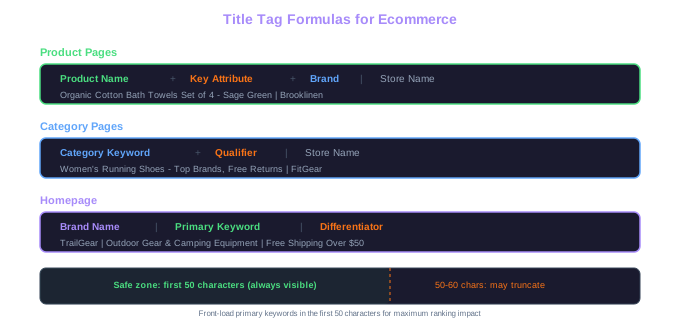
The ideal ecommerce title tag follows a structured formula that balances keyword targeting with persuasion. For product pages, the most effective pattern is: Primary Keyword (Product Name) + Differentiating Attribute + Brand + Store Name. For example, "Organic Cotton Bath Towels Set of 4 - Sage Green | Brooklinen" includes the product keyword, a color attribute that captures long-tail searches, the brand, and the retailer.
Category pages require a different approach. Here the formula shifts to: Category Keyword + Qualifier + Store Name. An example would be "Women's Running Shoes - Top Brands, Free Returns | FitGear." The qualifier adds a reason to click, while keeping the category keyword front-loaded for maximum ranking impact. Avoid including specific product names in category title tags, the goal is to capture broader search queries.
Character count matters significantly. Google displays roughly 50-60 characters of a title tag before truncating with an ellipsis. On mobile, the display is even narrower. Front-load your most important keywords and selling points within the first 50 characters, and treat anything beyond 60 characters as bonus content that may or may not be visible. Use pipe symbols (|) or dashes (-) as separators rather than commas, which can make titles feel cluttered.
For stores with thousands of products, manual title tag creation is impractical. Build dynamic templates that pull product attributes from your database. Most ecommerce platforms support variables like {product.name}, {product.brand}, and {product.category}. The key is testing multiple template structures across different categories and measuring CTR differences in Google Search Console over 4-6 week periods.
CTR Lift Data
Well-optimized title tags consistently lift CTR by 20-40% compared to generic alternatives. A title including brand, model, key feature, and purchase incentive wins clicks over bare product names every time.
Front-load your primary keyword in the title tag. If your target keyword is 'leather laptop bag,' start the title with those exact words rather than burying them after the brand name. Google gives slightly more weight to keywords appearing earlier in the title tag, and searchers scan from left to right.
Meta Descriptions That Drive Clicks
Meta descriptions do not directly influence rankings, but they have a massive impact on click-through rates, which indirectly affects your search performance. Google displays the meta description as the snippet beneath your title tag in search results, giving you roughly 150-160 characters to convince the searcher to choose your page over the competition.
For product pages, effective meta descriptions answer three questions the searcher has: What is this product? Why should I buy it here? What will I get? A strong product meta description might read: "Shop the Sony WH-1000XM5 with 30-hour battery life and industry-leading noise cancellation. Free 2-day shipping and 30-day returns. In stock now." This packs in the product name, key features, and purchase incentives within the character limit.
Category page meta descriptions should emphasize breadth and trust signals. "Browse 200+ women's running shoes from Nike, Adidas, and Brooks. Free shipping on orders over $50. Expert reviews and size guides included." This tells the searcher they will find a wide selection, recognizable brands, and helpful purchase tools.
Google bolds keywords in the meta description that match the search query, which visually draws the searcher's eye to your listing. Include your primary keyword naturally in the meta description to take advantage of this bolding effect. However, do not keyword-stuff the description, a meta description that reads like a keyword list looks spammy and discourages clicks rather than encouraging them.
Common Title Tag and Meta Description Mistakes
The most damaging mistake in ecommerce title tags is using the same title across multiple pages. When your "Blue Running Shoes" and "Red Running Shoes" product pages share the title "Running Shoes - MyStore," Google struggles to differentiate them, and searchers have no reason to prefer one listing over the other. Every page in your store needs a unique title tag that reflects the specific content on that page.
Keyword stuffing remains surprisingly common in ecommerce. Title tags like "Buy Running Shoes | Best Running Shoes | Cheap Running Shoes | Running Shoes Sale" trigger Google's spam filters and look unprofessional to searchers. Use your primary keyword once, naturally, and let the rest of the title communicate value rather than repeating variations of the same term.
Another frequent error is neglecting to update title tags when products change. Seasonal products, discontinued items, and updated models often retain outdated title tags that reference last year's collection or an old model number. Stale title tags mislead searchers and increase bounce rates when the page content does not match the search result preview.
Finally, many stores place their brand name at the beginning of every title tag: "MyStore | Blue Running Shoes." Unless your brand is a household name that drives clicks on its own (like Nike or Apple), your brand name belongs at the end of the title tag. The first words of the title carry the most SEO weight and should be your target keyword, not your store name.
Duplicate Title Risk
When 'Blue Running Shoes' and 'Red Running Shoes' share the same title 'Running Shoes - MyStore', Google cannot differentiate them. Every product page needs a unique title tag that reflects its specific content and attributes.
Measuring and Improving Title Tag Performance
Google Search Console is your primary tool for measuring title tag and meta description effectiveness. The Performance report shows impressions, clicks, and CTR for every page on your site. Sort by impressions to find pages that appear frequently in search results but have low CTR, these are your highest-opportunity pages for title tag improvement.
Establish a CTR benchmark for each page type. Product pages in competitive niches typically achieve 2-5% CTR from organic search. Category pages tend to fall between 3-8% CTR for their target keywords. Pages significantly below these benchmarks likely have weak title tags or meta descriptions that fail to motivate clicks.
When you update a title tag, track the change over a 4-6 week period before drawing conclusions. CTR fluctuations are normal week to week, and you need enough data to identify a genuine trend. Document every title tag change with the date, old title, new title, and the keyword you are targeting so you can correlate changes with performance shifts.
Consider running structured experiments by changing title tags for a batch of 20-50 similar products at once. This gives you a larger sample size and reduces the noise from individual page fluctuations. Compare the test group's average CTR against a control group of unchanged pages in the same category. Over time, these experiments build an internal playbook of what title tag formulas work best for your specific audience and product categories.
Pay attention to the queries report in Search Console. If Google shows your page for queries that do not match your title tag, it may be a signal that your title is confusing or that the page content needs realignment. The most effective title tags align the target keyword, the visible page content, and the search queries that trigger the listing.
Create a spreadsheet tracking title tag experiments with columns for page URL, old title, new title, date changed, 30-day CTR before, and 30-day CTR after. Over 6-12 months, this dataset becomes invaluable for understanding which patterns resonate with your audience.
titleMatchScore: How Google Compares Your Title to Your Actual Page
The Content Warehouse leak surfaced an attribute called titleMatchScore — Google measures how well a page's title matches the actual page content. A clickbait title that earns clicks but doesn't deliver on intent generates badClicks (pogo-sticking back to the SERP), feeding the NavBoost demotion path.
For ecommerce, this means title-optimisation can no longer be "write the best CTR magnet" in isolation. The title has to honestly describe what the searcher gets when they land. "Best Running Shoes for Wide Feet — 12 Tested Pairs Under £100" works only if the page actually has a tested-pair comparison under £100. If it lands on a generic category with no comparison content, badClicks accumulate and the page slips out of view within 13 months (NavBoost's rolling window).
The practical audit: pull every top-100-impression query in GSC, click through to the landing page, and check three things — does the title accurately describe the content, does the H1 reinforce it, and would a real shopper find what the title promised within the first scroll. Misalignment on any of the three is a titleMatchScore risk.
Free Tools & Resources
Try our free SEO tools
Work Together With SEO Experts who understand ecommerce
World’s first Ecom-founded SEO agency