Measuring Results
11 min readRank Tracking for Ecommerce
Ecommerce rank tracking is fundamentally different from tracking a service business with 50 keywords. Stores often need to monitor thousands of product and category keywords across multiple locations and devices. The right setup gives you actionable visibility into ranking movements. The wrong one buries you in noise and misleading data.
In this guide
Choosing the Right Rank Tracking Tool
Not every rank tracker handles ecommerce well. You need a tool that supports large keyword volumes without pricing you out, tracks SERP features like shopping carousels and product listings, and provides daily updates for at least your priority keywords. Tools like SE Ranking, Ahrefs, and Semrush all offer strong ecommerce capabilities, but they differ in keyword limits, update frequency, and how they handle localized results.
The ability to track SERP features matters more for ecommerce than almost any other vertical. If your product ranks #3 in organic results but a Google Shopping carousel sits above all organic listings, your actual visibility is much lower than position 3 suggests. A good rank tracker labels these SERP feature positions and shows whether your domain appears in shopping results, image packs, or featured snippets alongside the organic listing.
Consider how the tool handles device-specific tracking. Mobile and desktop rankings often differ significantly for ecommerce queries, and mobile typically accounts for 60-75% of ecommerce search traffic. Track your top product and category keywords separately for mobile and desktop to get an accurate picture. Some tools charge extra for mobile tracking, so factor this into your budget.
API access is another factor for larger stores. If you have 10,000+ keywords, you'll want to pull ranking data into your own dashboards or data warehouse rather than relying on the tool's interface. Check that the API provides the same data granularity as the web interface and that rate limits won't bottleneck your reporting workflows.
Building Your Ecommerce Keyword List
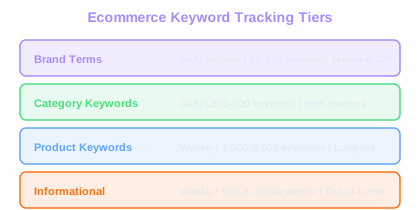
Organizing your tracking keywords into clear groups is what separates useful rank tracking from data overload. For ecommerce, structure your keyword list around your site architecture: brand terms, top-level category keywords, subcategory keywords, product-specific keywords, and informational keywords that drive top-of-funnel traffic.
Prioritize keywords by commercial value, not just search volume. A keyword with 500 monthly searches that converts at 4% with a $120 average order value is worth far more than a keyword with 5,000 searches that converts at 0.3% with a $25 AOV. Calculate the estimated monthly revenue potential for each keyword group to guide your tracking priorities.
Tag each keyword with metadata that enables meaningful analysis, building on your keyword research for ecommerce foundation. At minimum, tag by page type (product, category, blog), funnel stage (awareness, consideration, purchase), and product category. This tagging lets you report on rank performance by business segment rather than staring at individual keyword positions. When your CMO asks how the shoe category is performing in search, you can answer immediately.
Don't overlook long-tail product keywords. While each individual long-tail term has low volume, they collectively drive a large share of ecommerce revenue. Track a representative sample of long-tail keywords for your key product categories. If your sample of 200 long-tail shoe keywords is trending upward, your broader long-tail visibility is likely improving too.
Revenue-First Tracking
A keyword with 500 monthly searches at 4% CVR and $120 AOV generates $2,400/month. A 5,000-search keyword at 0.3% CVR and $25 AOV generates only $375. Prioritize tracking by revenue potential, not volume.
Setting Up Location-Based Tracking
Ecommerce stores that ship to multiple regions need location-specific rank tracking. Google personalizes results based on the searcher's location, and rankings can vary dramatically between cities and countries. A store ranking #2 for "running shoes" in London might rank #8 for the same term in Manchester.
For domestic stores, track your top keywords from at least 3-5 key metro areas where your customer base concentrates. If you have physical retail locations, add those zip codes to your tracking. The ranking data from your local areas tells a more accurate story than a single national average, especially for queries with local intent.
International ecommerce businesses face additional complexity. Track each target market separately using the correct country-specific Google domain (google.de, google.fr, google.co.uk) and the appropriate language. Ranking positions on google.de for German-language queries are completely independent from rankings on google.com.
Be mindful of tracking costs when adding locations. Each location effectively multiplies your keyword count from the tracker's perspective. Tracking 1,000 keywords across 5 locations equals 5,000 tracked positions. Start with your highest-revenue locations and expand as your budget allows.
If you sell through a marketplace like Amazon alongside your own store, track your Amazon product rankings separately. Many rank trackers now support Amazon SERP tracking, which lets you see whether your products or competitors dominate both Google and Amazon for the same queries.
Interpreting Rank Data Correctly
Rank tracking data is full of noise. Daily fluctuations of 1-3 positions are completely normal and don't indicate a problem or an opportunity. The search results page is a dynamic environment where Google constantly tests different orderings. Reacting to every small movement wastes time and creates unnecessary panic.
Focus on weekly and monthly trends rather than daily snapshots. A keyword that drops from position 4 to position 7 on a single day is not a crisis. A keyword that steadily declines from position 4 to position 12 over four weeks is a real signal that something has changed, either on your page, your competitors' pages, or in Google's algorithm.
Watch for ranking changes that cluster around specific page types or categories. If all your shoe category pages dropped 5-10 positions in the same week while your clothing pages held steady, the problem is specific to your shoe pages. Maybe a competitor launched an aggressive shoe content campaign, or perhaps a template change on your shoe category pages introduced a technical issue.
Always correlate rank changes with actual traffic and revenue changes using Google Search Console for stores. A ranking drop that doesn't reduce traffic may mean the keyword had low CTR at the original position anyway. Conversely, a small ranking improvement on a high-volume keyword can deliver a meaningful traffic increase. The rank tracker tells you what happened; your analytics tells you whether it matters.
Set up automated rank change alerts for your top 50 revenue-driving keywords. Configure alerts to trigger only when a keyword moves more than 5 positions up or down over a 7-day period. This filters out daily noise while catching genuine shifts early enough to act.
Tracking SERP Feature Visibility
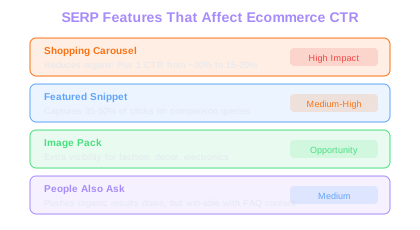
For ecommerce, SERP features can steal clicks even when you rank well organically. Google Shopping results, Product Knowledge Panels, image packs, and featured snippets all compete for attention above or alongside organic listings. Tracking your presence in these features is as valuable as tracking your organic position.
Google Shopping integration into the main search results has been steadily expanding. For many product queries, the shopping carousel appears at the very top of the page, pushing organic results below the fold on mobile. If you're running Google Shopping campaigns, your rank tracker should show whether your products appear in these carousels alongside your organic listings.
Featured snippets are another area where ecommerce stores can gain or lose visibility. Category pages that answer comparison queries ("best running shoes for flat feet") can win featured snippets that capture a disproportionate share of clicks. Track which of your pages hold featured snippets and monitor for losses. When you lose a snippet, examine what the new snippet holder did differently.
Image packs appear frequently for product queries, especially in fashion, home decor, and electronics. If your product images appear in these packs, they drive additional traffic beyond your organic listing. Ensure your image SEO is optimized with descriptive filenames, alt text, and proper image sitemaps so rank trackers can detect your presence in image results.
CTR Reality Check
Shopping carousels cut organic position 1 CTR nearly in half. For product queries where these appear, your rank tracker position is misleading unless it also reports SERP feature presence.
Reporting and Acting on Rank Data
Raw rank data is meaningless to most stakeholders. Transform tracking data into business-relevant insights by reporting on visibility scores, share of voice, and estimated organic traffic value rather than individual keyword positions.
Visibility score condenses thousands of keyword positions into a single metric that represents your overall search footprint. Most rank trackers calculate this by weighting each keyword's position by its search volume and estimated CTR. A visibility score trending upward means your aggregate organic presence is growing, even if some individual keywords fluctuate.
Share of voice measures what percentage of total available organic clicks your domain captures compared to competitors. Track this metric at the category level. If your share of voice for "women's dresses" is 12% while your main competitor holds 18%, you can quantify exactly how much additional traffic closing that gap would deliver.
Build a monthly action list from your rank data. Identify the 10 keywords with the biggest ranking gains to understand what's working. Identify the 10 with the biggest losses to diagnose problems. Identify 10 keywords in striking distance (positions 11-20) that could move to page one with focused effort. This structured approach prevents rank tracking from becoming a passive reporting exercise and turns it into an active optimization driver that feeds your broader ecommerce SEO strategy.
Archive your rank data monthly. Year-over-year ranking comparisons reveal whether your SEO program is delivering sustained improvement or just reacting to algorithm updates. A store that consistently improves its average position across tracked keywords over 12 months is building durable organic equity.
Free Tools & Resources
Try our free SEO tools
Work Together With SEO Experts who understand ecommerce
World’s first Ecom-founded SEO agency