Keyword Research
9 min readKeyword Mapping for Online Stores
A keyword map assigns specific target keywords to specific URLs in your store. Without one, you end up with multiple pages competing for the same terms, wasted optimization effort, and missed opportunities where no page targets a proven keyword at all. For stores with hundreds or thousands of products, a keyword map is the difference between organized SEO growth and chaos.
In this guide
What a Keyword Map Is and Why Your Store Needs One
A keyword map is a document, usually a spreadsheet, that creates a one-to-one relationship between each URL on your site and the primary keyword that URL should rank for. Each URL also gets 2-3 secondary keywords and a note about search intent. Think of it as a seating chart for your keywords: every term has an assigned seat, and no two guests sit in the same chair.
Without a keyword map, ecommerce sites inevitably develop keyword cannibalization. Your category page for "leather boots" and your blog post titled "Best Leather Boots for Winter" fight each other in search results. Google sees both pages targeting the same query and either picks the wrong one or suppresses both. We've seen stores lose 30-40% of their organic traffic to cannibalization problems that a keyword map would have prevented.
The map also exposes coverage gaps. When you list every URL alongside its primary keyword, you quickly spot high-volume keywords that have no assigned page. Maybe you sell dozens of running shoes but have no category page specifically targeting "trail running shoes", a 12,000 monthly search volume term going completely unaddressed.
For stores running on Shopify, WooCommerce, or Magento, the keyword map becomes your content planning bible. Every new product page, every new collection, every blog post gets a keyword assignment before it's created. This prevents the reactive approach where you build pages first and try to figure out what they should rank for afterward.
Building Your Keyword Map: The Spreadsheet Structure
Your keyword map spreadsheet needs seven columns at minimum. Column one is the URL (the actual page path). Column two is the page type: product, category, subcategory, blog post, or landing page. Column three is the primary keyword, the single most important term this page should rank for. Column four holds secondary keywords, usually 2-3 related variations. Column five is the monthly search volume for the primary keyword. Column six is the current ranking position, if any. Column seven is the search intent: navigational, informational, commercial, or transactional.
Start by exporting all your existing URLs. Pull your sitemap or use Screaming Frog to crawl the site. For a store with 500 products, 30 categories, and 20 blog posts, you'll have roughly 550 rows. Then export your keyword research data, every keyword you've identified through your research process, and begin assigning terms to URLs.
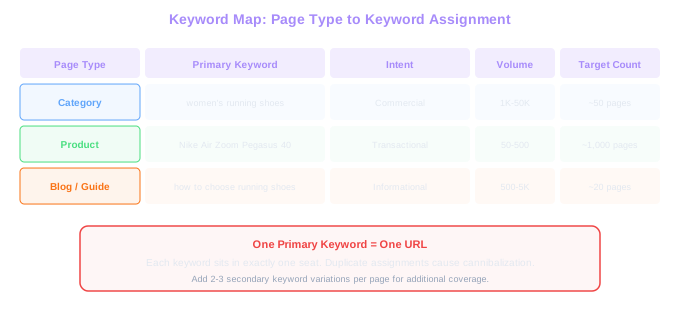
Category pages get the broadest, highest-volume terms. "Women's running shoes" goes to the women's running shoe category page, not to an individual product. Product pages get specific, long-tail terms that describe exactly what that product is. "Nike Air Zoom Pegasus 40 women's" maps to that specific product page.
Blog and guide pages get informational keywords. "How to choose running shoes for flat feet" maps to a buying guide, not to a product page. This intent-based assignment is critical, mapping an informational keyword to a product page won't work because Google expects informational content for that query.
Color-code your spreadsheet rows by page type. Categories in blue, products in green, blog posts in yellow. This makes it easy to scan the map and spot patterns, like if you've accidentally assigned a commercial keyword to a blog post instead of a category page.
Assigning Primary and Secondary Keywords
The primary keyword for each page should meet three criteria. First, it matches the page's search intent, a transactional keyword for a product page, a commercial keyword for a category page, an informational keyword for a guide. Second, only one page in your entire store targets this primary keyword. Third, the keyword has meaningful search volume relative to your niche.
Secondary keywords are close variations of the primary keyword that the same page can naturally rank for. If the primary keyword for a category page is "organic baby clothes," secondary keywords might be "organic baby clothing," "organic cotton baby outfits," and "natural baby clothes." These are variations Google already associates with the same intent, so a single well-optimized page can capture all of them.
Avoid assigning secondary keywords that have different intent from the primary keyword. "Organic baby clothes" (commercial) and "are organic baby clothes worth it" (informational) should not be on the same page, the informational query belongs on a blog post or guide page.
For product pages, the primary keyword is usually the product name plus its key differentiator. "Ergobaby Omni 360 carrier" is a product-level primary keyword. Secondary keywords add modifiers: "Ergobaby Omni 360 review," "Ergobaby Omni 360 all positions baby carrier." If search volume data shows people search for both the brand name format and a generic descriptor, assign the higher-volume version as primary.
Detecting and Fixing Keyword Cannibalization
Cannibalization occurs when two or more pages on your site target the same keyword, forcing Google to choose which one to rank. The result is usually neither page ranking as well as a single focused page would. In ecommerce, the most common cannibalization happens between category pages and blog posts, or between overlapping subcategory pages.
To detect cannibalization, search Google for "site:yourstore.com keyword" for each of your primary keywords. If two or more pages appear, you have a conflict. A more systematic approach uses Google Search Console: go to Performance, filter by query, and check the Pages tab. If multiple URLs receive impressions for the same query, Google is splitting signals between them.
Ahrefs and Semrush also flag cannibalization. In Semrush, the Cannibalization report under Position Tracking highlights keywords where multiple URLs from your domain appear in search results. The report shows which URL Google currently prefers and which ones are competing.
Fixes depend on the situation. If a blog post and a category page both target "leather boots for men," you have three options. Option one: refocus the blog post on an informational variant like "how to style leather boots" and add an internal link to the category page. Option two: merge the content if the blog post has strong backlinks, redirecting it to the category page and incorporating the best content. Option three: use a canonical tag on the blog post pointing to the category page, though this is the weakest signal.
The best fix is always prevention. When your keyword map is in place and every new page gets a keyword assignment before publication, cannibalization rarely occurs.
After fixing a cannibalization issue, monitor the surviving page's rankings for 4-6 weeks. You should see a ranking improvement within that window as Google consolidates signals onto a single URL. If rankings don't improve, check that internal links and canonical tags are correctly pointing to the intended page.
Mapping Keywords Across Page Types
An ecommerce store typically has four page types that need keyword assignments: category pages, product pages, blog/guide pages, and informational or brand pages. Each type serves a different role in your keyword funnel.
Category pages capture the highest-volume commercial keywords. These are your money pages, "women's running shoes," "organic skincare," "wireless headphones under 100." Category pages typically target keywords with 1,000 to 50,000+ monthly searches. Because these terms are competitive, category pages need strong content, internal linking, and often backlinks to rank.
Product pages target specific, long-tail transactional keywords. Each product page maps to the product's exact name and closest variant searches. Volume per keyword is lower (often 50-500 searches per month), but you have hundreds or thousands of product pages, so the aggregate traffic is significant.
Blog and guide pages handle informational queries that feed your sales funnel. "How to choose a running shoe for overpronation" brings in potential buyers who haven't decided on a product page yet. These pages link to relevant category and product pages, creating a content-to-commerce pathway.
Brand and comparison pages sit between informational and transactional intent. "Nike vs Adidas running shoes" or "best running shoes 2025" capture comparison shoppers. These pages are keyword-mapped like blog posts but typically have higher conversion potential because the intent is closer to purchase.
Cannibalization Cost
Stores without a keyword map lose 30-40% of organic traffic to cannibalization. The fix takes weeks to diagnose but only 5 minutes to prevent: check the map before every new page goes live.
Maintaining Your Keyword Map Over Time
A keyword map is a living document, not a one-time project. Every time you add a new product, create a new category, or publish a blog post, the map needs an update. We recommend reviewing the full map quarterly, but incremental updates should happen in real time as new pages go live.
Set a process: before any new page is created, the content or SEO team checks the keyword map. Is there already a page targeting this keyword? If yes, either refocus the new page on a different keyword or merge it with the existing page. This five-minute check prevents cannibalization issues that take weeks to diagnose and fix later.
Quarterly reviews should include three tasks. First, update ranking positions for all primary keywords. Export current rankings from your tracking tool and paste them into the map. This shows which pages are improving, stagnating, or declining. Second, check for new keyword opportunities from your research pipeline and assign them to existing or planned pages. Third, remove discontinued products or archived pages and reassign their keywords if the terms still have value.
For larger stores with thousands of products, consider automating parts of this process. A Python script that pulls ranking data from an API and updates your spreadsheet saves hours of manual work. Some teams move from spreadsheets to database-backed tools like Airtable or Notion for easier collaboration and filtering.
The keyword map also becomes your reporting foundation. When leadership asks why organic traffic grew 15% last quarter, you can point to specific keywords that were assigned, pages that were optimized, and rankings that improved, all tracked in one document. For a broader view of how keyword mapping fits into your overall approach, see our ecommerce SEO strategy guide.
Free Tools & Resources
Try our free SEO tools
Work Together With SEO Experts who understand ecommerce
World’s first Ecom-founded SEO agency