Technical SEO
11 min readCanonical Tags for Ecommerce
Ecommerce stores routinely generate multiple URLs for the same product through color variants, tracking parameters, session IDs, and filter combinations. Without canonical tags, search engines see each URL as a separate page, splitting your ranking signals across dozens of duplicates. Mastering canonical tags is essential for consolidating authority and ensuring the right version of every page appears in search results. This is a critical topic within [technical SEO for ecommerce](/blog/technical-seo-for-ecommerce).
In this guide
What Canonical Tags Do and Why Ecommerce Needs Them
A canonical tag (rel="canonical") is an HTML element placed in the head section of a page that tells search engines which URL represents the master version of that content. When Google encounters a page with a canonical tag pointing to a different URL, it treats the referenced URL as the authoritative version and consolidates ranking signals such as backlinks, engagement metrics, and internal link equity to that single URL.
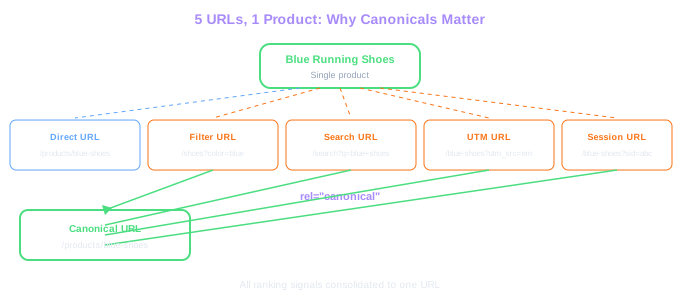
Ecommerce stores face a unique duplication challenge that content sites rarely encounter. A single product can be accessible through its direct URL (/products/blue-running-shoes), a category-filtered URL (/shoes?color=blue&type=running), a search result URL (/search?q=blue+running+shoes), a URL with tracking parameters (/products/blue-running-shoes?utm_source=email), and a URL with a session ID (/products/blue-running-shoes?sid=abc123). All five URLs display the same product, but to Google each is a separate page competing for the same rankings.
Without canonical tags, Google must guess which URL to index. It might choose the parameter-heavy URL, leaving your clean product URL out of search results. Or it might split your backlink authority across all five versions, weakening every one of them. Canonical tags eliminate this guesswork by explicitly declaring which URL should receive all the credit.
Duplicate URL Math
A store with 10,000 products, 4 tracking parameters, 3 filter paths, and session IDs can generate over 80,000 duplicate URLs. Each one dilutes ranking authority unless canonicalized.
Every page on your store should have a self-referencing canonical tag, even pages without duplicates. This prevents future duplication issues when parameters or tracking codes get appended to your URLs unexpectedly.
Common Ecommerce Duplication Scenarios
The most pervasive source of duplicate content in ecommerce is product variants accessed through different URLs. If your store creates separate URLs for each color or size selection (/product/t-shirt?color=red vs. /product/t-shirt?color=blue), and both pages display near-identical content with only a color swatch changed, these are duplicates that need canonical treatment. The canonical should point to the primary variant URL or the base product URL, depending on how different the variant content truly is.
Faceted navigation generates duplication at massive scale. Category pages with filters for brand, price range, size, material, and rating produce combinatorial URL explosions. A page like /jackets?brand=northface&size=large&color=black and /jackets?color=black&brand=northface&size=large show identical results but have different URLs. Each filter combination needs a canonical pointing back to the most relevant category page.
Paginated category pages create another layer of duplication. While page 2 of a category (/category?page=2) is not truly a duplicate of page 1, sort-order parameters on paginated pages (/category?page=2&sort=price-asc vs. /category?page=2&sort=newest) create genuine duplicates. The canonical for these should point to the paginated page without sorting parameters.
Cross-domain duplication affects stores selling on multiple marketplaces. If you syndicate product descriptions to Amazon, eBay, or comparison shopping sites, those platforms may outrank your own store for your own product descriptions. While you cannot place canonical tags on third-party sites, you should ensure your own product pages have strong canonical signals and unique supplementary content.
Audit your store for duplicate content by searching Google for site:yourdomain.com followed by a unique phrase from one of your product descriptions. If multiple URLs from your store appear, those pages need canonical tags pointing to the correct version.
Canonical Tags vs. Other Duplicate Content Solutions
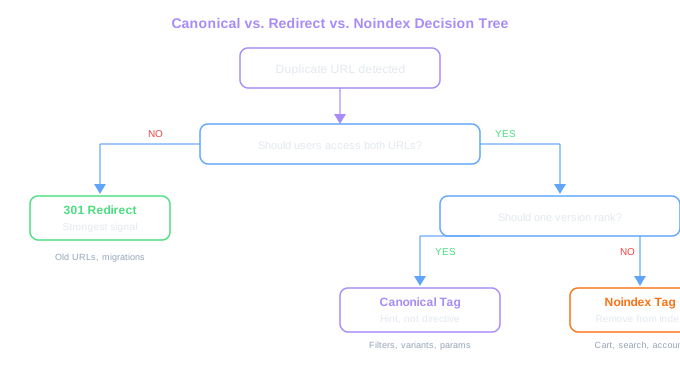
Canonical tags are not the only tool for handling duplicate content, and choosing the wrong tool leads to wasted effort or worse outcomes. Understanding when to use canonicals versus 301 redirects, noindex tags, or robots.txt blocking is critical for ecommerce SEO.
301 redirects are the strongest signal and should be used when the duplicate URL should never be accessible to users. If you migrated from /old-product-url to /new-product-url, a 301 redirect is correct because users should never land on the old URL. Canonical tags, by contrast, are appropriate when both URLs need to remain accessible. A product accessible through both /products/shoes and /category/running?product=shoes should use a canonical tag because both URLs serve valid user journeys.
Noindex tags tell Google to remove a page from the index entirely. Use noindex for pages like internal search results (/search?q=xyz), cart pages, or account pages that have no business appearing in search. Canonical tags would be wrong here because there is no master version you want indexed. The entire page type is unwanted in search results.
Robots.txt blocking prevents Google from crawling a URL at all. This is useful for conserving crawl budget but dangerous for canonicalization because Google cannot see a canonical tag on a page it cannot crawl. If you block a page via robots.txt and that page has external backlinks, Google will lose those signals entirely. For pages with backlinks that should consolidate authority elsewhere, canonical tags are the correct approach.
Critical Difference
Robots.txt blocks crawling but not indexing. If a blocked page has external backlinks, Google loses those signals entirely. For pages with backlinks, canonical tags are the correct approach to consolidate authority.
Never combine noindex with a canonical tag pointing to a different URL on the same page. These signals contradict each other and Google may ignore both. Use one or the other, not both.
Common Canonical Tag Mistakes in Online Stores
The most damaging canonical mistake in ecommerce is pointing all paginated category pages to page one. If /category/shoes?page=2, /category/shoes?page=3, and /category/shoes?page=4 all have canonical tags pointing to /category/shoes (page 1), Google will ignore the products listed on pages 2 through 4 because you have told it those pages are duplicates of page 1. Each paginated page should have a self-referencing canonical, as the content on each page is genuinely unique.
Another frequent error is canonicalizing to non-existent or broken URLs. This happens when products are deleted but canonical tags on variant pages still point to the removed parent URL. Google receives a 404 for the canonical target and may drop all the variant pages from the index. Always verify that canonical target URLs return a 200 status code.
Dynamic canonical tags that include session parameters defeat the purpose entirely. We have seen stores where the CMS generates canonical tags that include the user's session ID, creating a unique canonical URL for every visitor. This means Google sees thousands of different canonical targets for the same page, providing no consolidation signal whatsoever.
Chaining canonicals is another common problem. Page A canonicalizes to Page B, which canonicalizes to Page C. Google will attempt to follow the chain, but chains longer than one hop are unreliable. Always point canonicals directly to the final target URL. Similarly, canonical loops (Page A points to Page B, which points back to Page A) cause Google to ignore both canonical signals.
Run a monthly audit using Screaming Frog or Sitebulb to check for canonical errors. Filter for pages where the canonical URL differs from the page URL and verify each case is intentional. Pay special attention to canonicals returning non-200 status codes.
Free Tools & Resources
Try our free SEO tools
Work Together With SEO Experts who understand ecommerce
World’s first Ecom-founded SEO agency