Platform SEO
10 min readPlatform Migration SEO
Migrating an ecommerce store to a new platform is one of the highest-risk SEO events a business can undertake. URL structures change, internal linking patterns shift, and technical implementations differ across platforms. Without a rigorous migration plan, stores routinely lose 30 to 60 percent of organic traffic that can take months or years to recover. This guide covers the complete migration process from pre-migration auditing through post-launch monitoring. For a thorough breakdown of migration risks and strategies, read our [ecommerce SEO migration](/blog/ecommerce-seo-migration) blog post.
In this guide
Pre-Migration SEO Audit Checklist
Before touching any migration settings, you need a comprehensive snapshot of your current SEO performance. This baseline becomes your reference point for measuring migration success and diagnosing any post-migration issues. Start by exporting a complete crawl of your existing site using tools like Screaming Frog, Sitebulb, or Lumar. Capture every URL, its HTTP status code, canonical tag, meta title, meta description, H1 tag, word count, and internal link count.
Document your current indexation status by downloading the full list of indexed pages from Google Search Console. Compare this against your crawl data to identify pages that are indexed but not in your sitemap, and pages in your sitemap that are not indexed. Both scenarios need attention during migration planning.
Record your top-performing pages by organic traffic, revenue, and keyword rankings. These are the pages where any disruption will have the most significant business impact. Export your Google Analytics landing page report filtered to organic traffic for the past 12 months, and cross-reference it with your Search Console performance data to identify the keywords driving traffic to each page.
Capture your current structured data implementation, including which pages have Product schema, breadcrumb markup, FAQ schema, and any other rich result types. Also document your robots.txt rules, XML sitemap structure, hreflang implementation, and any custom canonical tag patterns. Every one of these elements must be replicated or improved on the new platform. Running a full SEO audit before migration creates the definitive baseline you need.
Create a shared spreadsheet that is your migration control document. Include tabs for URL mapping, redirect rules, pre-migration metrics, and post-migration checkpoints. This document becomes the single source of truth for everyone involved in the migration.
URL Mapping and Redirect Strategy
URL mapping is the single most critical SEO task during a platform migration. Every URL on your current site that receives organic traffic, has backlinks, or is indexed by Google must be mapped to its equivalent URL on the new platform. Missing even a handful of high-traffic URLs can result in significant ranking and revenue losses.
Start with a one-to-one URL mapping for all product pages, category pages, content pages, and blog posts. Export your current URL list from the crawl data and create a mapping spreadsheet with columns for the old URL, new URL, page type, monthly organic sessions, and number of referring domains. Prioritize mapping by traffic value, which ensures your highest-revenue pages are mapped first.
For URLs that have no direct equivalent on the new platform, decide whether to redirect them to the nearest relevant page or allow them to return a 404 status. Pages with significant backlink profiles should always be redirected, even if the content no longer exists, to preserve link equity. Redirect these to the most topically relevant existing page rather than the homepage.
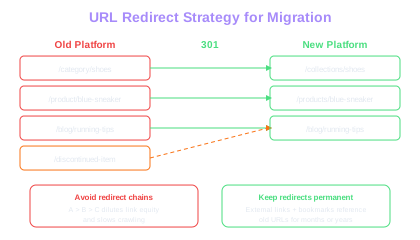
Implement all redirects as 301 permanent redirects, not 302 temporary redirects. Test your redirect map on a staging environment before launching the new site. Use a crawling tool to follow every redirect and verify that the destination URL returns a 200 status code, has proper canonical tags, and does not create redirect chains. A redirect chain occurs when URL A redirects to URL B, which then redirects to URL C. These chains dilute link equity and slow down crawling.
For sites with thousands of URLs, most ecommerce platforms support CSV-based bulk redirect imports. Prepare your redirect file in the required format well before the migration date and test it on staging. Common issues include URL encoding problems, trailing slash mismatches, and case sensitivity differences between platforms.
Redirect Chain Cost
Each hop in a redirect chain (A to B to C) dilutes link equity and adds latency. Google follows up to 10 hops but passes less authority with each. Flatten all chains to direct A-to-C redirects before launch.
Preserving Rankings During Migration
Preserving rankings requires more than just implementing redirects. Google evaluates the entire page experience, so the new pages must match or exceed the SEO quality of the originals. Title tags, meta descriptions, heading structures, and on-page content should be migrated as closely as possible to the original versions. Changing page titles during a migration is one of the most common causes of ranking drops because Google must re-evaluate the relevance signal for the new title.
Internal linking architecture is equally critical. The new platform must replicate the internal link structure of the old site, including navigation menus, breadcrumb trails, cross-sell and upsell widgets, and footer links. If the new platform changes how category pages link to products or how blog posts link to product pages, the authority flow through your site changes, which directly affects rankings. Pay close attention to canonical tags for ecommerce to prevent duplicate content on the new platform.
Structured data must be implemented on the new platform before launch. If your old site had Product schema with reviews, pricing, and availability, the new site must have identical or better structured data. Missing structured data after migration causes rich results to disappear from SERPs, which can reduce click-through rates by 20 to 30 percent even if rankings remain stable.
Page speed performance on the new platform should be tested extensively before launch. If the new site is slower than the old one, expect rankings to decline for queries where page experience is a tiebreaker. Run Lighthouse audits on key page templates and compare the scores against your current site. Pay special attention to Largest Contentful Paint and Cumulative Layout Shift, as these are the Core Web Vitals that most directly affect rankings.
Submit the updated XML sitemap to Google Search Console immediately after launch. This signals to Google that your site structure has changed and encourages faster recrawling of your most important pages.
Avoid making content changes, design overhauls, and platform migrations simultaneously. Each change introduces ranking risk, and combining them makes it impossible to diagnose what caused any traffic drops. Migrate first, stabilize rankings, then iterate on content and design.
Post-Migration Monitoring and Recovery
The first 72 hours after a platform migration are critical for identifying and fixing issues before they compound. Set up a monitoring dashboard that tracks indexed page count, organic sessions, crawl errors, and average position for your top 50 keywords. Check these metrics every few hours on the day of launch and daily for the first two weeks.
Google Search Console is your primary monitoring tool. Watch the Coverage report for spikes in excluded pages, redirect errors, or server errors. Use the URL Inspection tool to manually request indexing of your most important pages. Submit the new sitemap and monitor its processing status. Google typically takes 24 to 48 hours to begin processing a new sitemap, but full recrawling of a large site can take several weeks depending on your crawl budget management setup.
Traffic dips of 10 to 20 percent are normal in the first week after migration as Google recrawls and reindexes your pages. If the drop exceeds 30 percent or persists beyond two weeks, investigate immediately. Common post-migration issues include broken redirects that were not caught during testing, canonical tags pointing to old URLs, internal links still referencing old URL patterns, and missing structured data on the new templates.
Monitor your Google Analytics landing page report filtered to organic traffic. Compare the top 50 landing pages from the month before migration against the current data. Any page that shows a significant drop should be investigated individually. Check that the redirect is working, the new page has the correct canonical tag, and the content matches the original.
Set up Bing Webmaster Tools in addition to Google Search Console. Bing often recrawls more slowly than Google, and monitoring both search engines gives you a more complete picture of your migration's SEO impact. Also check your backlink profile in a tool like Ahrefs or Majestic to verify that external links are following redirects to the new URLs rather than hitting dead ends.
Common Migration Pitfalls to Avoid
The most frequent migration mistake is incomplete URL mapping. Teams often focus on product and category pages but forget to map blog posts, informational pages, image URLs, PDF documents, and paginated collection pages. Every URL that Google has indexed or that has external backlinks needs a redirect. Run a pre-migration crawl comparison to catch any unmapped URLs.
Another critical mistake is launching the migration during a peak traffic period. Never migrate during Black Friday season, major sale events, or any period that represents a disproportionate share of annual revenue. Schedule migrations for your lowest-traffic months and ideally mid-week to ensure development resources are available if issues arise.
Failing to preserve URL parameters used by marketing campaigns is a subtle but costly error. If your old platform used parameters like ?utm_source or ?ref for campaign tracking, ensure the new platform handles these parameters correctly and does not strip them during redirects. Test campaign landing pages with their full parameter strings.
Many migrations fail because the staging environment does not accurately replicate the production setup. Test redirects, canonical tags, structured data, and page speed on a staging server that mirrors the production configuration. Domain-level differences between staging and production can mask issues that only surface after launch.
Finally, do not remove the old site's redirect rules after migration. Redirects should remain in place permanently because external links, bookmarks, and cached search results will continue to reference old URLs for months or even years after migration. Removing redirects too early results in a wave of 404 errors and lost link equity.
Create a rollback plan before starting the migration. Document the exact steps needed to revert to the old platform if the new site has critical issues at launch. Having a tested rollback procedure reduces pressure on the team and prevents panic-driven decisions.
Timeline Planning and Rollback Strategy
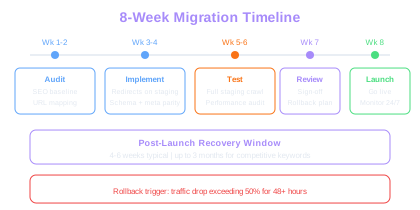
A well-structured migration timeline prevents rushed decisions and ensures every SEO element is addressed. Begin the planning process at least eight weeks before the target launch date. The first two weeks should focus on the pre-migration audit, URL mapping, and redirect file preparation. Weeks three and four are for implementing redirects on staging, testing structured data, and verifying meta tag parity between old and new sites.
Weeks five and six should be dedicated to full staging crawls, performance testing, and fixing any issues discovered during testing. Run a complete Screaming Frog crawl of the staging site and compare it against your pre-migration baseline. Every page should have a matching or improved title tag, meta description, canonical tag, and structured data output.
Week seven is for final review and stakeholder sign-off. Present the migration plan to all stakeholders including marketing, development, and leadership. Share the expected timeline for traffic recovery and set realistic expectations. Most well-executed migrations see traffic recovery within four to six weeks, but some competitive keywords may take up to three months to stabilize.
The rollback strategy should define specific trigger conditions that initiate a revert to the old platform. Common triggers include a traffic drop exceeding 50 percent for more than 48 hours, critical functionality failures on the new platform, or widespread redirect failures. Document the technical steps for rollback, including DNS changes, database restoration, and redirect reversal. Test the rollback procedure at least once before the migration date.
On launch day, execute the migration during low-traffic hours and have the full team available for monitoring. Assign specific team members to monitor Google Search Console, site crawl health, conversion rates, and customer-facing functionality. Document every issue encountered and its resolution for future migration reference.
Traffic Drop Norms
A 10-20% organic traffic dip in week one is normal as Google recrawls. Drops exceeding 30% that persist beyond two weeks signal broken redirects, missing canonical tags, or stripped structured data that need immediate investigation.
After the migration stabilizes, document everything that went well and every issue you encountered. This migration playbook becomes invaluable for future platform changes and helps your team avoid repeating mistakes.
Free Tools & Resources
Try our free SEO tools
Work Together With SEO Experts who understand ecommerce
World’s first Ecom-founded SEO agency