SEO by Platform
13 min readWooCommerce SEO Guide
WooCommerce runs on WordPress, giving store owners access to the most flexible SEO toolkit available for ecommerce. With full control over URLs, server configuration, and thousands of plugins, WooCommerce allows granular optimization that hosted platforms cannot match. That flexibility also means more decisions and more potential for misconfiguration. For broader context on ecommerce optimization, see our overview of [technical SEO for ecommerce](/blog/technical-seo-for-ecommerce).
In this guide
Permalink Structure and URL Optimization
WordPress lets you define custom permalink structures through Settings > Permalinks. For WooCommerce stores, the default product URL pattern is /product/product-name/, but you can modify the /product/ base slug or remove it entirely using plugins or custom rewrite rules. Category pages default to /product-category/category-name/, which can also be customized.
The most SEO-friendly approach is to keep URLs short and descriptive. Many store owners remove the /product-category/ and /product/ base slugs to achieve cleaner URLs like /running-shoes/ for categories and /blue-running-shoe/ for products. However, removing these bases creates a risk of URL conflicts between products, categories, pages, and posts that share similar slugs. Test thoroughly after changing permalink structures.
WooCommerce also generates query-parameter URLs for filtered and sorted product listings (?orderby=price, ?filter_color=blue). These parameterized URLs can create massive duplicate content if Google indexes them. Configure your SEO plugin to add noindex directives to filtered URLs, or use the URL Parameters tool in Google Search Console to tell Google how to handle them.
For stores with large catalogs, consider implementing faceted navigation with AJAX-based filtering that does not generate new URLs. This prevents the creation of thousands of indexable filter combination pages while maintaining a smooth user experience.
After changing your permalink structure, use a database search-and-replace tool like Better Search Replace to update internal links in product descriptions and page content. WordPress does not automatically update hardcoded links.
SEO Plugins: Yoast vs RankMath vs SEOPress
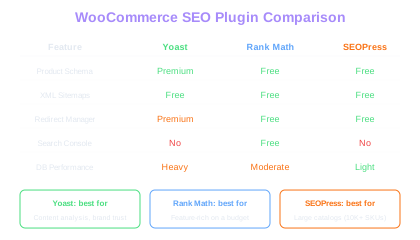
Every WooCommerce store needs a dedicated SEO plugin to manage title tags, meta descriptions, XML sitemaps, schema markup, and canonical tags. The three leading options are Yoast SEO, Rank Math, and SEOPress, each with distinct strengths for ecommerce.
Yoast SEO is the most established plugin with dedicated WooCommerce integration through its premium WooCommerce SEO addon. It provides product-specific schema markup (price, availability, reviews), breadcrumb generation, and social media meta tags. The content analysis feature evaluates product descriptions for readability and keyword usage, though its suggestions should be treated as guidelines rather than strict rules.
Rank Math offers more features in its free tier than Yoast, including built-in schema generators for products, advanced redirect management, and Google Search Console integration directly in the WordPress dashboard. Its WooCommerce integration automatically generates Product schema with variant support. For stores on a budget, Rank Math provides enterprise-level SEO features without requiring a premium subscription.
SEOPress is a lighter-weight alternative that appeals to performance-conscious store owners. It generates fewer database queries than Yoast or Rank Math, which can matter for stores with 10,000+ products where admin panel load times become noticeable. All three plugins handle the core SEO requirements well, so the choice often comes down to user interface preference and performance priorities.
Plugin Performance
For stores with 10,000+ products, SEOPress generates fewer database queries than Yoast or Rank Math. This difference becomes noticeable in admin panel load times when editing products in bulk.
Database and Hosting Optimization for SEO
WooCommerce performance depends heavily on your hosting environment and database optimization, which directly impacts site speed optimization. Unlike hosted platforms such as Shopify, you bear full responsibility for server speed, which directly impacts Core Web Vitals and crawl efficiency.
Choose a hosting provider that offers server-level caching (Varnish, LiteSpeed Cache, or NGINX FastCGI cache), PHP 8.1 or newer, and MySQL or MariaDB with properly tuned query caches. Shared hosting plans that run dozens of sites on a single server frequently produce Time to First Byte (TTFB) values above 600 milliseconds, which Google considers slow. Managed WordPress hosting from providers like Cloudways, Kinsta, or WP Engine typically delivers TTFB under 200 milliseconds.
Database optimization matters increasingly as your product catalog grows. WooCommerce stores post-meta data in the wp_postmeta table, which can balloon to millions of rows for stores with thousands of products and their associated attributes, variations, and pricing data. WordPress 6.1 introduced High-Performance Order Storage (HPOS) that moves order data to custom tables, reducing the load on wp_postmeta. Enable HPOS if your plugins support it.
Install a page caching plugin (WP Super Cache, W3 Total Cache, or LiteSpeed Cache) and an object caching layer (Redis or Memcached). Page caching serves pre-built HTML to visitors and search engine crawlers, dramatically reducing server response time. Object caching stores frequently accessed database queries in memory, speeding up both the frontend and admin panel.
WooCommerce Schema Markup and Rich Results
Proper schema markup enables Google to display rich results for your products, including price, availability, review ratings, and shipping information directly in search results. WooCommerce does not include schema markup by default, so your SEO plugin or a dedicated schema plugin must generate it.
Product schema should include at minimum: name, description, image, SKU, brand, price, priceCurrency, availability, and review/aggregateRating when applicable. Learn more about implementing structured data for products to maximize rich result eligibility. For variable products, generate an Offer for each variation so Google can display the price range. The schema should reference the correct currency and availability status pulled dynamically from WooCommerce product data.
Breadcrumb schema helps Google understand your site hierarchy and can replace the URL in search results with a readable breadcrumb trail. Both Yoast and Rank Math generate BreadcrumbList schema automatically when breadcrumbs are enabled. Verify that the breadcrumb hierarchy matches your actual site navigation.
FAQ schema on product pages can earn additional SERP real estate. If your product pages include an FAQ section or expandable question-and-answer panels, mark them up with FAQPage schema. Use the Rich Results Test tool to verify your schema renders correctly before and after implementation.
Test your schema markup on a product page, a variable product page, and a category page. Variable products often produce schema errors because each variation needs its own Offer element within the Product schema.
WooCommerce Image and Media Optimization
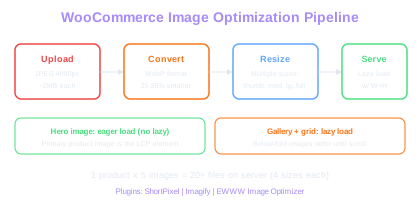
Product images are typically the largest files on any ecommerce page, making image optimization critical for Core Web Vitals performance. WooCommerce generates multiple image sizes for each uploaded product photo (thumbnail, medium, large, and full), which means a single product with five images can create 20 or more image files on the server.
Convert all product images to WebP format using a plugin like ShortPixel, Imagify, or EWWW Image Optimizer. WebP files are 25 to 35 percent smaller than equivalent JPEG files with no visible quality loss. These plugins can also serve AVIF format to browsers that support it, achieving even greater compression.
Implement lazy loading for product gallery images, related product carousels, and any images below the fold. WordPress 5.5+ includes native lazy loading via the loading="lazy" attribute, but verify it is working on your WooCommerce templates. The main product image above the fold should not be lazy loaded, as this delays LCP.
Set explicit width and height attributes on all image elements to prevent Cumulative Layout Shift. WooCommerce themes that use CSS-based responsive images without defined dimensions cause the browser to reflow the page as images load, resulting in poor CLS scores. Review your theme's product image template and add the dimensions if missing.
WebP Savings
Converting from JPEG to WebP reduces file size by 25-35% with no visible quality loss. For a store with 5,000 product images, this can save 2-5GB of bandwidth per month and measurably improve LCP scores.
WooCommerce Site Architecture and Internal Linking
WordPress gives you complete control over your site's information architecture, which is both a strength and a responsibility. Plan your category taxonomy before building the store, because restructuring categories after products are indexed means managing hundreds of redirects.
Keep your category hierarchy to three levels maximum: top-level categories, subcategories, and sub-subcategories. Each additional level dilutes internal link equity and pushes products further from the homepage. For a clothing store, this might look like Men > Shirts > Casual Shirts rather than adding a fourth level for fabric type.
WooCommerce product pages automatically include related products and cross-sell sections, which provide internal links between products. Customize the related products algorithm using WooCommerce hooks or a plugin to ensure it surfaces genuinely relevant items rather than random products from the same category. Well-curated cross-links between complementary products strengthen topical clusters and keep users browsing.
Breadcrumb navigation is essential for both users and search engines. Enable breadcrumbs through your SEO plugin and configure them to follow your category hierarchy. For products that appear in multiple categories, set a primary category in Yoast or Rank Math to ensure the breadcrumb trail is consistent.
Create a comprehensive internal linking structure beyond automated widgets. Link from blog posts to relevant product and category pages. Link from product descriptions to related buying guides. Use category page descriptions to link to subcategories and featured products. This manual internal linking passes authority to your most commercially valuable pages.
Free Tools & Resources
Try our free SEO tools
Work Together With SEO Experts who understand ecommerce
World’s first Ecom-founded SEO agency