Advanced SEO
10 min readEcommerce SEO Automation
Manual SEO optimization does not scale for ecommerce stores with thousands or tens of thousands of product pages. Writing unique meta descriptions, monitoring indexation status, and auditing structured data across an entire catalog requires automation to be sustainable. This guide covers practical automation strategies that reduce repetitive [SEO tasks](/academy/seo-task-planning) while maintaining the quality that search engines and users expect.
In this guide
Automating Meta Tag Generation at Scale
For stores with large catalogs, writing individual meta titles and descriptions for every product page is impractical. Template-based meta tag generation uses product attributes like name, brand, category, price, and key features to construct unique, keyword-rich meta tags programmatically. The template approach works because product pages follow predictable patterns that can be encoded into generation rules.
A well-designed title tag template might follow the format: {Product Name} - {Key Feature} | {Brand} | {Store Name}. For a running shoe product, this generates: "CloudRun Pro 3 - Lightweight Trail Runner | Nike | SportShoes.com". The key is building templates with enough variability to avoid creating duplicate or near-duplicate titles across products. Include conditional logic that adapts the template based on available product data, falling back to simpler formats when certain attributes are missing.
Meta description templates should incorporate persuasive language alongside product attributes: "Shop the {Product Name} by {Brand}. {Short Description}. Free shipping on orders over {Threshold}. {Review Count} reviews, {Average Rating} stars." This pattern creates unique descriptions that include both SEO-relevant keywords and conversion-driving information.
Implement these templates at the platform level using your ecommerce platform's templating engine (Liquid for Shopify, Handlebars for BigCommerce, PHP for WooCommerce/Magento). This ensures meta tags update automatically when product data changes, eliminating the need for manual updates when prices change, new reviews arrive, or product descriptions are edited.
For stores that need more sophisticated generation, consider using an API-based approach where product data feeds into a script that applies business rules before outputting meta tags. This allows for A/B testing different template formats and measuring their impact on click-through rates from search results.
Keep a blacklist of words and phrases that should never appear in auto-generated meta tags, such as internal product codes, warehouse locations, or supplier names. Run a weekly automated check to catch any meta tags that contain blacklisted terms.
Bulk Product Page Optimization
Bulk optimization addresses the challenge of improving hundreds or thousands of product pages simultaneously. The process starts with a data export from your ecommerce platform containing all product URLs, titles, descriptions, image alt texts, and category assignments. Load this data into a spreadsheet or database where you can apply transformation rules across the entire catalog.
Image alt text automation is one of the highest-impact bulk optimizations. Most ecommerce platforms allow you to set alt text templates that automatically populate based on product data. A template like "{Product Name} - {Color} - {Angle} view" generates descriptive alt text such as "Nike Air Max 90 - Black - Side view" for each product image. This is far better than the empty alt attributes or generic filenames that most stores default to.
Product description enrichment at scale typically uses a combination of product feed data and templating. For categories where products share common features (electronics specifications, clothing materials, nutritional information), create category-level description templates that automatically incorporate product-specific values. A supplement product template might include sections for ingredients, suggested use, and serving size, pulling the specific values from product attributes.
Internal linking automation connects related products and content without manual intervention. Configure your ecommerce platform's recommendation engine to display related products based on shared categories, tags, or purchase history. Extend this by automating the insertion of contextual links within product descriptions that point to relevant category pages, buying guides, or complementary products.
Schema markup generation should be automated through your theme templates rather than managed on a per-page basis. Product schema pulls from your product data (price, availability, SKU, reviews), breadcrumb schema generates from your URL structure, and FAQ schema can be built from customer question data if your platform supports it.
Automated Monitoring and Alert Systems
Automated monitoring catches SEO issues before they impact traffic. The most critical monitoring systems track indexation changes, crawl errors, ranking fluctuations, and structured data validity. Without automation, these issues can persist for weeks before anyone notices, causing cumulative damage that is harder to reverse.
Set up Google Search Console API integration to pull indexation data into a monitoring dashboard. Track the total number of indexed pages daily and trigger alerts when the count drops by more than 5 percent in a 24-hour period. This catches accidental noindex tags, robots.txt changes, and server errors that prevent crawling. Supplement this with a scheduled crawl using tools like Screaming Frog scheduled crawls or cloud-based crawlers that run weekly.
Rank tracking should be automated through a tool that checks your target keywords daily. Configure alerts for any keyword that drops more than five positions or falls off the first page. Correlate ranking drops with site changes by maintaining a change log that records every deployment, content update, and configuration change with timestamps.
Structured data validation should run automatically against every product page template change. Use the Google Rich Results Test API to validate a sample of pages after any theme deployment. If structured data errors are detected, the deployment pipeline should flag the issue before it affects the entire catalog.
Page speed monitoring integrates with Google PageSpeed Insights API or CrUX data to track Core Web Vitals over time. Set thresholds for LCP, CLS, and INP that trigger alerts when performance degrades. This is especially important after installing new apps, updating themes, or adding third-party scripts that might impact loading performance.
Content change monitoring watches for unexpected modifications to key pages. Tools like ContentKing, Lumar, or custom scripts can detect when title tags, meta descriptions, canonical tags, or heading structures change, alerting your team to unauthorized or accidental edits.
Early Warning System
Without automated monitoring, SEO issues can persist for weeks before anyone notices. A 5% index count drop alert catches accidental noindex tags, robots.txt changes, and server errors within 24 hours.
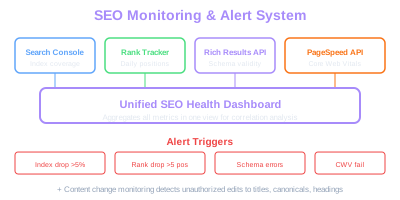
Build a single SEO health dashboard that aggregates data from Google Search Console, Google Analytics, your rank tracker, and your crawling tool. Having all metrics in one view makes it dramatically easier to spot correlations between site changes and performance impacts.
API-Driven SEO Workflows
Modern ecommerce SEO increasingly relies on API integrations to connect data sources, automate decisions, and execute optimizations without manual intervention. The Google Search Console API, Google Analytics Data API, and your ecommerce platform's API form the foundation of an automated SEO workflow.
A practical API workflow starts with data extraction. Pull organic landing page performance from the Google Analytics Data API, keyword impression and click data from the Search Console API, and product catalog data from your ecommerce platform API. Merge these datasets to create a comprehensive view of which products receive organic traffic, which keywords drive that traffic, and how those products perform commercially.
Use this merged data to automate optimization prioritization. Build a scoring model that ranks product pages by a combination of organic traffic potential (search volume and current ranking position), revenue contribution, and optimization gap (how far the current meta tags, content, and structured data deviate from best practices). Pages with high potential and large optimization gaps should be flagged for immediate attention.
Automate redirect management through your platform's API. When products are discontinued, automatically create 301 redirects from the old product URL to the most relevant alternative product or category page. This prevents the accumulation of 404 errors that waste crawl budget and frustrate users who arrive through old bookmarks or external links.
Build automated content freshness workflows that identify product pages with outdated information. Compare product data from your inventory system against what appears on the live site. When prices, availability, or specifications change in your inventory system, the workflow should trigger an update to the corresponding product page, which ensures search engines always see accurate information.
For multi-channel retailers, API workflows can synchronize SEO elements across marketplaces. When you optimize a product title or description on your primary site, the workflow can propagate those changes to Amazon, Google Shopping, and other channels where consistent product information improves visibility.
Start Small, Scale Up
Build one API workflow solving your biggest pain point first. Automated redirect creation when products are discontinued prevents 404 accumulation and preserves link equity across your catalog.
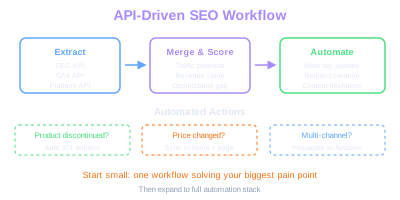
Start small with API automation. Build one workflow that solves your biggest pain point, test it thoroughly, and then expand. Attempting to automate everything at once leads to brittle systems that break when any single API changes its response format.
Template-Based Optimization at Scale
Template-based optimization is the most sustainable approach for maintaining SEO quality across thousands of pages. Rather than optimizing individual pages, you optimize the templates that generate those pages. Every change to a template instantly propagates to every page that uses it, creating a multiplicative effect on your optimization efforts.
Start by auditing your existing page templates for SEO completeness. Each template should include: a dynamic title tag that incorporates the page-specific primary keyword, a meta description field with fallback template logic, proper heading hierarchy with a single H1, structured data output using platform variables, image optimization with lazy loading and alt text templates, and internal linking components.
Category page templates deserve special attention because they often generate the highest-volume landing pages for commercial keywords. Optimize the category template to include a unique, editable content block above the product grid for category-specific descriptions. This content block should be long enough to establish topical relevance (300 words minimum) but positioned so it does not push the product grid below the fold on mobile devices.
Product page templates should include automated sections that enhance content depth. A specifications table that pulls from product attributes, a dynamically generated FAQ section based on common customer questions for that product category, and related product carousels that strengthen internal linking all contribute to page quality without requiring manual content creation for each product.
Pagination templates need careful SEO configuration. Implement self-referencing canonical tags on each paginated page rather than pointing all pages to the first page. Ensure that the page title includes the pagination indicator (e.g., "Running Shoes - Page 2 of 5") to differentiate paginated pages in search results and prevent title duplication.
Blog and content templates should be optimized for featured snippet capture. Include structured heading hierarchies, summary paragraphs that directly answer common questions, and list or table formats that Google can easily extract for featured snippet display.
SEO Automation Tools and Custom Scripts
The right combination of SEO tools and custom scripts can automate 70 to 80 percent of routine SEO tasks for an ecommerce store. Off-the-shelf tools handle monitoring, crawling, and reporting, while custom scripts address platform-specific optimizations and data pipeline tasks.
For crawl automation, Screaming Frog's command-line interface allows scheduled crawls that export data to a specific location for automated processing. Cloud-based alternatives like Lumar, Sitebulb, or ContentKing provide continuous crawling with built-in alerting. Choose a cloud solution if you need real-time monitoring or if your site is too large for local crawling.
Python scripts are the most common choice for custom SEO automation due to the availability of libraries for HTTP requests, data manipulation, and API integration. A typical Python-based SEO automation stack includes the requests library for API calls, pandas for data processing, BeautifulSoup for HTML parsing, and a scheduler like cron or Apache Airflow for orchestration.
Common custom scripts for ecommerce SEO include: a broken link checker that crawls your site weekly and reports internal 404 errors, a structured data validator that tests a random sample of product pages against Google's requirements, a meta tag auditor that flags pages with missing, duplicate, or truncated title tags and meta descriptions, and a redirect chain detector that identifies URLs with more than one redirect hop.
For stores running on platforms with open APIs (WooCommerce, Magento, BigCommerce), build scripts that directly update product SEO fields through the API. A script that detects products with missing meta descriptions can auto-generate them using the template approach and push the updates live without manual admin panel work.
Version control your automation scripts in a Git repository and document their dependencies, schedules, and expected outputs. This prevents knowledge silos where only one team member understands how the automation works. Include error handling and notification logic so failed scripts alert the team rather than silently breaking.
Log the results of every automated optimization run with timestamps and affected URLs. This audit trail is invaluable when diagnosing unexpected ranking changes, as you can quickly determine whether an automated process made changes that coincide with a traffic shift.
Free Tools & Resources
Try our free SEO tools
Work Together With SEO Experts who understand ecommerce
World’s first Ecom-founded SEO agency