Search Fundamentals
12 min readThe Ecommerce SEO Learning Roadmap
Most store owners pick up SEO in fragments. A blog post here, a YouTube video there, maybe a course that was recorded before Google's last three algorithm updates. This roadmap gives you a structured path through nine stages, from absolute beginner to running a repeatable monthly SEO process that actually moves revenue.
In this guide
Who This Roadmap Is For
We built this roadmap for three groups of people. Store owners who handle their own marketing and want to stop guessing about SEO. In-house marketers at ecommerce companies who need a proper framework instead of scattered tactics. And junior SEOs who are moving into ecommerce for the first time and need to understand how this vertical differs from content sites or local businesses.
You do not need any prior SEO knowledge to follow this path. If you have managed an online store for a few months, you already understand product pages, categories, and checkout flows. That operational knowledge is more useful than most people realize, because ecommerce SEO is ultimately about making those same pages perform in search results.
What we do assume is that you have access to your store's backend, can install tracking tools, and are willing to dedicate at least a few hours per week to implementation. Reading about SEO without doing the work produces nothing. Every stage in this roadmap ends with concrete actions you should complete before moving on.
Key Prerequisite
You need access to your store's backend, the ability to install tracking tools, and a few hours per week for implementation. Reading about SEO without doing the work produces nothing.
Stages 1 to 3: Building Your Foundation
Stage 1 is understanding how Google actually works for ecommerce. Not the simplified version, but how Googlebot discovers product pages, why crawl budget matters when you have 50,000 URLs, and what the rendering queue means for JavaScript-heavy storefronts. You cannot make good SEO decisions without understanding the mechanics. Most stores we audit have technical problems rooted in a fundamental misunderstanding of how search engines process their pages.
Stage 2 is setting up your measurement infrastructure. That means Google Search Console verified and connected, Google Analytics 4 configured with ecommerce tracking, and a proper site audit using a crawler like Screaming Frog or Sitebulb. We have walked into stores that had been running for three years without Search Console access. They had no idea which pages were indexed, which queries drove traffic, or whether Google was even finding half their catalog.
Stage 3 is your first technical audit. You run the crawler, export the data, and identify the top issues: broken pages, missing titles, duplicate meta descriptions, orphan pages with no internal links, and crawl depth problems where products sit five or more clicks from the homepage. This audit becomes your project backlog for the next several months.
Do not skip the audit. We have seen teams jump straight to keyword research and spend months optimizing pages that Google was not even indexing. Fix the plumbing before you redecorate.
Stages 4 and 5: Keywords and On-Page Optimization
Stage 4 is keyword research for ecommerce, and it works differently than for blogs. You are not looking for informational queries with high volume. You need to find the terms people use right before they buy. That means product-level keywords like specific model names and SKU searches, category-level keywords that match how shoppers browse, and modifier keywords like best, cheapest, or reviews that signal commercial intent.
The process starts with your own data. Pull the queries from Search Console that already send traffic. Check which product and category pages rank for what. Then expand outward using keyword tools to find gaps, especially category keywords your competitors rank for but you do not. Sort everything by revenue potential, not just search volume. A keyword with 200 monthly searches and a 4 EUR CPC is often worth more than a keyword with 5,000 searches and a 0.10 EUR CPC.
Stage 5 is applying those keywords to your pages. Product page optimization means unique title tags, structured descriptions that go beyond the manufacturer copy, proper heading hierarchy, and image alt text that includes relevant search terms without keyword stuffing. Category page SEO means writing genuine intro copy that targets your primary keyword, adding contextual internal links, and making sure your category titles match what people actually search for instead of whatever your merchandising team decided sounded clever.
Revenue Over Volume
A keyword with 200 monthly searches and 4 EUR CPC is often worth more than one with 5,000 searches and 0.10 EUR CPC. Sort your keyword list by revenue potential, not raw search volume.
Map one primary keyword per page. When two pages target the same term, Google has to choose which one to rank, and it often picks neither. Cannibalization is one of the most common problems we see in store audits.
Stages 6 and 7: Technical SEO and Content Strategy
Stage 6 digs deeper into the technical side. Site architecture is the big one for ecommerce. Your category hierarchy should mirror how customers shop and how Google understands topical relevance. Flat architectures where every product is one click from the homepage sound great in theory, but they create pages with hundreds of links that dilute authority. Deep architectures where products sit behind four layers of subcategories bury important pages. The sweet spot is usually two to three clicks from homepage to product.
Page speed is non-negotiable at this stage. Ecommerce sites tend to be image-heavy, loaded with third-party scripts for reviews, chat widgets, and tracking pixels. Run Core Web Vitals checks on your key templates: homepage, category page, product page, and cart. Fix the biggest offenders first, usually unoptimized images and render-blocking JavaScript. Structured data also belongs here. Product schema, breadcrumb schema, and FAQ schema help Google understand your pages and can earn you rich results that improve click-through rates.
Stage 7 shifts to content. Every store needs content that is not directly transactional. Buying guides, comparison posts, how-to articles, and educational content serve two purposes: they capture shoppers earlier in the research phase, and they attract backlinks from other websites in ways that product pages simply cannot. A store selling running shoes should have content about choosing the right shoe type, training plans, and injury prevention. This content links internally to product and category pages, passing authority where it matters.
Stages 8 and 9: Link Building and Measuring Results
Stage 8 is where most ecommerce teams get stuck. Link building for online stores is hard because product pages rarely attract natural links. You need strategies built around your content and your brand. Digital PR works well: original research, data studies about your industry, or newsworthy product launches can earn coverage from journalists and bloggers. Supplier and manufacturer relationships can lead to links from brand pages. Guest contributions on industry publications build authority and referral traffic simultaneously.
The approach that works best long-term is creating genuinely useful resources that people link to because they solve a problem. A furniture store that publishes a detailed room measurement guide will earn links from interior design blogs, renovation forums, and architecture students. Those links pass authority to the entire domain, lifting product pages in the process. Avoid buying links, participating in link schemes, or mass-submitting to directories. Google's spam detection has gotten extremely good, and the penalty risk far outweighs any short-term gains.
Stage 9 is building a measurement and reporting system that keeps you accountable. Track organic revenue as your primary KPI, not just rankings or traffic. Set up a monthly reporting cadence that covers organic sessions, revenue from organic search, keyword position changes, new pages indexed, and backlinks acquired. The goal is to turn SEO from a one-time project into a repeatable monthly process with clear inputs and measurable outputs. For a complete overview of these principles, start with our ecommerce SEO pillar guide.
Measure SEO success in revenue, not rankings. A number-one ranking for a keyword nobody buys from is worthless. Tie every SEO action back to pages that convert.
Making This Roadmap Work in Practice
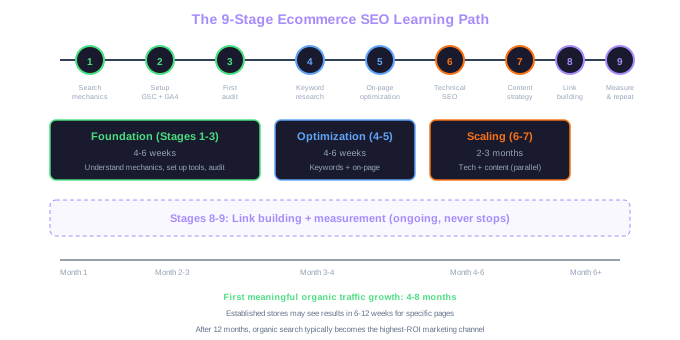
The biggest mistake teams make with a roadmap like this is trying to do everything at once. Stages 1 through 3 should take four to six weeks. Stages 4 and 5 need another four to six weeks. Stages 6 and 7 run in parallel over two to three months. Stages 8 and 9 are ongoing and never really finish. If you try to compress all of this into a single month, you will cut corners on the foundation and spend the next year fixing the consequences.
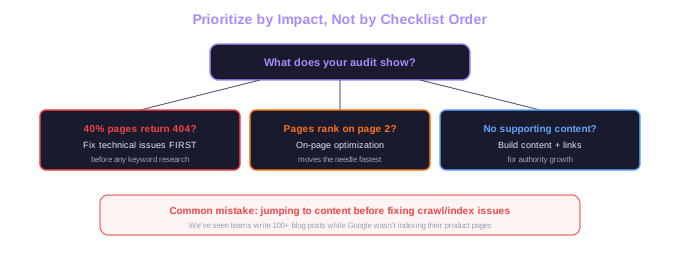
Prioritize based on impact. If your site audit reveals that 40% of your product pages return 404 errors, fixing that comes before keyword research. If your category pages already rank on page two for valuable terms, on-page optimization will move the needle faster than starting a blog. Let the data guide the sequence, not a generic checklist.
Finally, accept that SEO results take time. You will not see meaningful organic revenue growth for three to six months after starting. That is normal. The stores that succeed are the ones that commit to the process, execute consistently, and resist the temptation to abandon the plan when results are not immediate. After twelve months of disciplined execution, organic search typically becomes the highest-ROI channel in the marketing mix.
Free Tools & Resources
Try our free SEO tools
Work Together With SEO Experts who understand ecommerce
World’s first Ecom-founded SEO agency