Technical SEO
11 min readStructured Data for Product Pages
Structured data tells search engines exactly what your products are, what they cost, and whether they are in stock. Properly implemented Product schema can earn your listings rich results with star ratings, price ranges, and availability badges directly in Google search results, increasing click-through rates by 20% to 35%. Use our [schema generator](/tools/schema-generator) to create valid Product markup quickly.
In this guide
Product Schema Markup Essentials
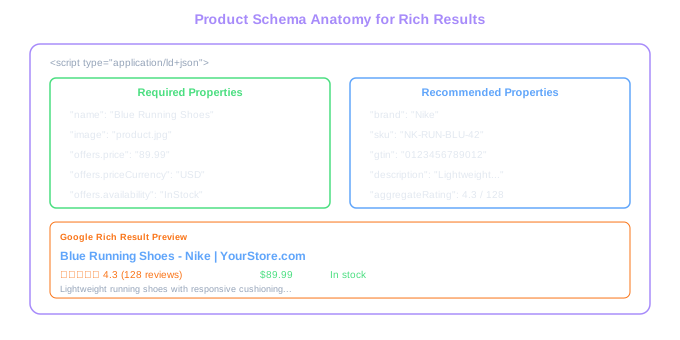
Google supports the Product structured data type for ecommerce pages, and it expects specific properties to trigger rich results. At minimum, you need the product name, image, and at least one offer with price, currency, and availability. Missing any of these prevents rich results from appearing.
Use JSON-LD format for all structured data. Google explicitly recommends JSON-LD over Microdata or RDFa because it separates the markup from the visual HTML, making it easier to maintain and less prone to breaking when templates change. Place the JSON-LD script in the head or body of your product pages.
Each product page should contain exactly one Product entity. Do not mark up multiple products on a single product page. If your page displays product variants (sizes, colors), the primary product should be the main entity with each variant represented through individual Offer objects within the offers array.
Include the brand, SKU or GTIN (barcode), and description properties even though they are not strictly required. Google uses these to match your product data with Google Merchant Center feeds, and products with complete schema markup receive preferential treatment in shopping-related search results.
Rich Results Boost
Product pages with complete schema markup (name, price, availability, ratings) see 20-35% higher click-through rates from search results compared to plain listings without rich snippets.
AggregateRating and Review Markup
Star ratings in search results are among the most powerful click-through rate boosters available to ecommerce sites. To display them, you need either AggregateRating (summary of all reviews) or individual Review markup on your product pages. Both require actual reviews from real customers; Google prohibits self-authored or fabricated review markup.
AggregateRating requires a ratingValue (the average score), reviewCount or ratingCount, and bestRating/worstRating if you use a scale other than 1 to 5. The data must match what is visible on the page. If your page shows 4.3 stars from 128 reviews, the structured data must reflect those exact numbers.
For individual Review markup, include the author name, datePublished, reviewRating, and reviewBody. Google may display a featured review snippet alongside your product listing if individual reviews are marked up. This additional information in search results helps differentiate your listing from competitors.
A critical mistake many stores make is marking up review data on pages that display no visible reviews. Google calls this a structured data policy violation, and it can result in a manual action that strips rich results from your entire site. Only add review schema to pages where reviews are actually displayed to users.
Sync your structured data with your review platform's API. If you use Yotpo, Judge.me, or Trustpilot, configure the integration to automatically update the AggregateRating values whenever new reviews are submitted. Stale rating data that does not match visible reviews triggers Google warnings.
Offer Schema: Price and Availability
The Offer portion of your Product schema communicates pricing and stock status to Google. Getting this right enables price display in search results and powers Google Shopping's free listings. Getting it wrong means your products show without pricing, which dramatically reduces click-through rates.
For products with a single price, use a straightforward Offer with price and priceCurrency. For products with variant-based pricing (different prices for different sizes), use an AggregateOffer with lowPrice and highPrice to show a price range, or list individual Offer objects for each variant with its specific price.
Availability values must use Schema.org's predefined set: InStock, OutOfStock, PreOrder, BackOrder, or Discontinued. Google cross-references this with your product feed and actual page content. If your structured data says InStock but the page shows "Sold Out," you will receive a mismatch warning in Search Console.
Update your availability markup dynamically. A product that goes out of stock at 2 PM should not still show InStock in its structured data at 3 PM. For platforms like Shopify, this is handled automatically if you use the default product schema. For custom implementations, connect availability to your inventory management system.
Testing and Monitoring Structured Data
Deploying structured data without validation is a common source of errors that silently prevent rich results. Google provides two tools for testing: the Rich Results Test (for checking if a URL qualifies for rich results) and the Schema Markup Validator (for checking general schema syntax). Use both.
The Rich Results Test shows exactly which rich result types your page is eligible for and flags any errors or warnings. Run every product page template through this tool before launching. A single missing required property (like priceCurrency) across thousands of product pages means zero rich results for your entire catalog.
After deployment, monitor structured data health in Google Search Console under the Enhancements section. Search Console groups issues by type and shows how many pages each error affects. Common ecommerce issues include missing availability values on out-of-stock products, price mismatches between structured data and page content, and missing images.
Set up alerts for structured data errors. When your platform updates its theme or a developer modifies a product template, structured data can break silently. Weekly checks of the Enhancements report in Search Console catch these issues before they affect your search presence for an extended period.
For stores with large catalogs, automate structured data testing. Tools like Screaming Frog can extract and validate JSON-LD from every page during a crawl, flagging pages where required properties are missing or values have become stale. Schedule monthly automated checks to catch issues at scale.
Silent Breakage
A single missing priceCurrency property across thousands of product pages means zero rich results for your entire catalog. Always validate templates before launch and monitor GSC Enhancements weekly.
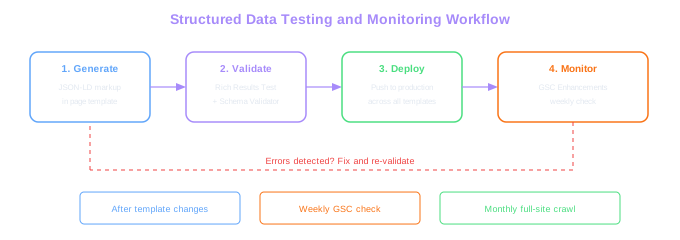
Create a structured data monitoring checklist: validate with Rich Results Test after any template change, check Search Console Enhancements weekly, and run a full-site crawl with JSON-LD extraction monthly. Structured data issues that go unnoticed for weeks can cost thousands of lost clicks.
Entity Signals: How Structured Data Feeds Google's Internal Knowledge Graph
The leak confirmed that structured data feeds into Google's entity understanding well beyond rich-result eligibility. Attributes around entity confidence and topical association rely on consistent, machine-readable signals across the page (Product schema, Brand schema, Organization schema) and across the site (sameAs links, NAP consistency, author markup).
For ecommerce, the practical move is treating structured data as the data layer Google uses to understand what your store is, not as a rich-snippet trick. Brand schema on every page with consistent legalName, sameAs links to verified social profiles, and Organization schema on the homepage with foundingDate, address, and contactPoint — these don't typically produce visible SERP changes on day one, but they raise the entity-confidence signals that influence siteAuthority over time.
Getting Product schema right is table stakes. Beyond that, sameAs is the cheapest authority signal you can ship — link your Brand entity to every verified social profile, Wikipedia page if applicable, and Google Business profile. The leak suggests these cross-references materially influence how Google models your brand entity.
Free Tools & Resources
Try our free SEO tools
Work Together With SEO Experts who understand ecommerce
World’s first Ecom-founded SEO agency