Keyword Research
9 min readSeasonal Keyword Trends
Ecommerce demand is never flat. Search volume for "swimwear" spikes in May, "Christmas gifts" starts climbing in September, and "tax software" peaks every March. Stores that anticipate these shifts and prepare their pages months in advance capture traffic that reactive competitors miss entirely. Seasonal keyword planning turns predictable demand cycles into a reliable revenue advantage.
In this guide
How Seasonality Affects Ecommerce Keyword Demand
Nearly every product category has a seasonal curve. Some are obvious, winter coats, pool supplies, back-to-school gear. Others are subtler. Search volume for "office chairs" spikes in January as companies furnish new workspaces after budget resets. "Protein powder" peaks in January and again in late spring as people chase New Year's resolutions and summer fitness goals.
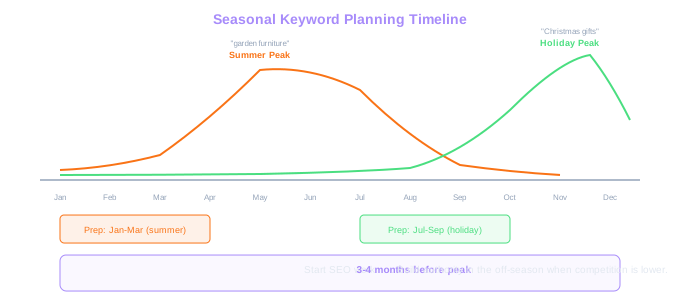
The magnitude of these swings matters more than you'd expect. A keyword like "garden furniture" might average 40,000 monthly searches, but that average masks a range from 8,000 in December to 110,000 in May. If your category page isn't ranking by April, you've already missed most of the demand curve. SEO takes time, so you need to start optimizing well before the peak.
Seasonality also affects keyword difficulty. During peak season, more competitors invest in content and ads, making it harder to rank. But during the off-season, competition drops and you can build authority when it costs less effort. The stores that publish and optimize seasonal content in the quiet months are the ones sitting at position 1-3 when demand returns.
Understanding your product's seasonal pattern is the foundation, and it builds on the principles from keyword research for ecommerce. Pull 2-3 years of Google Trends data for your main category keywords and chart the curves. You'll see patterns repeating year after year. These aren't guesses, they're predictable demand cycles you can plan around.
The 10x Swing
"Garden furniture" averages 40,000 monthly searches but swings from 8,000 in December to 110,000 in May. If your page is not ranking by April, you miss the majority of a demand curve that is 14x the trough.
Using Google Trends for Seasonal Planning
Google Trends is the single most useful free tool for seasonal keyword planning. Set the time range to 5 years and enter your category keywords to see recurring patterns. The tool shows relative search interest on a 0-100 scale, which makes it easy to compare the shape of demand curves even across different volume levels.
Compare related terms on the same graph to spot timing differences. "Christmas gifts for him" might peak two weeks earlier than "last minute Christmas gifts." "Summer dresses" might start climbing in March while "linen pants" doesn't pick up until May. These timing differences tell you when to prioritize which pages.
Google Trends also reveals emerging trends versus declining ones. If "sustainable swimwear" shows higher peaks each year while "cheap bikinis" shows a declining trend, that's a product and keyword strategy signal. Year-over-year growth in a seasonal keyword suggests both rising demand and a content opportunity.
The Related Queries section in Google Trends is often overlooked but extremely valuable. When you enter a seasonal term, it shows "rising" queries, searches that have grown significantly. These are often new product variations or emerging needs within your category. A rising query like "recyclable wrapping paper" during the holiday season could inform a new product page or blog post before your competitors notice the trend.
Export your Trends data and create a seasonal calendar. Map each keyword's peak month, the month you should start optimization, and the content assets needed. This becomes a repeatable playbook you execute year after year.
When using Google Trends, switch from "Web Search" to "Google Shopping" search type for ecommerce keywords. The Shopping graph often shows a different and more purchase-oriented seasonal curve than general web search, which includes informational queries.
Building a Seasonal Content Calendar
A seasonal content calendar maps your SEO activities across the entire year, which ensures you're always working 3-4 months ahead of demand peaks. For most ecommerce stores, this means the calendar has two layers: category page optimization timing and supporting content creation.
Start with your biggest seasonal peaks and work backward. If your top category keyword peaks in June, you want the category page fully optimized by April and supporting blog content published by March. This gives Google time to crawl, index, and rank your pages before the search volume surge.
The calendar should cover four content types for each seasonal push. First, the category page itself, update product selections, refresh copy with current-year references, and ensure internal links are in place. Second, buying guides like "Best [product] for Summer 2025" that target mid-funnel keywords. Third, comparison and versus pages that capture commercial intent. Fourth, informational content like "How to [seasonal activity]" that builds topical authority and links to your commercial pages.
For stores with multiple seasonal peaks, stagger the work so your team isn't overwhelmed. A home goods store might have garden furniture peaking in May, outdoor cooking in June, back-to-school organization in August, and holiday decor in November. If you try to prepare all four pushes in the same month, quality suffers. Instead, maintain a rolling 4-month preparation window.
Document which seasonal content performed well last year. Did your "best winter coats" guide drive traffic and conversions? Update it rather than creating something new. Google rewards freshness signals on existing URLs that already have ranking history and backlinks.
Preparing Category Pages Before Peak Season
Category pages are your highest-converting seasonal assets, and they need preparation before demand arrives. The work splits into three phases: content optimization, technical readiness, and internal linking.
Content optimization means updating the category page copy to reflect current-year products and trends. If your "winter jackets" category page still references last year's styles, both users and search engines notice. Add 300-500 words of buying guidance that includes current-year terms naturally, "winter jackets 2025," "warmest jackets this season", without keyword stuffing. Mention new arrivals and highlight any changes in materials, technology, or pricing.
Technical readiness ensures the page can handle increased traffic and provides a good user experience. Check page speed on mobile, ensure product images are optimized, and verify that filters and sorting work correctly. A category page that loads in 4 seconds during peak season loses 20-30% of potential visitors. Run a Lighthouse audit and fix performance issues before the rush.
Internal linking is the most underused seasonal tactic. In the months before peak season, publish blog content that targets related informational keywords and links back to your category page. Three or four well-placed blog posts linking to "winter jackets" with relevant anchor text can meaningfully boost the category page's authority before the November-December search spike.
Also review your navigation structure. Is the seasonal category easily accessible from your homepage or main navigation? During peak season, elevate seasonal categories in your site structure. A "Holiday Gift Guide" link in the main nav during November-December sends strong signals to both users and search engines about what matters on your site right now.
Add FAQ schema to your seasonal category pages addressing common questions shoppers have during that season. "What's the warmest jacket material?" or "When do summer sales start?" can earn featured snippets during peak demand periods, driving additional visibility at the moment it matters most.
Managing Post-Season Pages: Keep vs. Redirect
What happens to your seasonal pages after peak season ends is a decision that affects next year's performance. You have three options: keep the page live, redirect it, or remove it. The right choice depends on the page's authority and your URL strategy.
For evergreen seasonal pages, like "winter coats" or "summer dresses", keep them live year-round. These pages accumulate backlinks and ranking authority over time. Removing them in the off-season and recreating them next year means starting from zero every cycle. Instead, update the content before the next season begins. Swap out old product references, refresh the copy, and the page is ready to rank again with all its historical authority intact.
For date-specific pages like "best Christmas gifts 2024," you have a choice. If the page earned significant backlinks and rankings, redirect it to a current-year version ("best Christmas gifts 2025") and update the content. The redirect passes link equity to the new URL. Alternatively, use a year-agnostic URL like "/best-christmas-gifts" and update the content annually so the same URL accumulates authority year after year. This second approach is what we recommend for most stores.
Pages tied to one-time events or discontinued products should be redirected to the nearest relevant category page. A "Valentine's Day 2024 Gift Guide" for products you no longer carry should 301 redirect to your general gift guide or relevant category. Don't leave orphaned seasonal pages returning 404 errors, those waste the link equity the page earned.
Never noindex seasonal pages during the off-season. Some stores do this thinking they're cleaning up their site, but it destroys the page's ability to rank when the season returns. A thin page in the off-season is better than a page Google has been told to ignore.
Holiday-Specific Keyword Strategies
Major shopping holidays each have distinct keyword patterns that require tailored approaches. Black Friday and Cyber Monday keywords typically start gaining volume in early October, with "Black Friday deals" and "Cyber Monday [product]" entering the search landscape 6-8 weeks before the events. Pages targeting these terms should be published by late September and optimized through October.
Christmas keyword strategy splits into three phases. Early season (September-October) targets planners searching "Christmas gift ideas" and "holiday gift guide." Mid-season (November) targets active shoppers with "best Christmas gifts for [recipient]" and "[product] Christmas sale." Late season (December 15-24) targets last-minute buyers with "same day delivery gifts" and "digital gift cards." Each phase benefits from dedicated content.
Valentine's Day, Mother's Day, and Father's Day follow a compressed timeline. Search volume ramps up 2-3 weeks before the holiday and drops sharply the day after. For these holidays, your content needs to be ranking by the start of the ramp-up, which means publishing 2-3 months early. "Valentine's gifts for her" should be live and optimized by December at the latest.
Back-to-school represents a different pattern, it's more of a season than a single event. Keywords shift from "backpack for school" in July to "school supplies list" in August to "first day of school outfit" in late August. Covering the full keyword arc requires multiple content pieces published in sequence.
Track your holiday keyword performance year over year. Build a simple spreadsheet that logs each holiday keyword, the ranking position you achieved, estimated traffic, and revenue. This performance history lets you set realistic goals and allocate budget to the holidays that drive the most return for your store. Combining this data with SEO forecasting for ecommerce helps you predict revenue impact and prioritize the right seasonal pushes.
Free Tools & Resources
Try our free SEO tools
Work Together With SEO Experts who understand ecommerce
World’s first Ecom-founded SEO agency