Technical SEO
10 min readMobile-First SEO for Ecommerce
Google uses the mobile version of your store for all indexing and ranking decisions. If your product pages look different, load slower, or contain less content on mobile than desktop, that mobile version is what determines your search visibility. Over 70% of ecommerce traffic now comes from mobile devices. This makes mobile optimization a non-negotiable part of [technical SEO for ecommerce](/blog/technical-seo-for-ecommerce).
In this guide
What Mobile-First Indexing Means for Your Store
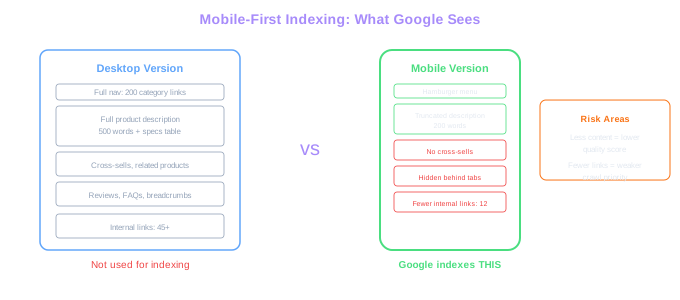
Mobile-first indexing means Google predominantly uses the mobile version of your content for indexing and ranking. This shift completed in 2023, and there is no opt-out. If your mobile pages have less content than desktop, Google only sees the mobile version. If your mobile site hides product descriptions behind tabs that require clicks to expand, Google may not index that content at all.
The practical impact is significant. Many ecommerce sites were built desktop-first and later adapted for mobile through responsive design or a separate mobile site. During that adaptation, content was often trimmed, product descriptions shortened, and internal links removed to fit smaller screens. All of those decisions now directly affect how Google evaluates those pages.
Check your mobile indexing status in Google Search Console under Settings > Indexing crawler. It should show "Googlebot Smartphone" as the primary crawler. If you see any pages where the mobile and desktop versions differ substantially in content, fix the mobile version first. That is what Google cares about.
Content Parity Risk
Desktop pages averaging 45+ internal links often drop to 12 on mobile. With mobile-first indexing, those missing 33 links weaken crawl priority for the pages they pointed to.
Responsive Design vs. Separate Mobile Sites
Responsive design serves the same HTML to all devices and uses CSS media queries to adjust the layout. A separate mobile site (m.example.com) serves different HTML entirely. For ecommerce SEO, responsive design is the clear winner and the approach Google recommends.
Separate mobile sites create canonicalization headaches. You need rel="alternate" and rel="canonical" tags pointing between desktop and mobile versions, and any mismatch causes indexing problems. We have audited stores where 30% of mobile pages had broken canonical references, resulting in duplicate content issues and wasted crawl budget.
Responsive design keeps a single URL per page, which consolidates all link equity and simplifies your sitemap, canonical tags, and hreflang implementation. Every inbound link points to one URL rather than splitting between desktop and mobile versions.
If you are still running a separate mobile site, plan a migration to responsive design. The migration requires careful redirect mapping (301 redirects from every m.example.com URL to its responsive equivalent) and usually takes three to six months to complete without significant traffic loss. The long-term SEO benefits consistently outweigh the short-term migration costs.
Mobile Page Speed: The Revenue Multiplier
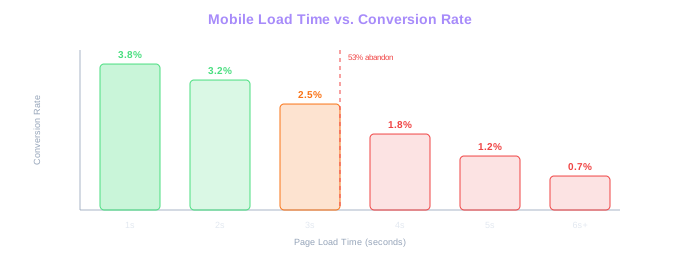
Mobile users are less patient than desktop users, and they are typically on slower connections. A page that loads in 3 seconds on desktop WiFi may take 6 seconds on a 4G mobile connection. Google's research shows 53% of mobile visitors abandon a site that takes longer than 3 seconds to load.
For ecommerce, the revenue impact is measurable. We tracked a fashion retailer before and after mobile speed optimization. Reducing mobile load time from 5.2 seconds to 2.1 seconds increased mobile conversion rate by 27% and mobile revenue by 34% over 90 days. The speed improvements cost less than one week of their paid advertising budget.
Prioritize these mobile-specific optimizations: compress hero images to under 100 KB, defer all non-critical JavaScript until after the first paint, reduce DOM size to under 1,500 elements on product pages, and eliminate render-blocking CSS. Our site speed optimization guide covers each of these techniques in depth. Test every change specifically on throttled mobile connections, not just desktop WiFi.
Use Chrome DevTools device emulation with network throttling set to "Fast 3G" as your baseline test. If your product pages load and become interactive within 3 seconds on Fast 3G, they will perform well for the vast majority of mobile users.
Revenue Impact
Reducing mobile load time from 5.2s to 2.1s increased mobile conversion by 27% and revenue by 34% over 90 days. The optimization cost less than one week of paid advertising budget.
Set up a mobile performance monitoring dashboard using Google Search Console's Core Web Vitals report filtered to mobile. Check it weekly. Mobile CWV scores tend to degrade over time as new apps, scripts, and features are added to the store.
Touch-Friendly Design and SEO Impact
Google evaluates mobile usability as part of its page experience signals, and our technical SEO service can help you identify and fix these issues. Pages that fail mobile usability checks receive lower rankings. The most common failures on ecommerce sites are tap targets that are too close together, text that is too small to read without zooming, and content wider than the screen.
Tap targets (buttons, links, form fields) must be at least 48x48 CSS pixels with 8 pixels of spacing between them. On product pages, this means your "Add to Cart" button, size selectors, and color swatches all need adequate spacing. Dense product grids with tiny tap targets frustrate mobile users and trigger Google's mobile usability warnings.
Font sizes below 16px on mobile force users to pinch-zoom, which Google flags as a usability issue. Set your base font size to 16px minimum and scale headings proportionally. Product descriptions, prices, and reviews should all be readable without any user intervention.
Avoid horizontal scrolling entirely. If any element extends beyond the mobile viewport width, Google marks the page as failing mobile usability. Common offenders include wide product comparison tables, oversized images without max-width constraints, and desktop-width iframes for video embeds or size guides.
Free Tools & Resources
Try our free SEO tools
Work Together With SEO Experts who understand ecommerce
World’s first Ecom-founded SEO agency