Advanced SEO
11 min readSERP Domination Strategy
Ranking first for a product keyword is good. Owning three or four distinct placements on that same results page is dramatically better. SERP domination means securing visibility across organic listings, Google Shopping carousels, image packs, featured snippets, People Also Ask boxes, and brand panels simultaneously. Each additional placement compounds click-through rates and pushes competitors below the fold. For ecommerce stores, this multi-format approach turns a single keyword into a compound traffic source. A well-planned [ecommerce SEO strategy](/blog/ecommerce-seo-strategy) should incorporate SERP domination from the start.
In this guide
What SERP Domination Actually Means
Search results pages are no longer ten blue links. A typical product query now shows a mix of shopping ads, free shopping listings, organic results, image carousels, People Also Ask accordions, video thumbnails, featured snippets, and knowledge panels. Each of these represents a separate entry point that your store can occupy. SERP domination is the practice of deliberately targeting as many of these placements as possible for your highest-value queries.
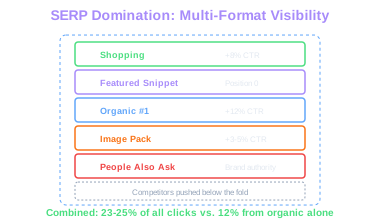
The math is straightforward. If your organic listing gets a 12% click-through rate, adding a Shopping result might capture another 8%, and an image pack appearance another 3-5%. Combined, you pull 23-25% of all clicks on that page instead of 12%. You also displace competitor visibility with every additional slot you claim. On mobile screens, where vertical space is even more limited, pushing a competitor from position four to below the fold can cut their traffic in half.
Start by auditing your top 50 revenue-driving keywords. For each one, screenshot the full SERP and catalog every result type present. Note which types your store currently appears in and which are occupied by competitors. This gap analysis becomes your roadmap. A keyword where you hold position two organically but have no Shopping listing, no image in the image pack, and no FAQ triggering a PAA result has three concrete expansion opportunities.
Compound CTR Effect
Organic listing at 12% CTR plus Shopping at 8% plus Image Pack at 3-5% yields 23-25% of all clicks. Each additional placement displaces competitor visibility on the same page.
Google Shopping: Free Listings and Feed Optimization
Google Shopping results appear at the top of commercial queries and on the Shopping tab, and since 2020, free product listings are available alongside paid Shopping ads. Submitting a product feed through Google Merchant Center gets your products into these free surfaces. If you sell physical products and have not set up Merchant Center, you are leaving one of the highest-visibility SERP placements on the table.
Feed quality determines whether your products appear and how they perform. Titles should front-load the most searched attributes: brand, product type, key differentiator, then variant details like color or size. 'Nike Air Max 90 Men Running Shoe White Size 10' outperforms 'Amazing Running Shoes for Men' because Google matches feed titles to search queries literally. Descriptions should include long-tail variations and specifications without keyword stuffing.
Product images in your feed need white or clean backgrounds, must show the actual product (not lifestyle shots), and should be at least 800x800 pixels. Google rejects feeds with watermarks, promotional overlays, or placeholder images. Keep pricing and availability synchronized between your feed and your live website. Mismatches trigger merchant account warnings and can suspend your listings.
Use product categories from Google's taxonomy, not your own internal categories. Add GTIN (barcode numbers) for every product that has one. Products with GTINs get significantly higher visibility in Shopping results because Google can match them against its product database and verify pricing across retailers.
Add the 'product_highlight' attribute to your Merchant Center feed. These are short bullet points (up to 10, max 150 characters each) that appear alongside your free listing and give you extra real estate to communicate key selling points like 'Free 2-day shipping' or 'Organic certified.'
Featured Snippets and People Also Ask
Featured snippets pull a block of content from a page and display it above the standard organic results, at position zero. For ecommerce, snippet opportunities cluster around informational queries tied to purchase decisions: 'how to choose a hiking backpack,' 'what thread count is best for sheets,' 'difference between LED and OLED monitors.' Winning these snippets puts your brand at the very top of the page for queries your potential customers search before buying.
To target snippets, identify which of your keywords already trigger a featured snippet (Ahrefs and Semrush both flag this). Then create or restructure content to directly answer the query in a format Google prefers. Paragraph snippets need a concise 40-60 word answer immediately following an H2 or H3 that matches the query. List snippets need an ordered or unordered list under a heading that frames the question. Table snippets need HTML tables with clear headers.
People Also Ask boxes expand across the page as users click them. Each PAA question links to a different source, so there are multiple opportunities to appear. Your FAQ pages, buying guides, and product comparison articles should target these questions directly. Use Search Console's query data and tools like AlsoAsked.com to find the PAA questions triggered by your commercial keywords.
Structure answers to PAA-style questions with the question as an H2, a direct one-to-two sentence answer immediately below, and then expanded detail. Google pulls the concise answer for the PAA box while users who click through get the full explanation on your page.
Image Pack Optimization for Product Queries
Image packs appear in roughly 30-40% of product-related searches, often near the top of the page. Clicking an image leads to Google Images, which then links to your product page. For visually driven categories like fashion, home decor, jewelry, and electronics, image pack appearances drive meaningful traffic.
Image SEO for product pages starts with file names and alt text. Name files descriptively: 'red-leather-crossbody-bag-front.jpg' instead of 'IMG_4821.jpg.' Alt text should describe the product accurately and include the primary keyword naturally: 'Red leather crossbody bag with gold chain strap.' Avoid stuffing alt text with keywords. Google devalues images with alt text that reads like a keyword list rather than a genuine description.
Image dimensions and quality matter. Use high-resolution images (at least 1200px on the longest edge) and serve them in modern formats like WebP with proper responsive srcset attributes. Google prefers images that are prominently placed on the page, above the fold, and directly relevant to the page content. A product image buried at the bottom of a long text article rarely enters the image pack.
Add structured data to reinforce the connection between your images and product information. Product schema with the 'image' property helps Google understand that a specific image represents a specific product with a price, availability, and rating. Pages with complete Product schema paired with high-quality images have a stronger chance of appearing in both the image pack and Shopping results.
Image Pack Reach
Image packs appear in roughly 30-40% of product-related searches. Pages with complete Product schema paired with high-quality, above-fold images have the strongest chance of appearing.
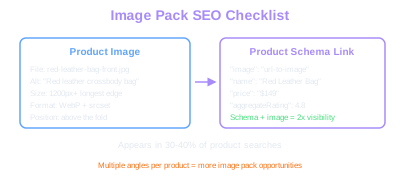
Create multiple image angles for each product (front, back, side, in-use, scale reference) and give each a distinct, descriptive file name and alt text. More indexed images per product page means more opportunities to appear in image pack results for different query variations.
Sitelinks, Brand Panels, and Branded SERPs
When someone searches your brand name, the results page they see shapes their first impression. A strong branded SERP shows your homepage with expanded sitelinks, a knowledge panel on the right, your social profiles, recent news mentions, and possibly People Also Ask questions that you influence. A weak branded SERP shows your homepage, a few scattered pages, and competitor ads above your results.
Sitelinks are the indented sub-links that appear beneath your main listing. Google generates these automatically based on your site structure and internal linking. You influence them by having a clear, shallow navigation hierarchy with descriptive anchor text on your main menu links. Pages you want as sitelinks should be one click from the homepage and have strong internal link equity. If an unwanted page keeps appearing as a sitelink, it usually means that page has disproportionate internal links relative to the page you actually want there.
Knowledge panels for ecommerce brands appear when Google has enough entity data about your business. Claim your Google Business Profile, ensure your Wikipedia entry exists (if your brand is notable enough), verify your brand on Wikidata, and maintain consistent NAP (Name, Address, Phone) data across business directories. Social profiles linked through your Organization schema markup appear in the panel and give you more real estate.
Monitor your branded SERP monthly. Search your brand name in an incognito window and take a full-page screenshot. Compare it against previous months. If competitors are bidding on your brand name in paid ads, that is a separate problem worth addressing through trademark complaints or defensive brand bidding, but it also signals that your organic branded presence needs strengthening.
The SERP Audit Workflow
A systematic SERP audit turns domination from a concept into a repeatable process. Run this workflow quarterly for your top keywords and monthly for your highest-revenue terms. The goal is a living document that tracks your multi-format visibility over time and surfaces the specific actions needed to claim additional placements.
Step one: export your top 100 keywords by revenue or traffic from your rank tracker. For each keyword, record the SERP features present: organic results, Shopping carousel, image pack, featured snippet, PAA, video carousel, local pack, knowledge panel. Tools like Semrush's SERP Features report or Ahrefs' SERP overview automate this for large keyword sets. Flag every SERP feature where your domain does not appear.
Step two: prioritize gaps by impact. A missing Shopping listing on a high-volume transactional keyword is higher priority than a missing PAA appearance on a low-volume informational query. Score each gap by keyword volume, current organic position, and the effort required to claim that placement. Feed optimization is usually faster than building content for featured snippets, which is faster than earning image pack appearances from scratch.
Step three: assign each gap to a specific action and owner. Shopping gaps go to whoever manages your Merchant Center feed. Snippet gaps go to your content team with specific formatting instructions. Image gaps go to your product photography or asset team. Track completion and re-audit after 30-60 days to measure progress. Over time, this workflow builds compound visibility that individual ranking improvements cannot match.
Build a simple spreadsheet with keywords as rows and SERP feature types as columns. Mark each cell as 'present and ours,' 'present but competitor,' or 'not present.' This matrix makes it obvious where your biggest domination opportunities are and lets you track progress over quarters.
Free Tools & Resources
Try our free SEO tools
Work Together With SEO Experts who understand ecommerce
World’s first Ecom-founded SEO agency