Technical SEO
12 min readSite Speed Optimization for Ecommerce
Page load time directly affects both rankings and revenue. Google uses Core Web Vitals as a ranking signal, and research consistently shows that every additional second of load time reduces ecommerce conversion rates by 7% to 12%. Faster stores rank higher and sell more. Speed is a core pillar of [technical SEO for ecommerce](/blog/technical-seo-for-ecommerce).
In this guide
Core Web Vitals: The Metrics That Matter
Google measures page experience through three Core Web Vitals: Largest Contentful Paint (LCP), Interaction to Next Paint (INP), and Cumulative Layout Shift (CLS). Each metric captures a different aspect of how users experience your store, and all three feed into Google's ranking algorithm.
LCP measures how long it takes for the largest visible element to render, typically a hero image or product photo. Google expects LCP under 2.5 seconds. For ecommerce, the primary offender is unoptimized product imagery. A single 3 MB hero image on a category page can push LCP past 4 seconds on mobile connections.
INP replaced First Input Delay in March 2024 and measures responsiveness across the entire page session, not just the first interaction. Every tap, click, and keyboard input counts. Ecommerce sites struggle here because of heavy JavaScript from analytics tools, chat widgets, and recommendation engines. Each third-party script competes for the main thread, delaying user interactions.
CLS tracks unexpected layout shifts during page load. On product pages, this commonly happens when images load without defined dimensions, when price badges inject after the initial render, or when lazy-loaded reviews push content downward. Google requires CLS below 0.1 for a passing score.
Revenue Correlation
Every additional second of load time reduces ecommerce conversion rates by 7-12%. A store loading in 2 seconds converts at nearly 3x the rate of one loading in 6 seconds.
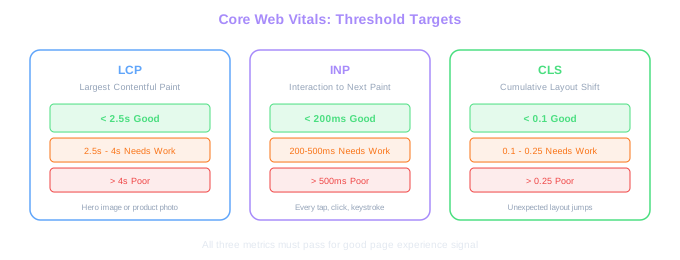
Image Optimization for Product Catalogs
Images account for 50% to 70% of total page weight on most ecommerce sites. A category page displaying 40 products with unoptimized images can easily exceed 15 MB. Proper image optimization alone can cut page load time in half.
Convert all product images to WebP or AVIF format. WebP delivers 25% to 35% smaller files than JPEG at equivalent quality, and AVIF pushes savings to 50%. Every major browser now supports WebP, and AVIF support covers over 90% of users. Serve AVIF with WebP fallback using the HTML picture element.
Resize images to match their display dimensions. A product thumbnail displayed at 300x300 pixels does not need a 2000x2000 source file. Generate multiple sizes at build time or through your CDN's image transformation API. Serve 1x images to standard displays and 2x to retina screens using srcset attributes.
Implement lazy loading for images below the fold. The first row of products on a category page should load immediately (eager loading), while everything below should use loading="lazy". This reduces the initial page weight dramatically. A furniture store we optimized went from loading 80 images on initial page load to 12, dropping LCP from 4.8 seconds to 1.9 seconds.
Use your CDN's automatic image optimization if available. Cloudflare Polish, Shopify's built-in image CDN, and Imgix all handle format conversion, resizing, and compression automatically. This eliminates the need to manage image variants manually.
JavaScript and Third-Party Script Management
The average ecommerce store loads 20 to 35 third-party scripts: analytics, heatmaps, chat widgets, review platforms, recommendation engines, retargeting pixels, and payment providers. Each script blocks the main thread, delays interactivity, and inflates page weight. Auditing and managing these scripts is one of the highest-impact speed improvements you can make.
Start by cataloging every script loading on your store. Open Chrome DevTools, go to the Network tab, filter by JS, and reload the page. Sort by size and load time. You will almost certainly find scripts that are no longer needed, duplicated trackers, or tools that were installed for a test and never removed.
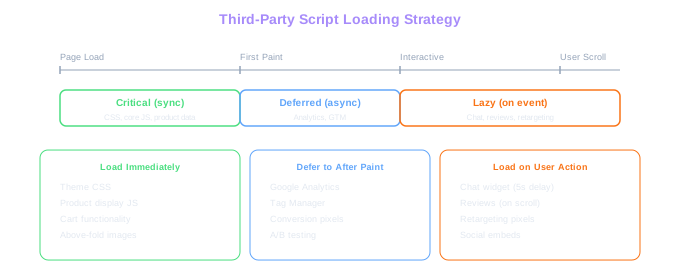
Defer non-critical scripts using the defer or async attribute. Analytics and marketing pixels do not need to load before the page renders. Move them below the fold or load them after the DOMContentLoaded event. For chat widgets, delay initialization until the user scrolls or after a 5-second timeout.
Consider using a tag manager like Google Tag Manager with trigger-based loading. Instead of firing every script on page load, configure triggers so retargeting pixels only fire on product pages, chat widgets load after 10 seconds of inactivity, and review widgets load only when the review section scrolls into view. This approach reduced main-thread blocking time by 40% on a home goods store we optimized.
Script Audit Result
The average ecommerce store loads 20-35 third-party scripts. Using trigger-based loading via Google Tag Manager reduced main-thread blocking time by 40% on a home goods store we optimized.
Server Response Time and Hosting
Time to First Byte (TTFB) measures how long it takes your server to respond with the first byte of HTML. Google recommends TTFB under 800 milliseconds, but the best ecommerce sites achieve under 200 milliseconds. Slow TTFB delays everything that follows: rendering, resource loading, and interactivity.
Shared hosting plans cannot deliver consistent TTFB for stores with more than a few hundred products. The database queries required to build category pages with filtering, sorting, and inventory checks demand dedicated resources. Upgrade to a VPS, dedicated server, or a managed ecommerce platform that handles infrastructure scaling.
Implement full-page caching for category and product pages. Most product pages change infrequently, and serving a cached HTML response eliminates database queries entirely. Varnish, Redis, or your platform's built-in cache layer can reduce TTFB from 1.5 seconds to under 100 milliseconds for cached pages.
Use a CDN with edge caching to serve static assets and cached pages from locations close to your customers. A CDN reduces latency by 50% to 80% for geographically distant visitors. For international stores, this is essential. A UK customer accessing a US-hosted store without a CDN adds 150 to 250 milliseconds of latency on every request.
Test your TTFB from multiple locations using WebPageTest.org. Select server locations that match your customer base. If TTFB varies wildly between regions, your CDN configuration likely needs attention.
Critical Rendering Path Optimization
The critical rendering path is the sequence of steps the browser takes to convert HTML, CSS, and JavaScript into rendered pixels. Optimizing this path means ensuring the browser can display meaningful content as quickly as possible, even while additional resources are still loading.
Inline your critical CSS directly in the HTML head. Critical CSS is the minimum set of styles needed to render the above-the-fold content. Tools like Critical or Penthouse can extract this automatically. By inlining 10 to 15 KB of critical CSS, the browser can paint the initial view without waiting for external stylesheet downloads.
Preload key resources that the browser discovers late in the parsing process. Web fonts, hero images, and critical JavaScript bundles should use rel="preload" link tags in the HTML head. Without preloading, the browser only discovers these resources after parsing CSS or JavaScript files, adding hundreds of milliseconds of delay.
Eliminate render-blocking resources by deferring non-critical CSS and JavaScript. Load your full stylesheet asynchronously using the media="print" trick with an onload handler that switches it to media="all". This lets the browser render the page using inlined critical CSS while the complete stylesheet downloads in the background.
For Shopify stores, the theme's liquid templates and app blocks often inject render-blocking scripts and styles. Ensuring your store performs well on phones is equally critical — see our mobile-first SEO guide. Audit your theme.liquid file and move non-essential app scripts to deferred loading. Each render-blocking resource adds 100 to 300 milliseconds to the initial render.
Free Tools & Resources
Try our free SEO tools
Work Together With SEO Experts who understand ecommerce
World’s first Ecom-founded SEO agency