SEO by Platform
12 min readShopify SEO Guide
Shopify powers over four million online stores, but its opinionated architecture creates specific SEO constraints that store owners must work around. Understanding how Shopify handles URLs, templates, and rendering lets you maximize organic visibility without fighting the platform. For a comprehensive walkthrough, also read our [Shopify ecommerce SEO](/blog/shopify-ecommerce-seo) guide.
In this guide
Shopify URL Structure and Its SEO Implications
Shopify enforces a rigid URL structure that prepends /collections/, /products/, and /pages/ prefixes to every page. Unlike open-source platforms, you cannot remove these prefixes or create fully custom URL patterns. A product URL always looks like /products/blue-widget, and a collection page always sits at /collections/summer-sale.
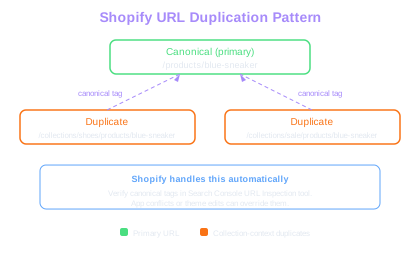
This matters for SEO because the /products/ prefix adds an extra directory level that some merchants find undesirable. However, Google has confirmed that URL structure alone is not a ranking factor, so the practical impact is minimal. The real concern is duplicate content: Shopify generates a secondary URL for every product within a collection context (/collections/shoes/products/blue-sneaker), which duplicates the canonical /products/blue-sneaker page.
Shopify handles this by placing a canonical tag pointing to the /products/ version. You should verify these canonical tags are working correctly using Google Search Console's URL Inspection tool. If you find indexed collection-based product URLs, the canonical tag may be overridden by a theme customization or app conflict.
Duplicate URL Risk
Each product in N collections creates N+1 crawlable URLs. A store with 2,000 products averaging 3 collections each generates 8,000 duplicate URLs that consume crawl budget if canonical tags fail.
Use the Shopify bulk URL redirect feature to clean up old product URLs after removing or renaming items. Broken product links that return 404 errors erode crawl efficiency over time.
Liquid Templates and On-Page SEO Control
Shopify themes use the Liquid templating language, which gives you direct control over title tags, meta descriptions, heading hierarchy, and structured data output. Every theme file under the /templates/ and /sections/ directories can be edited to inject SEO-relevant markup.
For title tags, edit the theme.liquid layout file or use the seo-specific title object provided by Shopify. The {{ page_title }} variable outputs whatever you set in the admin panel, but you can append your store name or add separators with Liquid logic. Meta descriptions follow the same pattern through {{ page_description }}.
Structured data requires more effort. While Shopify injects basic JSON-LD for products (price, availability, name), it often lacks review aggregate data, breadcrumb markup, and FAQ schema. You need to add these manually in the product.liquid or product.json template. Many SEO apps automate this, but manually coding your schema gives you full control and avoids the performance overhead of loading another app. Our schema generator can help you build valid structured data for products.
Heading hierarchy is another area where Shopify themes frequently fall short. Many themes use H1 tags for the store name in the header, pushing the actual page title to an H2. Audit your theme's header.liquid section and ensure each page type has exactly one H1 that describes the page content.
Shopify App Ecosystem and SEO Performance
Shopify's app ecosystem is both a strength and a liability for SEO. Apps like Yoast SEO for Shopify, Smart SEO, and SEO Manager can automate meta tags, generate sitemaps, and manage redirects. However, each app injects JavaScript into your storefront, increasing page load times and potentially affecting Core Web Vitals scores.
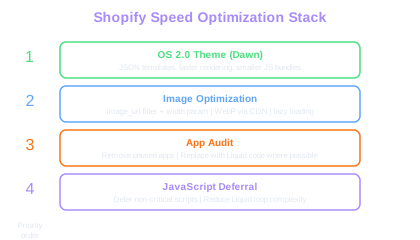
Every app you install adds at least one additional HTTP request, and many inject render-blocking scripts. We have measured stores where removing three unused apps improved Largest Contentful Paint by over 800 milliseconds. Before installing any SEO app, ask whether its functionality can be achieved through a simple Liquid code edit instead.
Shopify's built-in sitemap (sitemap.xml) is auto-generated and cannot be directly edited. It includes all published products, collections, pages, and blog posts. If you need to exclude specific URLs from the sitemap, you must either unpublish those pages or use an app that provides sitemap override functionality. The native sitemap also lacks image sitemap entries for product galleries, which some SEO apps address.
For redirect management, Shopify supports 301 redirects through the admin panel under Online Store > Navigation > URL Redirects. This interface works for small numbers of redirects but becomes unwieldy above a few hundred entries. For bulk redirect management during migrations or catalog changes, use the CSV import feature or a redirect management app.
Shopify Speed Optimization for SEO
Core Web Vitals directly influence Google rankings, and Shopify stores often struggle with Largest Contentful Paint (LCP) and Cumulative Layout Shift (CLS). Addressing these issues is a critical part of site speed optimization. The primary bottleneck is usually the theme itself combined with unoptimized images and excessive app scripts.
Shopify automatically serves images through its CDN and supports WebP format conversion. Use the image_url Liquid filter with width parameters to serve appropriately sized images: {{ image | image_url: width: 800 }}. This prevents the browser from downloading full-resolution 4000-pixel product images on mobile devices. Always include width and height attributes on image tags to prevent layout shift.
Theme selection matters enormously. Shopify's Online Store 2.0 themes built on the JSON template architecture generally perform better than legacy Liquid-only themes. Dawn, Shopify's reference theme, scores well on Core Web Vitals out of the box. If you are using an older theme, migrating to an OS 2.0 theme can yield substantial speed improvements.
Lazy loading below-the-fold images, deferring non-critical JavaScript, and minimizing Liquid loop complexity in collection templates all contribute to faster page loads. For stores with large catalogs, paginating collection pages to show 24 to 48 products rather than loading hundreds at once prevents excessive DOM size.
App Bloat Impact
Removing just 3 unused Shopify apps can improve LCP by over 800ms. Each app injects at least one render-blocking script, and the cumulative effect compounds on every page load.
Run a Shopify theme speed audit using Lighthouse on both a collection page and a product page. Collection pages with many product cards often score significantly worse than simpler product pages.
Shopify Blogging and Content SEO
Shopify includes a built-in blog engine, but it is limited compared to WordPress or dedicated CMS platforms. Blog posts support basic formatting, image embedding, and tags, but lack native category support, advanced content blocks, and built-in table-of-contents generation.
Despite these limitations, Shopify blogs remain the best option for content SEO because they live on your main domain and pass authority directly to your product and collection pages through internal links. Creating buying guides, comparison articles, and how-to content that links to relevant products builds topical authority and captures informational search traffic.
Optimize each blog post by setting a custom URL handle (slug), writing a unique meta description, and structuring the content with proper H2 and H3 subheadings. Use the blog post's featured image alt text strategically, as this image often appears in social shares and Google Discover. Add internal links from blog posts to relevant collection pages, and from product pages back to related blog content.
For stores that need more advanced content capabilities, consider using Shopify as the commerce engine while running a subdirectory blog through a reverse proxy setup with WordPress. This approach preserves the SEO benefit of same-domain content while unlocking WordPress's superior content management features. The technical setup requires careful configuration to avoid introducing latency or routing errors.
International SEO on Shopify
Shopify Markets allows you to sell in multiple countries and languages from a single store. When properly configured, Markets creates subfolders (e.g., /en-ca/, /fr/) with hreflang tags that tell Google which version of a page to show in each locale.
The hreflang implementation through Shopify Markets is generally reliable, but you should verify the tags using the hreflang checker in Google Search Console or a third-party crawling tool. Common issues include missing self-referencing hreflang tags and inconsistencies between the hreflang annotations and the actual content language on the page.
For stores using Shopify's automatic translation feature, review the translated content quality carefully. Machine-translated product descriptions and meta tags can read unnaturally, which hurts click-through rates from search results. Invest in professional translation or careful editing of auto-generated translations for your top-selling products and highest-traffic pages.
Currency and pricing display should use the localized format for each market. While this is primarily a conversion optimization concern, mismatched currency symbols in structured data can cause Google to display incorrect pricing in rich results, which damages trust and click-through rates.
Free Tools & Resources
Try our free SEO tools
Work Together With SEO Experts who understand ecommerce
World’s first Ecom-founded SEO agency