Search Fundamentals
10 min readCrawling & Indexing Product Pages
Google crawling your pages does not guarantee they will appear in search results. Crawling and indexing are two separate processes, and understanding the gap between them is critical for any store dealing with thousands of product URLs.
In this guide
- 1. Crawling vs. Indexing: The Difference That Matters
- 2. Why Google Skips Indexing Product Pages
- 3. Canonical Tags and Duplicate Content in Ecommerce
- 4. Managing Index Bloat From Filters and Facets
- 5. Checking Indexation Status in Google Search Console
- 6. Practical Steps to Improve Product Page Indexation
- 7. CompressedQualitySignals: The Pre-Filter Your PDPs Have to Pass
Crawling vs. Indexing: The Difference That Matters
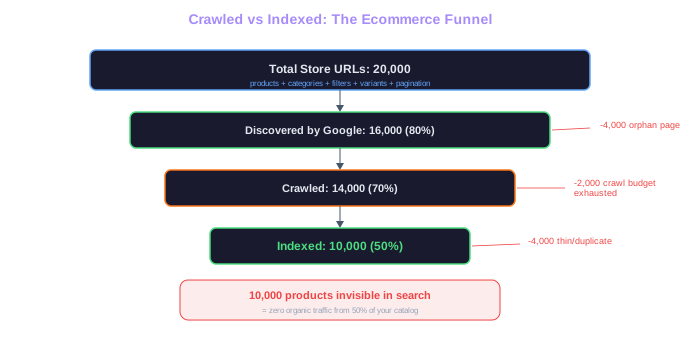
Crawling means Googlebot visited your page and downloaded its content. Indexing means Google analyzed that content, found it worthy of inclusion, and stored it in its search index. A page can be crawled but not indexed, which happens more often than most store owners realize.
Think of crawling as Google walking through every aisle in your physical store. Indexing is Google deciding which products are worth putting on the shelf for shoppers to find. If a product page has thin content, duplicates another page, or has technical issues, Google may crawl it and then decide it does not deserve a spot in the index.
For a typical online store with 20,000 product pages, we commonly see 30% to 50% of those pages go unindexed. That means thousands of products are invisible in search results. The gap between crawled and indexed pages is where most ecommerce SEO opportunities hide.
Hidden Opportunity
For a store with 20,000 product pages, 30-50% typically go unindexed. That means 6,000 to 10,000 products are invisible in search results, generating zero organic traffic.
Why Google Skips Indexing Product Pages
The most common reason Google refuses to index a product page is duplicate or near-duplicate content. When 500 products from the same manufacturer share identical descriptions differing only in the product name, Google sees little reason to index all 500 versions. It picks a few and ignores the rest.
Thin content is the second biggest culprit. A product page with a 20-word description, a price, and a buy button provides almost no information for Google to evaluate. Compare that to a competitor whose product page includes a 300-word unique description, customer reviews, specification tables, and usage instructions. Google will index the richer page and skip the thin one.
Technical signals can also prevent indexing. Pages that load slowly, return soft 404 errors, have conflicting canonical tags, or are blocked by noindex directives will never make it into the index regardless of their content quality.
Page quality signals matter too. If your site has a high ratio of low-quality pages, Google may reduce the crawl rate for your entire domain, making it harder for even your good pages to get indexed promptly. Effective crawl budget management helps you focus Google's attention on your most valuable pages.
Run a crawl with Screaming Frog or Sitebulb and filter for pages with fewer than 100 words of body text. Those thin pages are your top candidates for content improvement or consolidation.
Managing Index Bloat From Filters and Facets
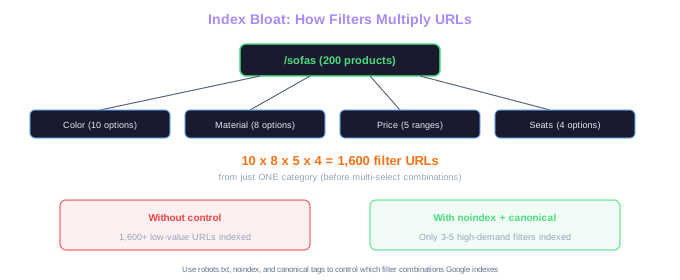
Index bloat occurs when Google indexes thousands of low-value URLs that dilute your site's overall quality signals. For ecommerce, the primary source of index bloat is faceted navigation that generates filterable URLs.
Consider a furniture store with 200 products in the "sofas" category. If shoppers can filter by color (10 options), material (8 options), price range (5 brackets), and seating capacity (4 options), the possible URL combinations reach 1,600 before accounting for multi-select filters. Most of these filtered views show the same small set of products in different orders.
The standard approach to controlling index bloat involves three layers. First, use robots.txt and XML sitemaps to block Googlebot from crawling the most obvious low-value filter patterns. Second, apply noindex tags to filtered pages that Googlebot can still reach through other paths. Third, use canonical tags to point filtered views back to the main category page.
A more surgical approach is to selectively allow indexing on filter combinations that match real search queries. If people search for "leather sofas" in meaningful numbers, the /sofas?material=leather URL might be worth indexing. But /sofas?material=leather&color=brown&seats=3 almost certainly is not.
Shopify stores handle this differently from WooCommerce or Magento because Shopify does not generate filter URLs by default. Third-party filter apps like Smart Product Filter create these URLs, and each app handles canonical tags and indexation controls differently. Always verify how your filter app manages these technical details.
Filter Math
A sofa category with 10 colors, 8 materials, 5 price ranges, and 4 seat options generates 1,600 filter URLs. Across 20 categories, that is 32,000 low-value pages competing with your real product pages for crawl budget.
Checking Indexation Status in Google Search Console
Google Search Console provides two primary tools for monitoring indexation. The Pages report (formerly Coverage report) shows how many of your pages are indexed and why the rest were excluded. The URL Inspection tool lets you check the status of individual pages.
In the Pages report, focus on the "Not indexed" tab. Google groups excluded pages by reason: "Crawled - currently not indexed", "Discovered - currently not indexed", "Duplicate without user-selected canonical", "Excluded by noindex tag", and several others. Each reason requires a different fix.
"Crawled - currently not indexed" means Google visited the page but chose not to add it to the index. This usually signals a content quality issue. Improving the page's content, adding unique descriptions, or enhancing it with reviews and structured data can help.
"Discovered - currently not indexed" means Google knows the URL exists but has not bothered to crawl it yet. This indicates low crawl priority, often caused by weak internal linking or the page being too deep in the site hierarchy.
The URL Inspection tool shows you exactly what Google sees when it crawls a specific page. Use it to verify that your canonical tags are being respected, that your page is rendering correctly, and that no accidental noindex tags are blocking indexation. We recommend inspecting 10 to 20 representative product pages monthly to catch issues early.
Export the "Not indexed" data from GSC as a spreadsheet and categorize pages by type (product, category, filter, blog). This reveals whether your indexation problems are concentrated in a specific page type, making the fix more targeted.
Practical Steps to Improve Product Page Indexation
Start by auditing which product pages are currently indexed. Use the site: operator in Google (site:yourstore.com/products/) to get a rough count, then cross-reference with GSC data for accuracy. If less than 70% of your product pages are indexed, you have work to do.
Write unique product descriptions for your top-selling and highest-margin products first. These pages have the most revenue potential from organic search. Even adding 150 to 200 words of unique, descriptive content per product page can make the difference between indexed and ignored.
Consolidate pages that serve no independent purpose. If you have 30 color variants of the same product and none of those color-specific terms have search volume, consolidate them under a single product page with a color selector. That one strong page will outperform 30 thin pages every time.
Strengthen internal linking to product pages you want indexed. Link from related blog posts, from the homepage's featured products section, and from other product pages via "customers also bought" or "related products" widgets. Each additional internal link signals to Google that the page matters.
Finally, keep your sitemap clean. Remove URLs that return 404 errors, that are set to noindex, or that you have decided to consolidate. A lean sitemap that only contains pages you genuinely want indexed gives Google a clearer picture of your site's structure. For a deeper dive into these technical foundations, see our technical SEO for ecommerce guide.
CompressedQualitySignals: The Pre-Filter Your PDPs Have to Pass
The Content Warehouse leak revealed a module called CompressedQualitySignals that acts as a per-document "rap sheet". It bundles siteAuthority, unauthoritativeScore, lowQuality, anchorMismatchDemotion, exactMatchDomainDemotion, and pandaDemotion. Documents that fail the pre-filter get passed over before more expensive ranking work even runs.
For product pages, this changes prioritisation. Thin PDPs with template descriptions can trigger the lowQuality flag at scale and drag down the entire site's standing. A store with 10,000 products, 8,000 of which have only manufacturer-supplied paragraphs, is teaching Google that the catalogue is mostly low-effort. The fix is rarely "write more keyword-rich copy" — it's pruning, consolidating variants under a single canonical, and concentrating editorial effort on the PDPs that actually carry revenue.
Indexing decisions follow from this. Google often refuses to index PDPs that look low-quality, even when they're crawled. If your GSC "Crawled — currently not indexed" count is high, the lowQuality and pandaDemotion signals are a likelier explanation than crawl budget.
Free Tools & Resources
Try our free SEO tools
Work Together With SEO Experts who understand ecommerce
World’s first Ecom-founded SEO agency