Content & Authority
8 min readFAQ Pages for Ecommerce
FAQ pages are one of the most underused SEO assets in ecommerce. Done well, they capture long-tail search traffic, reduce support tickets, and earn featured snippets that put your store at position zero. We walk through how to structure FAQ content so it ranks, converts, and scales across your entire catalog.
In this guide
Why FAQ Pages Are an SEO Opportunity
Most ecommerce stores treat FAQ pages as an afterthought, a dumping ground for generic questions buried in the footer. That is a missed opportunity. Google processes billions of question-based queries every day, and FAQ content structured with proper markup can win featured snippets, People Also Ask boxes, and voice search results.
The traffic potential is substantial. Question queries like "can I wash suede shoes in a washing machine" or "what size generator do I need for a caravan" represent high-intent searches from people actively researching before a purchase. A store that answers these questions well earns the click and establishes trust before the shopper ever sees a product page. Learn more in our category page SEO guide.
FAQ pages also serve a dual purpose internally. Every question answered on your site is a support ticket that never gets filed. Stores we have worked with report 15-30% reductions in repetitive customer service inquiries after launching comprehensive FAQ sections tied to their product categories.
Sourcing the Right Questions
The worst FAQ pages are written by marketers guessing what customers might ask. The best are built from actual customer data. Start by exporting your last 12 months of customer service tickets, live chat transcripts, and product review comments. Sort by frequency and group into themes, you will quickly see which questions come up repeatedly.
Google Search Console is another rich source. Filter your queries to those containing question words: what, how, why, can, does, which, where. These are the exact phrases people type before buying. Pay attention to queries where your site appears on page two or three, those represent ranking opportunities where a dedicated FAQ answer could push you onto page one.
Competitor FAQ pages and third-party forums are useful for filling gaps. Search Reddit, Quora, and niche forums for questions about your product categories. If people are asking these questions elsewhere, they are also typing them into Google. Tools like AnswerThePublic and AlsoAsked generate question clusters from autocomplete data that reveal how real users phrase their queries.
Finally, talk to your sales and support teams directly. They hear the same objections and confusion points daily. Questions about shipping times, return policies, product compatibility, sizing, and material care tend to recur across nearly every ecommerce vertical.
Export your top 100 customer service questions and cross-reference them with Google Search Console question queries. The overlap between what customers ask your team and what they search on Google reveals your highest-priority FAQ content.
Structuring FAQ Content for Rankings
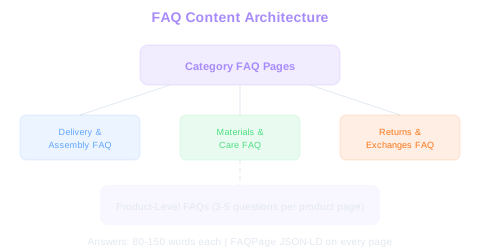
A single monolithic FAQ page rarely performs well in search. Google prefers pages with clear topical focus, so split your FAQs across multiple pages aligned to product categories or themes. A furniture store might have separate FAQ pages for delivery and assembly, materials and care, returns and exchanges, and custom orders.
Each FAQ page should target a cluster of related questions. Structure the page with a clear heading, a brief introductory paragraph, and then individual question-answer pairs. Each answer should be 80-150 words, long enough to provide genuine value but concise enough to win a featured snippet.
Use FAQ schema markup (FAQPage structured data) on every FAQ page. Our schema generator can help you create the correct markup. This tells Google explicitly that your content follows a question-and-answer format, making it eligible for rich results. Implement the JSON-LD format in your page template so every FAQ page automatically receives the markup without manual intervention.
Internal linking within FAQ answers is critical. When a question relates to a specific product or category, link to that page within the answer. A question about "how to care for leather boots" should link to both your leather boots category and your boot care product page. This creates topical connections that strengthen your entire site.
Snippet Sweet Spot
FAQ answers between 80-150 words hit the sweet spot for featured snippets. Shorter answers lack depth, longer ones get truncated. Implement FAQPage JSON-LD on every FAQ page to qualify for rich results automatically.
FAQ Schema Markup and Rich Results
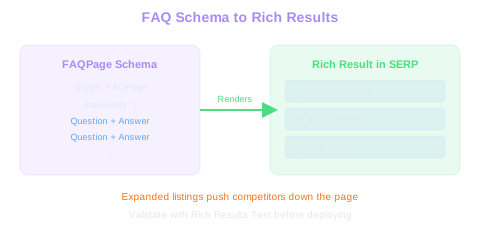
FAQ schema markup is one of the few structured data types that directly expands your search result real estate. When Google renders FAQ rich results, your listing can display two or more question-answer dropdowns directly in the SERP. This pushes competitors further down the page and dramatically increases your click-through rate.
Implementation is straightforward. Each FAQ page needs a FAQPage schema wrapper containing individual Question entities. Each Question includes an acceptedAnswer with the text of your response. Nest the JSON-LD in a script tag in the page head or body, both work, but head placement is conventional.
Validate your markup using Google's Rich Results Test before deploying. Common errors include mismatched question text between the visible page and the schema, missing required fields, and incorrectly nested objects. After deployment, monitor the FAQ appearance in Google Search Console under the Enhancements section.
One important caveat: Google has tightened FAQ rich result eligibility over the past two years. As of recent updates, FAQ rich results primarily appear for well-known, authoritative websites. Smaller stores may not see the expanded SERP display, but the schema still helps Google understand your content structure, which benefits rankings even without the visual enhancement.
Keep the Schema
Even without visible rich results, FAQ schema helps Google understand your content structure and benefits rankings. Eligibility criteria change over time, and stores with markup already in place benefit immediately when access expands.
Even if Google does not display FAQ rich results for your domain, keep the schema markup in place. Structured data helps Google parse your content accurately, and eligibility criteria can change. Stores that already have the markup benefit immediately when Google expands access.
Category-Level and Product-Level FAQs
Beyond standalone FAQ pages, embed relevant questions directly on category and product pages. A well-optimized category page for "wireless headphones" can include three to five frequently asked questions at the bottom: battery life expectations, Bluetooth version differences, noise cancellation types. These embedded FAQs target long-tail queries that the category page alone cannot rank for.
Product-level FAQs address specific items. Questions about compatibility, dimensions, warranty coverage, and usage instructions belong on individual product pages. Source these from product reviews and customer questions on your own site and on marketplaces like Amazon where the same products are discussed.
The key is avoiding duplication. If a question applies broadly to a category, answer it on the category FAQ page and link from individual product pages. If a question is specific to one product, place it only on that product page. This prevents Google from seeing duplicate content across your site and ensures each page targets unique queries.
For Shopify, WooCommerce, or similar platforms, use a reusable FAQ component that pulls questions from a metafield or custom field. This lets your content team add and update FAQs without touching code, and it scales cleanly across hundreds of product pages.
Measuring FAQ Page Performance
Track FAQ page performance through three lenses: search visibility, user engagement, and support deflection. In Google Search Console, filter performance by FAQ page URLs and monitor impressions, clicks, and average position. Look specifically at question-format queries where your FAQ pages appear.
Engagement metrics reveal whether your answers are useful. High bounce rates on FAQ pages are not necessarily bad, if a shopper finds their answer quickly and then navigates to a product page, that is a successful interaction. Track the click path from FAQ pages: what percentage of visitors proceed to a product or category page within the same session.
Support deflection is the business metric that justifies continued investment in FAQ content. Compare monthly support ticket volume for topics covered by FAQ pages against the period before those pages existed. Break this down by question category, shipping, returns, product care, compatibility, to identify which FAQ content delivers the most value.
Refresh FAQ content quarterly. Questions shift as your product catalog evolves, policies change, and new customer concerns emerge. Archive questions that no longer receive search traffic, and add new ones based on recent customer service data and Search Console queries.
Free Tools & Resources
Try our free SEO tools
Work Together With SEO Experts who understand ecommerce
World’s first Ecom-founded SEO agency