Search Fundamentals
10 min readHow Google Finds Online Stores
Before Google can rank your products, it needs to discover them. Understanding how Googlebot navigates ecommerce sites reveals why some stores get thousands of pages indexed while others struggle to get even their main category pages noticed.
In this guide
- 1. How Googlebot Crawls Ecommerce Sites
- 2. The Crawl Queue and Priority System
- 3. JavaScript Rendering and Ecommerce Platforms
- 4. XML Sitemaps for Product Discovery
- 5. Internal Links as Discovery Paths
- 6. Common Discovery Problems in Ecommerce
- 7. Inside Google's Indexing Pipeline: Trawler, Alexandria and Mustang
How Googlebot Crawls Ecommerce Sites
Googlebot is the software Google uses to fetch web pages. It works by following links from one page to the next, much like a shopper clicking through your store. When it lands on a page, it reads the HTML, follows links it finds there, and adds newly discovered URLs to its crawl queue.
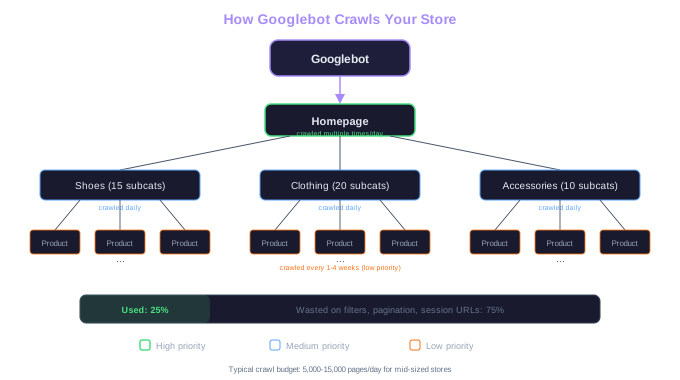
For ecommerce sites, this crawling process hits complications fast. A homepage might link to 15 category pages, each linking to 20 subcategories, each listing 40 products. That is already 12,000 product pages discovered from a single crawl path. But Googlebot does not have unlimited resources. Google assigns each site a crawl budget based on the site's authority and server capacity.
A mid-sized store with moderate domain authority might see Googlebot request 5,000 to 15,000 pages per day. If your store has 80,000 URLs including filtered views and pagination, it could take weeks for Googlebot to visit every page once. That is why crawl efficiency matters so much for ecommerce. Every URL Googlebot wastes on a low-value filtered page is a URL it did not spend on a product page you actually want ranked. Learn more about how this process continues in our guide to crawling and indexing product pages.
Crawl Budget Math
15 categories x 20 subcategories x 40 products = 12,000 product pages from one crawl path. Add filtered views and pagination, and a 50,000-SKU store can easily generate 200,000+ crawlable URLs.
The Crawl Queue and Priority System
Googlebot does not crawl all pages equally. It maintains a priority queue that determines which URLs get crawled first and how often they get revisited. Pages that change frequently, receive more internal links, or have higher authority get crawled more often.
Your homepage might get crawled several times per day. Top-level category pages may be crawled daily or every few days. Individual product pages deeper in the site structure might only get crawled every few weeks. For a seasonal product that just launched, that delay can mean missing weeks of potential search traffic.
We can influence crawl priority through internal linking. A product page linked from your homepage, a category page, and three blog posts will get crawled sooner and more frequently than one only accessible through two levels of category navigation. This is why strategic internal linking is one of the highest-impact SEO tactics for stores.
Check your crawl stats in Google Search Console under Settings > Crawl Stats. If the average response time exceeds 500ms, your server speed may be limiting how many pages Googlebot crawls per day.
JavaScript Rendering and Ecommerce Platforms
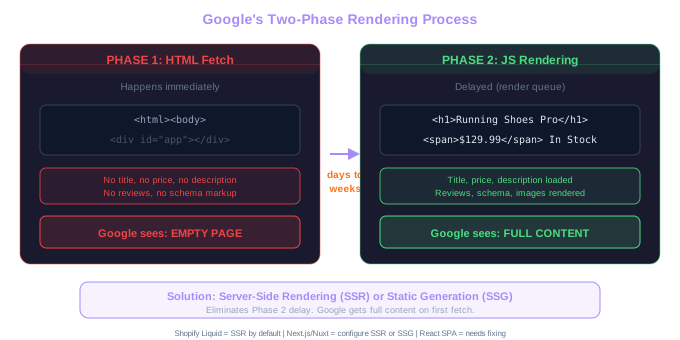
Many modern ecommerce platforms use JavaScript to load product information, pricing, and reviews. Shopify themes, React-based headless stores, and some WooCommerce setups rely heavily on client-side rendering. This creates a challenge because Googlebot crawls in two phases.
In the first phase, Googlebot fetches the raw HTML. If your product title, description, and price are loaded via JavaScript after the page renders, that initial HTML fetch returns an empty shell. Google then queues the page for a second rendering phase where it executes JavaScript. This rendering queue can add days or even weeks of delay before Google sees your actual content.
Shopify stores using the standard Liquid templating system generally avoid this problem because product data is rendered server-side. But stores using headless commerce setups with frameworks like Next.js or Nuxt need to implement server-side rendering (SSR) or static site generation (SSG) to ensure Googlebot sees product content on the first fetch.
We have audited stores where 30% of product pages were not indexed because the product schema markup, reviews, and even the product title were all loaded via JavaScript that Googlebot failed to render. Switching to server-side rendering fixed the indexation within three weeks. Our technical SEO for ecommerce guide covers rendering issues in more detail.
Real Case
We audited a store where 30% of product pages were not indexed. The product title, schema markup, and reviews were all loaded via JavaScript. Switching to server-side rendering fixed indexation within 3 weeks.
XML Sitemaps for Product Discovery
An XML sitemap is a file that lists the URLs you want Google to know about. For ecommerce sites, sitemaps serve as a direct channel to tell Google which pages exist, when they were last updated, and how frequently they change.
A well-structured ecommerce sitemap strategy uses multiple sitemap files. One sitemap for product pages, another for category pages, one for blog content, and one for static pages like your about page and shipping policy. This separation lets you monitor indexation by page type in Search Console.
We typically recommend including only canonical, indexable pages in your sitemaps. Filtered URLs, out-of-stock product pages you have set to noindex, and paginated listing pages beyond page one should be excluded. A sitemap that lists 200,000 URLs when only 30,000 are indexable sends a confusing signal to Google about your site's quality.
Most ecommerce platforms generate sitemaps automatically. Shopify creates a sitemap.xml that includes products, collections, pages, and blog posts. WooCommerce with Yoast SEO or RankMath generates sitemaps with more configuration options. Regardless of platform, review your sitemap monthly to ensure it reflects your current site structure.
Sitemap Structure Example
sitemap-products.xml (30,000 URLs) + sitemap-categories.xml (200 URLs) + sitemap-blog.xml (150 URLs) + sitemap-pages.xml (20 URLs). Separate files let you track indexation by content type in Search Console.
Submit your sitemaps in Google Search Console and check the coverage report after two weeks. If the ratio of indexed to submitted pages is below 70%, investigate why Google is choosing not to index a significant portion of your submitted URLs.
Internal Links as Discovery Paths
While sitemaps tell Google that pages exist, internal links show Google how those pages relate to each other and which ones matter most. A product page with 50 internal links pointing to it carries more crawl priority than one with only 2.
Category pages are the backbone of internal linking for ecommerce. Each category page links to dozens of products, passing crawl priority and ranking signals to those product pages. Well-structured breadcrumb navigation adds another layer of internal links, connecting products back to their parent categories and the homepage.
Cross-selling and related product sections create lateral internal links between products. When a product page for running shoes links to related laces, insoles, and socks, those connections help Googlebot discover more of your catalog while also distributing link equity across your store.
Orphan pages are the enemy of discovery. An orphan page has no internal links pointing to it. It might exist in your sitemap, but if Googlebot cannot reach it by following links from any other page, it signals low importance. We frequently find orphan product pages in stores that have restructured their categories without updating internal links. A solid site architecture for ecommerce prevents these orphan page problems.
Common Discovery Problems in Ecommerce
The most common discovery problem we see is stores blocking Googlebot from essential resources in their robots.txt file. Some WooCommerce installations block the /wp-admin/ directory, which is correct, but accidentally also block CSS and JavaScript files that Googlebot needs to render pages properly.
Another frequent issue is infinite crawl traps from faceted navigation. A clothing store that lets users combine size, color, material, brand, and price filters can generate millions of unique URLs. Without proper controls, Googlebot can spend its entire crawl budget exploring these filter combinations while never reaching deep product pages.
Session-based URLs also cause problems. Some ecommerce platforms append session IDs or tracking parameters to URLs, creating what looks like thousands of duplicate pages. Each visit by Googlebot generates a new URL variant, wasting crawl budget on pages that are all identical in content.
Pagination can slow discovery too. If your category page lists 500 products across 25 paginated pages, Googlebot needs to crawl through page 1, page 2, page 3, and so on to discover all products. Products listed on page 20 may take significantly longer to get discovered and indexed than those on page 1.
Inside Google's Indexing Pipeline: Trawler, Alexandria and Mustang
The 2024 Content Warehouse leak named the systems that move your store from URL to ranked result. Trawler crawls and fetches pages. Alexandria indexes them. Mustang then runs initial scoring (the Ascorer) using hundreds of features, before twiddlers rerank the results. Every product page on your store passes through every stage.
For stores, the pipeline implication is that crawl-priority signals (link equity, freshness, internal-link depth) decide how often Trawler revisits a URL. Pages buried 4+ clicks deep, with no inbound internal links and stale lastmod dates, get crawled rarely — and changes you make to them take much longer to show up in rankings. The leak's hostAge attribute also confirms the long-rumoured "sandbox": new domains under ~12 months see capped visibility regardless of optimisation.
Indexing is also not binary. Alexandria can index a URL without showing it (Google Search Console marks these "Crawled — currently not indexed"), and the choice is influenced by quality signals already computed at index time. The takeaway for ecommerce: treat crawl architecture and the technical baseline as load-bearing — they decide which of your pages even make it to the scoring stage.
Free Tools & Resources
Try our free SEO tools
Work Together With SEO Experts who understand ecommerce
World’s first Ecom-founded SEO agency