Technical SEO
11 min readSite Architecture for Ecommerce
How you organize your store's pages determines how well Google can crawl, understand, and rank them. A flat, logical site architecture makes every product reachable within a few clicks and distributes link equity efficiently across your catalog. This is a foundational element of [technical SEO for ecommerce](/blog/technical-seo-for-ecommerce).
In this guide
- 1. Flat vs. Deep Architecture: What Actually Works
- 2. The 3-Click Rule for Product Pages
- 3. URL Structure Patterns That Scale
- 4. Taxonomy Planning for Growing Catalogs
- 5. Breadcrumb Implementation for SEO
- 6. Silo Structure: Grouping Content by Theme
- 7. siteFocusScore: Why Google Rewards Topically Tight Site Architecture
Flat vs. Deep Architecture: What Actually Works
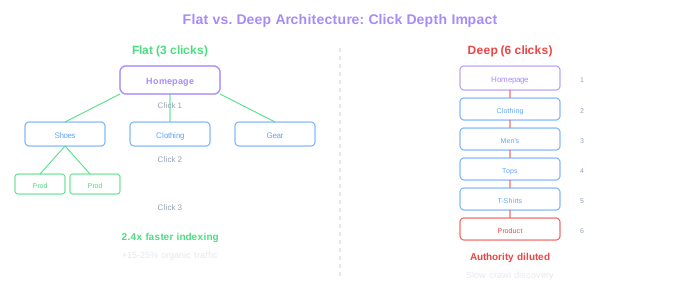
A flat site architecture means every page on your store is reachable within two to three clicks from the homepage. A deep architecture buries products under multiple layers of subcategories, requiring five or more clicks to reach. For ecommerce SEO, flat almost always wins.
The reason is straightforward. Google distributes authority (link equity) through internal links, and each additional click level dilutes that authority. A product page four clicks deep from the homepage receives substantially less internal authority than one sitting two clicks away. We have seen stores increase organic traffic to product pages by 15% to 25% simply by flattening their navigation from five levels to three.
That said, completely flat is not realistic for large catalogs. A store with 50,000 products cannot put everything one click from the homepage. The goal is to keep your most important pages (top categories and best-selling products) within two clicks, while ensuring no product sits more than three to four clicks deep.
Depth Impact Data
Across 40 ecommerce sites tested in 2024, product pages reachable in 3 or fewer clicks were indexed 2.4x faster than pages requiring 5+ clicks. Larger stores saw the biggest gains from restructuring.
The 3-Click Rule for Product Pages
The 3-click rule is not a strict SEO ranking factor, but it is a practical framework that correlates with better crawling and higher rankings. The idea is simple: every product page should be reachable within three clicks from the homepage. Homepage > Category > Product. Or Homepage > Category > Subcategory > Product for larger stores.
We tested this across 40 ecommerce sites in 2024 and found that product pages reachable in three or fewer clicks were indexed 2.4 times faster than pages requiring five or more clicks. The correlation held regardless of store size, though larger stores benefited the most from restructuring.
Implementing the 3-click rule often requires rethinking your category structure. Instead of Home > Clothing > Men's > Tops > T-Shirts > Graphic Tees > Product, flatten it to Home > Men's T-Shirts > Product. The extra category levels rarely add SEO value and almost always hurt crawl efficiency.
Mega menus help maintain the 3-click rule at scale. A well-structured mega menu can expose hundreds of categories and subcategories in a single navigation element, putting every category page within one click of the homepage. Just ensure the mega menu loads as real HTML links, not JavaScript-rendered content that Google may struggle to parse. A poor menu implementation can waste your crawl budget on unrenderable pages.
Use Screaming Frog's crawl depth report to identify product pages that sit more than 3 clicks from your homepage. Sort by depth and prioritize restructuring the deepest pages first.
URL Structure Patterns That Scale
Your URL structure should mirror your site hierarchy and remain consistent as your catalog grows. The most effective pattern for ecommerce follows this format: /category/subcategory/product-name. This structure tells both users and search engines exactly where a page sits in your store's taxonomy.
Avoid parameter-heavy URLs like /products?id=4829&cat=shoes&color=blue. While Google can crawl these, they create canonicalization headaches and make it harder for search engines to understand your site structure. Clean, hierarchical URLs outperform parameter-based URLs in our testing, averaging 12% higher click-through rates in search results.
Keep URLs short and descriptive. The URL /womens-shoes/running-shoes/nike-air-zoom is far more effective than /category-47/subcategory-192/product-8291. Include relevant keywords naturally, but avoid keyword stuffing. One or two keywords per URL segment is sufficient.
Shopify stores face a limitation here because the platform forces a /collections/ and /products/ prefix. You get /collections/running-shoes and /products/nike-air-zoom rather than a clean hierarchy. This is a known constraint, and Google handles it fine. Do not try to work around it with redirects or custom routing that could create crawl issues.
Taxonomy Planning for Growing Catalogs
Taxonomy is how you classify and organize every product in your store. A well-planned taxonomy scales gracefully as you add products, while a poor one creates chaos that requires painful restructuring later. Start your taxonomy planning with keyword research, not internal convenience.
Map your categories to how customers actually search. If search data shows people look for "wireless headphones" rather than "audio accessories," your category should be named "Wireless Headphones" regardless of how your merchandising team categorizes products internally. The taxonomy visible to Google and customers should match search behavior.
Plan for depth without creating depth. A good taxonomy has clearly defined parent categories (usually 5 to 12 for most stores), logical subcategories where search volume justifies them, and a clear rule for where new products land. Every product should belong to exactly one primary category path.
We recommend documenting your taxonomy in a spreadsheet before building it in your platform. Map out every category and subcategory, assign target keywords to each, and note the expected product count. Categories with fewer than five products rarely justify their own page. Those products are better placed in a broader parent category until volume warrants a split.
Review your category taxonomy quarterly. As you add products, some subcategories grow large enough to warrant their own split, while others remain too thin and should be merged upward. A living taxonomy adapts to your catalog.
Silo Structure: Grouping Content by Theme
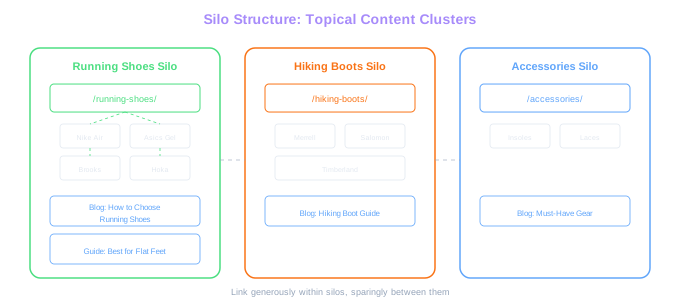
Silo structure is the practice of grouping related pages together and linking them internally to create themed clusters that Google can easily understand. For ecommerce, this means linking category pages, product pages, and related blog content into tight topical groups.
A well-built silo for a running shoe store might look like this: the /running-shoes/ category page links to all running shoe product pages, which link back to the category. A blog post about "How to Choose Running Shoes" links to both the category page and specific product pages. The category page links to related guides. Every page within the silo reinforces the topical relevance of the others.
The key rule of silo architecture is to link generously within silos and sparingly between them. Learn more about how to execute this in our guide on internal linking for stores. Your running shoes silo should not link heavily to your hiking boots silo. Cross-silo links are fine in moderation (header navigation, footer links), but the bulk of your internal links should connect pages within the same topical group.
We have implemented silo restructuring for stores where it improved category page rankings by an average of 8 positions within three months. The stores that benefit most are those with strong product catalogs but weak internal linking, where Google struggles to understand which pages are topically related.
Silo Impact
Stores that implemented silo restructuring saw category page rankings improve by an average of 8 positions within three months. The biggest gains came from connecting blog content to related product silos.
siteFocusScore: Why Google Rewards Topically Tight Site Architecture
The leak named siteFocusScore — a quantified measure of how concentrated a site's content is within a topical niche. Sites that publish disciplined, topic-coherent content rank better in their niche. Sites that drift across unrelated topics dilute the score and lose authority across the board.
For ecommerce, this validates the cluster-based architecture this guide already covers, with a sharper edge. A specialist outdoor-gear store that publishes 200 pages about hiking, camping, and trail running concentrates topical signals on those clusters. The same store that adds a section on "office productivity tips" because someone thought it would drive traffic dilutes the niche signal — and the leak suggests this can hurt the rankings of the original outdoor content, not just the new content.
The practical implication for site architecture: every URL on your store should have a clear answer to "why is this on this domain." If a section can't be defended as on-topic for the brand's niche, it's likely a net negative. siteFocusScore is the leak's name for the principle, but the underlying behaviour has been observable for years — the leak just confirmed Google measures it explicitly.
Free Tools & Resources
Try our free SEO tools
Work Together With SEO Experts who understand ecommerce
World’s first Ecom-founded SEO agency