On-Page SEO
10 min readProduct Page SEO
Your product pages are where transactions happen, yet most ecommerce stores treat them as afterthoughts, copying manufacturer descriptions, uploading unoptimized images, and slapping on generic [title tags](/academy/title-tags-and-meta-descriptions). A well-optimized product page does three things simultaneously: it ranks for specific product queries, it convinces the shopper to buy, and it sends structured data to search engines so your listings stand out in results. We see product page optimization as one of the highest-ROI activities in [ecommerce SEO](/blog/seo-for-ecommerce-product-pages) because the traffic these pages attract already carries strong purchase intent.
In this guide
- 1. Anatomy of a Well-Optimized Product Page
- 2. Title Tags with Product Attributes
- 3. Writing Unique Product Descriptions
- 4. Product Schema Markup
- 5. Image Alt Text and File Naming
- 6. UX Signals That Affect Product Page Rankings
- 7. Content Quality Signals From the Leak: contentEffort and originalContentScore
Anatomy of a Well-Optimized Product Page
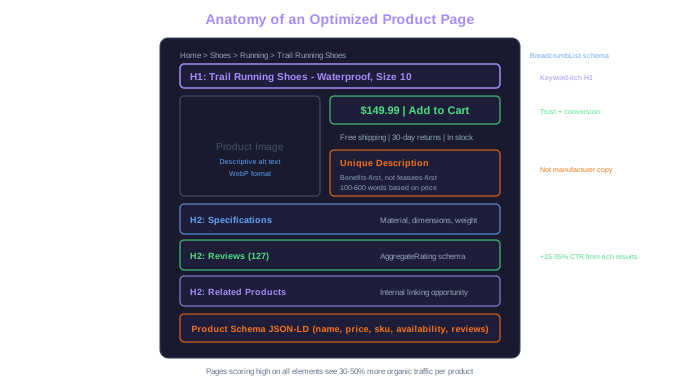
Every high-performing product page shares a set of structural elements that satisfy both search engines and shoppers. At the top, a clear H1 that matches the product name and primary keyword. Below that, product images with descriptive alt text. Then a unique description that goes beyond specs to address buyer questions and use cases. Supporting elements include breadcrumb navigation, customer reviews, related product links, and structured data markup.
The order and visual hierarchy of these elements matters. Eye-tracking studies consistently show that shoppers scan in an F-pattern: they look at the product image first, then the title, then the price, and finally the description. Your SEO elements should align with this natural scanning behavior rather than fighting against it. A title tag stuffed with keywords that doesn't match the visible H1 confuses both users and search engines.
We audit product pages using a 12-point checklist that covers technical SEO, content quality, and conversion elements. The stores that score highest on this checklist tend to have 30-50% more organic traffic per product page compared to competitors in the same niche. The difference isn't any single element, it's the compound effect of getting every element right on thousands of product pages.
Compound SEO Effect
Stores scoring high on all 12 product page elements see 30-50% more organic traffic per product page than competitors in the same niche. No single element drives this -- it is the compound effect across thousands of pages.
Writing Unique Product Descriptions
Manufacturer descriptions are one of the biggest SEO liabilities in ecommerce. When 200 stores use the same text for the same product, Google has no reason to rank your page over any of the others. Duplicate content doesn't trigger a penalty, but it eliminates your ability to differentiate in search results. Writing unique descriptions is non-negotiable for competitive product rankings.
A strong product description answers three questions the shopper is asking: What is this product? Why should I buy it from you? How does it solve my specific problem? Start with a short paragraph that covers the product's primary benefit, not a feature list, but the outcome the buyer gets. Then expand with details about materials, sizing, compatibility, or use cases. Close with any differentiators like warranty, free returns, or bundled accessories.
Length depends on the product's complexity and price point. A $15 phone case might need 100-150 words. A $2,000 espresso machine deserves 400-600 words covering every aspect a buyer would research before purchasing. Match your description depth to the consideration level of the purchase, the more expensive or complex the product, the more content the page needs to rank and convert.
Incorporate relevant keywords naturally throughout the description, but write for the human reader first. Phrases like "this stainless steel water bottle keeps drinks cold for 24 hours" naturally include the keywords a searcher would use while also communicating a concrete benefit. Forced keyword insertion like "buy best stainless steel water bottle online" reads poorly and doesn't improve rankings.
Product Schema Markup
Product schema (structured data) tells Google exactly what your page is about and enables rich results, those enhanced listings with star ratings, prices, and availability badges that dominate ecommerce search results. Pages with rich results consistently earn higher click-through rates than plain blue links, and we've measured 15-35% CTR improvements after implementing product schema across client stores.
The essential Product schema properties to include are: name, description, image, brand, sku, offers (with price, currency, and availability), and aggregateRating (if you have reviews). Each property must accurately reflect what's visible on the page, Google will penalize misleading structured data. If your product shows $49.99 on the page, the schema price must match exactly.
Implement schema using JSON-LD format, which Google recommends over microdata or RDFa. Place the JSON-LD script in the page's head or body. Most modern ecommerce platforms either include product schema by default or offer apps that generate it automatically. However, we always recommend auditing auto-generated schema because plugins frequently miss properties or output incorrect values.
Validate your schema using Google's Rich Results Test tool after implementation. Common errors include missing required fields, incorrect data types (price as string vs. number), and review markup on pages without visible reviews. Fix validation errors promptly, invalid schema won't generate rich results and could trigger a manual action if Google considers it spammy.
Rich Results ROI
We measured 15-35% CTR improvements after implementing Product schema across client stores. Essential properties: name, description, image, brand, sku, offers (price + availability), and aggregateRating if reviews exist on the page.
Add the 'review' property within your Product schema only when actual customer reviews are displayed on the page. Google has cracked down on review markup that doesn't correspond to visible review content, and violations can result in losing all rich results across your entire domain.
Image Alt Text and File Naming
Product images represent a significant SEO opportunity that most stores waste. Google Images drives a meaningful share of ecommerce traffic, we've seen it account for 10-25% of organic visits for visually-driven product categories like furniture, fashion, and home decor. Optimizing image alt text and file names is the entry point for capturing this traffic. Our full guide on image optimization for products covers compression, formats, and lazy loading in detail.
File names should describe the product before the image is ever uploaded. Rename "IMG_4582.jpg" to "red-leather-crossbody-bag-front.jpg" before it goes on your site. Search engines use file names as a ranking signal for image search, and descriptive names also help screen readers provide context for visually impaired shoppers. Use hyphens to separate words, keep names concise, and include the primary product keyword.
Alt text serves a dual purpose: accessibility and SEO. Write alt text that describes what the image shows as if you were explaining it to someone who can't see it. "Red leather crossbody bag with gold chain strap, front view" tells both screen readers and search engines exactly what's in the image. Avoid keyword-stuffing alt text, "buy red leather bag best red leather crossbody bag sale" is spammy and unhelpful.
For product pages with multiple images (front, back, detail, lifestyle), vary the alt text to describe each specific view. This creates multiple opportunities to rank in image search for different queries. The lifestyle shot of someone carrying the bag at a cafe might rank for "crossbody bag outfit" while the detail shot ranks for "gold chain bag strap."
UX Signals That Affect Product Page Rankings
Google measures how users interact with your product pages after clicking from search results. High bounce rates, short time-on-page, and pogo-sticking (clicking back to search results and choosing a different listing) all signal that your page didn't satisfy the searcher's intent. These behavioral signals influence rankings over time, which means UX and SEO are deeply connected on product pages.
Page speed is the most measurable UX factor. Product pages loaded with uncompressed images, excessive JavaScript, and third-party tracking scripts often take 4-6 seconds to load on mobile. Google's Core Web Vitals, Largest Contentful Paint, Interaction to Next Paint, and Cumulative Layout Shift, directly measure loading performance, interactivity, and visual stability. We target under 2.5 seconds for LCP, under 200ms for INP, and under 0.1 for CLS on all product pages.
Mobile usability is equally critical. Over 60% of ecommerce traffic comes from mobile devices, and a product page that's difficult to navigate on a phone will lose both rankings and sales. Tap targets need to be large enough for thumbs, product images should be zoomable, and the add-to-cart button must be visible without excessive scrolling. Test every product page template on actual mobile devices, not just browser resize tools.
Trust elements reduce bounce rates and increase dwell time. Visible shipping costs, return policies, security badges, and customer reviews all give shoppers reasons to stay on the page rather than bouncing back to search results. A product page that immediately answers "how much is shipping" and "can I return this" keeps users engaged, which sends positive signals to Google about your page's quality and relevance.
Content Quality Signals From the Leak: contentEffort and originalContentScore
Two leaked attributes reframe what "good PDP content" means to Google. contentEffort is an LLM-based estimate of how much human effort went into a page — the engine likely behind the Helpful Content System. originalContentScore (a 0–512 scale) measures how unique a page's content is versus what already exists on the web.
For product pages, manufacturer-supplied descriptions copied across hundreds of stores fail both. The fix isn't to spin or rewrite mechanically — that triggers different demotions. The fix is genuinely first-hand additions: tested-on photographs, sizing notes from real customers, fit comparisons, internal data on which variants sell best, video showing the product in use. These additions move both contentEffort and originalContentScore up because they cannot be auto-generated.
A practical test: if a page would still rank if you swapped the product image and price for a competitor's, contentEffort is the ceiling. The page is interchangeable. The PDPs that win are the ones a competitor cannot trivially clone — that's what the leak rewards.
Free Tools & Resources
Try our free SEO tools
Work Together With SEO Experts who understand ecommerce
World’s first Ecom-founded SEO agency